配置目标服务器,纳管主机节点,并将其调整至描述的状态。也包括节点上的 VIP,HAProxy 以及监控组件。
模块:NODE
配置目标服务器,纳管主机节点,并将其调整至描述的状态。也包括节点上的 VIP,HAProxy 以及监控组件。
1 - 集群配置
根据需求场景选择合适的 Node 部署类型,并对外提供可靠的接入。
Pigsty 使用 IP地址 作为 节点 的唯一身份标识,该IP地址应当是数据库实例监听并对外提供服务的内网IP地址。
node-test:
  hosts:
    10.10.10.11: { nodename: node-test-1 }
    10.10.10.12: { nodename: node-test-2 }
    10.10.10.13: { nodename: node-test-3 }
  vars:
    node_cluster: node-test
该IP地址必须是数据库实例监听并对外提供服务的IP地址,但不宜使用公网IP地址。尽管如此,用户并不一定非要通过该IP地址连接至该数据库。例如,通过SSH隧道或跳板机中转的方式间接操作管理目标节点也是可行的。但在标识数据库节点时,首要IPv4地址依然是节点的核心标识符。这一点非常重要,用户应当在配置时保证这一点。
IP地址即配置清单中主机的 inventory_hostname,体现为 <cluster>.hosts 对象中的 key。除此之外,每个节点还有两个额外的身份参数:
| 名称 | 类型 | 层级 | 必要性 | 说明 |
|---|---|---|---|---|
inventory_hostname | ip | - | 必选 | 节点IP地址 |
nodename | string | I | 可选 | 节点名称 |
node_cluster | string | C | 可选 | 节点集群名称 |
nodename 与 node_cluster 两个参数是可选的,如果不提供,会使用节点现有的主机名,和固定值 nodes 作为默认值。在 Pigsty 的监控系统中,这两者将会被用作节点的 集群标识(cls)与 实例标识(ins)。
对于 PGSQL节点 来说,因为Pigsty默认采用PG:节点独占1:1部署,因此可以通过 node_id_from_pg 参数,将 PostgreSQL 实例的身份参数(pg_cluster 与 pg_seq)借用至节点的 ins 与 cls 标签上,从而让数据库与节点的监控指标拥有相同的标签,便于交叉分析。
#nodename:                # [实例] # 节点实例标识,如缺失则使用现有主机名,可选,无默认值
node_cluster: nodes       # [集群] # 节点集群标识,如缺失则使用默认值'nodes',可选
nodename_overwrite: true          # 用 nodename 覆盖节点的主机名吗?
nodename_exchange: false          # 在剧本主机之间交换 nodename 吗?
node_id_from_pg: true             # 如果可行,是否借用 postgres 身份作为节点身份?
您还可以为主机集群配置丰富的功能参数,例如,使用节点集群上的 HAProxy 对外提供负载均衡,暴露服务,或者为集群绑定一个 L2 VIP。
2 - 参数列表
NODE 模块提供了 11 组共 85 个配置参数
NODE 模块负责将主机节点调整到期待的目标状态,并将其纳入 Pigsty 的监控系统中。
| 参数组 | 功能说明 |
|---|---|
NODE_ID | NODE_ID 相关参数 |
NODE_DNS | NODE_DNS 相关参数 |
NODE_PACKAGE | NODE_PACKAGE 相关参数 |
NODE_TUNE | NODE_TUNE 相关参数 |
NODE_SEC | NODE_SEC 安全相关参数 |
NODE_ADMIN | NODE_ADMIN 相关参数 |
NODE_TIME | NODE_TIME 相关参数 |
NODE_VIP | NODE_VIP 相关参数 |
HAPROXY | HAPROXY 相关参数 |
NODE_EXPORTER | NODE_EXPORTER 相关参数 |
VECTOR | VECTOR 日志收集相关参数 |
参数概览
NODE_ID 参数组用于定义节点的身份标识参数,包括节点名称、集群名称,以及是否从 PostgreSQL 借用身份。
| 参数 | 类型 | 级别 | 说明 |
|---|---|---|---|
nodename | string | I | node 实例标识,如缺失则使用主机名,可选 |
node_cluster | string | C | node 集群标识,如缺失则使用默认值’nodes’,可选 |
nodename_overwrite | bool | C | 用 nodename 覆盖节点的主机名吗? |
nodename_exchange | bool | C | 在剧本主机之间交换 nodename 吗? |
node_id_from_pg | bool | C | 如果可行,是否借用 postgres 身份作为节点身份? |
NODE_DNS 参数组用于配置节点的 DNS 解析,包括静态 hosts 记录与动态 DNS 服务器。
| 参数 | 类型 | 级别 | 说明 |
|---|---|---|---|
node_write_etc_hosts | bool | G/C/I | 是否修改目标节点上的 /etc/hosts? |
node_default_etc_hosts | string[] | G | /etc/hosts 中的静态 DNS 记录 |
node_etc_hosts | string[] | C | /etc/hosts 中的额外静态 DNS 记录 |
node_dns_method | enum | C | 如何处理现有DNS服务器:add,none,overwrite |
node_dns_servers | string[] | C | /etc/resolv.conf 中的动态域名服务器列表 |
node_dns_options | string[] | C | /etc/resolv.conf 中的DNS解析选项 |
NODE_PACKAGE 参数组用于配置节点的软件源与软件包安装,以及 uv Python 虚拟环境。
| 参数 | 类型 | 级别 | 说明 |
|---|---|---|---|
node_repo_modules | enum | C | 在节点上启用哪些软件源模块?默认为 local |
node_repo_remove | bool | C | 配置节点软件仓库时,删除节点上现有的仓库吗? |
node_packages | string[] | C | 要在当前节点上安装的软件包列表 |
node_default_packages | string[] | G | 默认在所有节点上安装的软件包列表 |
node_uv_env | path | C | uv venv 路径,默认 /data/venv,空则跳过 |
node_pip_packages | string | C | 在 uv venv 中安装的 pip 包 |
NODE_TUNE 参数组用于配置节点的内核参数、特性开关与性能调优模板。
| 参数 | 类型 | 级别 | 说明 |
|---|---|---|---|
node_disable_numa | bool | C | 禁用节点 numa,禁用需要重启 |
node_disable_swap | bool | C | 禁用节点 Swap,谨慎使用 |
node_static_network | bool | C | 重启后保留 DNS 解析器设置,即静态网络,默认启用 |
node_disk_prefetch | bool | C | 在 HDD 上配置磁盘预取以提高性能 |
node_kernel_modules | string[] | C | 在此节点上启用的内核模块列表 |
node_hugepage_count | int | C | 主机节点分配的 2MB 大页数量,优先级比比例更高 |
node_hugepage_ratio | float | C | 主机节点分配的内存大页占总内存比例,0 默认禁用 |
node_overcommit_ratio | float | C | 节点内存允许的 OverCommit 超额比率 (50-100),0 默认禁用 |
node_tune | enum | C | 节点调优配置文件:无,oltp,olap,crit,tiny |
node_sysctl_params | dict | C | 额外的 sysctl 配置参数,k:v 格式 |
NODE_SEC 参数组用于配置节点的安全相关选项,包括 SELinux、防火墙等。
| 参数 | 类型 | 级别 | 说明 |
|---|---|---|---|
node_selinux_mode | enum | C | SELinux 模式:disabled, permissive, enforcing |
node_firewall_mode | enum | C | 防火墙模式:zone(默认启用), off(关闭), none(自管) |
node_firewall_intranet | cidr[] | C | 内网 CIDR 列表,用于配置防火墙规则 |
node_firewall_public_port | port[] | C | 公网开放端口列表,默认为 [22, 80, 443] |
NODE_ADMIN 参数组用于配置节点的管理员用户、数据目录与命令别名。
| 参数 | 类型 | 级别 | 说明 |
|---|---|---|---|
node_data | path | C | 节点主数据目录,默认为 /data |
node_admin_enabled | bool | C | 在目标节点上创建管理员用户吗? |
node_admin_uid | int | C | 节点管理员用户的 uid 和 gid |
node_admin_username | username | C | 节点管理员用户的名称,默认为 dba |
node_admin_sudo | enum | C | 管理员用户的 sudo 权限:nopass, all, limit |
node_admin_ssh_exchange | bool | C | 是否在节点集群之间交换管理员 ssh 密钥 |
node_admin_pk_current | bool | C | 将当前用户的 ssh 公钥添加到管理员的 authorized_keys 中吗? |
node_admin_pk_list | string[] | C | 要添加到管理员用户的 ssh 公钥 |
node_aliases | dict | C | 配置主机上的 Shell Alias 命令,KV字典 |
NODE_TIME 参数组用于配置节点的时区、NTP 时间同步与定时任务。
| 参数 | 类型 | 级别 | 说明 |
|---|---|---|---|
node_timezone | string | C | 设置主机节点时区,空字符串跳过 |
node_ntp_enabled | bool | C | 启用 chronyd 时间同步服务吗? |
node_ntp_servers | string[] | C | /etc/chrony.conf 中的 ntp 服务器列表 |
node_crontab_overwrite | bool | C | 写入 /etc/crontab 时,追加写入还是全部覆盖? |
node_crontab | string[] | C | 在 /etc/crontab 中的 crontab 条目 |
NODE_VIP 参数组用于配置节点集群的 L2 VIP,由 keepalived 实现。
| 参数 | 类型 | 级别 | 说明 |
|---|---|---|---|
vip_enabled | bool | C | 在此节点集群上启用 L2 vip 吗? |
vip_address | ip | C | 节点 vip 地址的 ipv4 格式,启用 vip 时为必要参数 |
vip_vrid | int | C | 所需的整数,1-254,在同一 VLAN 中应唯一 |
vip_role | enum | I | 可选,master/backup,默认为 backup |
vip_preempt | bool | C/I | 可选,true/false,默认为 false,启用 vip 抢占 |
vip_interface | string | C/I | 节点 vip 网络接口监听,默认为 eth0 |
vip_dns_suffix | string | C | 节点 vip DNS 名称后缀,默认为空字符串 |
vip_auth_pass | password | C | VRRP 认证密码,空则使用 <cls>-<vrid> 作为默认值 |
vip_exporter_port | port | C | keepalived exporter 监听端口,默认为 9650 |
HAPROXY 参数组用于配置节点上的 HAProxy 负载均衡器与服务暴露。
| 参数 | 类型 | 级别 | 说明 |
|---|---|---|---|
haproxy_enabled | bool | C | 在此节点上启用 haproxy 吗? |
haproxy_clean | bool | G/C/A | 清除所有现有的 haproxy 配置吗? |
haproxy_reload | bool | A | 配置后重新加载 haproxy 吗? |
haproxy_auth_enabled | bool | G | 启用 haproxy 管理页面的身份验证? |
haproxy_admin_username | username | G | haproxy 管理用户名,默认为 admin |
haproxy_admin_password | password | G | haproxy 管理密码,默认为 pigsty |
haproxy_exporter_port | port | C | haproxy exporter 的端口,默认为 9101 |
haproxy_client_timeout | interval | C | haproxy 客户端连接超时,默认为 24h |
haproxy_server_timeout | interval | C | haproxy 服务器端连接超时,默认为 24h |
haproxy_services | service[] | C | 要在节点上对外暴露的 haproxy 服务列表 |
NODE_EXPORTER 参数组用于配置节点监控 Exporter。
| 参数 | 类型 | 级别 | 说明 |
|---|---|---|---|
node_exporter_enabled | bool | C | 在此节点上配置 node_exporter 吗? |
node_exporter_port | port | C | node exporter 监听端口,默认为 9100 |
node_exporter_options | arg | C | node_exporter 的额外服务器选项 |
VECTOR 参数组用于配置 Vector 日志收集器。
| 参数 | 类型 | 级别 | 说明 |
|---|---|---|---|
vector_enabled | bool | C | 启用 vector 日志收集器吗? |
vector_clean | bool | G/A | 初始化期间清除 vector 数据目录吗? |
vector_data | path | C | vector 数据目录,默认为 /data/vector |
vector_port | port | C | vector 指标监听端口,默认为 9598 |
vector_read_from | enum | C | vector 从头还是从尾开始读取日志 |
vector_log_endpoint | string[] | C | 日志发送目标端点,默认发送至 infra 组 |
NODE_ID
每个节点都有身份参数,通过在<cluster>.hosts与<cluster>.vars中的相关参数进行配置。
Pigsty使用IP地址作为数据库节点的唯一标识,该IP地址必须是数据库实例监听并对外提供服务的IP地址,但不宜使用公网IP地址。
尽管如此,用户并不一定非要通过该IP地址连接至该数据库。例如,通过SSH隧道或跳板机中转的方式间接操作管理目标节点也是可行的。
但在标识数据库节点时,首要IPv4地址依然是节点的核心标识符。这一点非常重要,用户应当在配置时保证这一点。
IP地址即配置清单中主机的inventory_hostname ,体现为<cluster>.hosts对象中的key。
node-test:
  hosts:
    10.10.10.11: { nodename: node-test-1 }
    10.10.10.12: { nodename: node-test-2 }
    10.10.10.13: { nodename: node-test-3 }
  vars:
    node_cluster: node-test
除此之外,在Pigsty监控系统中,节点还有两个重要的身份参数:nodename 与 node_cluster,这两者将在监控系统中被用作节点的 实例标识(ins) 与 集群标识 (cls)。
node_load1{cls="pg-meta", ins="pg-meta-1", ip="10.10.10.10", job="nodes"}
node_load1{cls="pg-test", ins="pg-test-1", ip="10.10.10.11", job="nodes"}
node_load1{cls="pg-test", ins="pg-test-2", ip="10.10.10.12", job="nodes"}
node_load1{cls="pg-test", ins="pg-test-3", ip="10.10.10.13", job="nodes"}
在执行默认的PostgreSQL部署时,因为Pigsty默认采用节点独占1:1部署,因此可以通过 node_id_from_pg 参数,将数据库实例的身份参数( pg_cluster 借用至节点的ins与cls标签上。
| 名称 | 类型 | 层级 | 必要性 | 说明 |
|---|---|---|---|---|
inventory_hostname | ip | - | 必选 | 节点IP地址 |
nodename | string | I | 可选 | 节点名称 |
node_cluster | string | C | 可选 | 节点集群名称 |
#nodename:                # [实例] # 节点实例标识,如缺失则使用现有主机名,可选,无默认值
node_cluster: nodes       # [集群] # 节点集群标识,如缺失则使用默认值'nodes',可选
nodename_overwrite: true          # 用 nodename 覆盖节点的主机名吗?
nodename_exchange: false          # 在剧本主机之间交换 nodename 吗?
node_id_from_pg: true             # 如果可行,是否借用 postgres 身份作为节点身份?
nodename
参数名称: nodename, 类型: string, 层次:I
主机节点的身份参数,如果没有显式设置,则会使用现有的主机 Hostname 作为节点名。本参数虽然是身份参数,但因为有合理默认值,所以是可选项。
如果启用了 node_id_from_pg 选项(默认启用),且 nodename 没有被显式指定,
那么 nodename 会尝试使用 ${pg_cluster}-${pg_seq} 作为实例身份参数,如果集群没有定义 PGSQL 模块,那么会回归到默认值,也就是主机节点的 HOSTNAME。
node_cluster
参数名称: node_cluster, 类型: string, 层次:C
该选项可为节点显式指定一个集群名称,通常在节点集群层次定义才有意义。使用默认空值将直接使用固定值nodes作为节点集群标识。
如果启用了 node_id_from_pg 选项(默认启用),且 node_cluster 没有被显式指定,那么 node_cluster 会尝试使用 ${pg_cluster} 作为集群身份参数,如果集群没有定义 PGSQL 模块,那么会回归到默认值 nodes。
nodename_overwrite
参数名称: nodename_overwrite, 类型: bool, 层次:C
是否使用 nodename 覆盖主机名?默认值为 true,在这种情况下,如果你设置了一个非空的 nodename ,那么它会被用作当前主机的 HOSTNAME 。
当 nodename 配置为空时,如果 node_id_from_pg 参数被配置为 true (默认为真),那么 Pigsty 会尝试借用1:1定义在节点上的 PostgreSQL 实例的身份参数作为主机的节点名。
也就是 {{ pg_cluster }}-{{ pg_seq }},如果该节点没有安装 PGSQL 模块,则会回归到默认什么都不做的状态。
因此,如果您将 nodename 留空,并且没有启用 node_id_from_pg 参数时,Pigsty不会对现有主机名进行任何修改。
nodename_exchange
参数名称: nodename_exchange, 类型: bool, 层次:C
是否在剧本节点间交换主机名?默认值为:false
启用此参数时,同一批组执行 node.yml 剧本的节点之间会相互交换节点名称,写入/etc/hosts中。
node_id_from_pg
参数名称: node_id_from_pg, 类型: bool, 层次:C
从节点上 1:1 部署的 PostgreSQL 实例/集群上借用身份参数? 默认值为 true。
Pigsty 中的 PostgreSQL 实例与节点默认使用 1:1 部署,因此,您可以从数据库实例上“借用” 身份参数。 此参数默认启用,这意味着一套 PostgreSQL 集群如果没有特殊配置,主机节点集群和实例的身份参数默认值是与数据库身份参数保持一致的。对于问题分析,监控数据处理都提供了额外便利。
NODE_DNS
Pigsty会为节点配置静态DNS解析记录与动态DNS服务器。
如果您的节点供应商已经为您配置了DNS服务器,您可以将 node_dns_method 设置为 none 跳过DNS设置。
node_write_etc_hosts: true        # modify `/etc/hosts` on target node?
node_default_etc_hosts:           # static dns records in `/etc/hosts`
  - "${admin_ip} i.pigsty"
node_etc_hosts: []                # extra static dns records in `/etc/hosts`
node_dns_method: add              # how to handle dns servers: add,none,overwrite
node_dns_servers: ['${admin_ip}'] # dynamic nameserver in `/etc/resolv.conf`
node_dns_options:                 # dns resolv options in `/etc/resolv.conf`
  - options single-request-reopen timeout:1
node_write_etc_hosts
参数名称: node_write_etc_hosts, 类型: bool, 层次:G|C|I
是否修改目标节点上的 /etc/hosts?例如,在容器环境中通常不允许修改此配置文件。
node_default_etc_hosts
参数名称: node_default_etc_hosts, 类型: string[], 层次:G
默认写入所有节点 /etc/hosts 的静态DNS记录,默认值为:
["${admin_ip} i.pigsty"]
node_default_etc_hosts 是一个数组,每个元素都是一条 DNS 记录,格式为 <ip> <name>,您可以指定多个用空格分隔的域名。
这个参数是用于配置全局静态DNS解析记录的,如果您希望为单个集群与实例配置特定的静态DNS解析,则可以使用 node_etc_hosts 参数。
node_etc_hosts
参数名称: node_etc_hosts, 类型: string[], 层次:C
写入节点 /etc/hosts 的额外的静态DNS记录,默认值为:[] 空数组。
本参数与 node_default_etc_hosts,形式一样,但用途不同:适合在集群/实例层面进行配置。
node_dns_method
参数名称: node_dns_method, 类型: enum, 层次:C
如何配置DNS服务器?有三种选项:add、none、overwrite,默认值为 add。
add:将node_dns_servers中的记录追加至/etc/resolv.conf,并保留已有DNS服务器。(默认)overwrite:使用将node_dns_servers中的记录覆盖/etc/resolv.confnone:跳过DNS服务器配置,如果您的环境中已经配置有DNS服务器,则可以直接跳过DNS配置。
node_dns_servers
参数名称: node_dns_servers, 类型: string[], 层次:C
配置 /etc/resolv.conf 中的动态DNS服务器列表:默认值为: ["${admin_ip}"],即将管理节点作为首要DNS服务器。
node_dns_options
参数名称: node_dns_options, 类型: string[], 层次:C
/etc/resolv.conf 中的DNS解析选项,默认值为:
- "options single-request-reopen timeout:1"
如果 node_dns_method 配置为add或overwrite,则本配置项中的记录会被首先写入/etc/resolv.conf 中。具体格式请参考Linux文档关于/etc/resolv.conf的说明
NODE_PACKAGE
Pigsty会为纳入管理的节点配置Yum源,并安装软件包,以及配置 uv Python 虚拟环境。
node_repo_modules: local          # upstream repo to be added on node, local by default.
node_repo_remove: true            # remove existing repo on node?
node_packages: [openssh-server]   # packages to be installed current nodes with latest version
#node_default_packages:           # default packages to be installed on all nodes
node_uv_env: /data/venv           # uv venv path, /data/venv by default, empty to skip
node_pip_packages: ''             # pip packages to be installed in uv venv
node_repo_modules
参数名称: node_repo_modules, 类型: string, 层次:C/A
需要在节点上添加的软件源模块列表,形式同 repo_modules。默认值为 local,即使用 repo_upstream 中 local 所指定的本地软件源。
当 Pigsty 纳管节点时,会根据此参数的值来过滤 repo_upstream 中的条目,只有 module 字段与此参数值匹配的条目才会被添加到节点的软件源中。
node_repo_remove
参数名称: node_repo_remove, 类型: bool, 层次:C/A
是否移除节点已有的软件仓库定义?默认值为:true。
如果启用,则Pigsty会 移除 节点上/etc/yum.repos.d中原有的配置文件,并备份至/etc/yum.repos.d/backup。
在 Debian/Ubuntu 系统上,则是 /etc/apt/sources.list(.d) 备份至 /etc/apt/backup。
node_packages
参数名称: node_packages, 类型: string[], 层次:C
在当前节点上要安装并升级的软件包列表,默认值为:[openssh-server] ,即在安装时会将 sshd 升级到最新版本(避免安全漏洞)。
每一个数组元素都是字符串:由逗号分隔的软件包名称。形式上与 node_packages_default 相同。本参数通常用于在节点/集群层面指定需要额外安装的软件包。
在本参数中指定的软件包,会 升级到可用的最新版本,如果您需要保持现有节点软件版本不变(存在即可),请使用 node_default_packages 参数。
node_default_packages
参数名称: node_default_packages, 类型: string[], 层次:G
默认在所有节点上安装的软件包,默认值为一组按操作系统族区分的软件包列表(字符串数组,每个元素为逗号分隔的包名):
字符串数组类型,每一行都是 由逗号分隔 的软件包列表字符串,指定默认在所有节点上安装的软件包列表。
在此变量中指定的软件包,只要求 存在,而不要求 最新。如果您需要安装最新版本的软件包,请使用 node_packages 参数。
本参数没有默认值,即默认值为未定义状态。如果用户不在配置文件中显式指定本参数,则 Pigsty 会从根据当前节点的操作系统族,从定义于 roles/node_id/vars 中的 node_packages_default 变量中加载获取默认值。
默认值(EL系操作系统):
- lz4,unzip,bzip2,pv,jq,git,ncdu,make,patch,bash,lsof,wget,tuned,nvme-cli,numactl,sysstat,iotop,htop,rsync,tcpdump
- python3,socat,net-tools,ipvsadm,telnet,ca-certificates,openssl,keepalived,etcd,haproxy,chrony,cronie,pig,uv
- zlib,yum,audit,bind-utils,readline,vim-minimal,node_exporter,grubby,openssh-server,openssh-clients,chkconfig,vector
默认值(Debian/Ubuntu):
- lz4,unzip,bzip2,pv,jq,git,ncdu,make,patch,bash,lsof,wget,tuned,nvme-cli,numactl,sysstat,iotop,htop,rsync,tcpdump
- python3,socat,net-tools,ipvsadm,telnet,ca-certificates,openssl,keepalived,etcd,haproxy,chrony,cron,pig,uv
- zlib1g,acl,dnsutils,libreadline-dev,vim-tiny,node-exporter,openssh-server,openssh-client,vector
本参数形式上与 node_packages 相同,但本参数通常用于全局层面指定所有节点都必须安装的默认软件包
node_uv_env
参数名称: node_uv_env, 类型: path, 层次:C
uv 虚拟环境路径,默认值为:/data/venv。设置为空字符串 '' 则跳过 uv 虚拟环境的配置。
当此参数非空时,Pigsty 会在节点上使用 uv venv 命令创建 Python 虚拟环境,并根据 node_pip_packages 安装指定的 pip 包。
在中国区域(region: china)时,会自动配置 /etc/uv/uv.toml 使用阿里云 PyPI 镜像加速下载。
node_pip_packages
参数名称: node_pip_packages, 类型: string, 层次:C
在 uv 虚拟环境中安装的 pip 包列表,默认值为:空字符串 ''。
使用空格分隔多个包名,例如:'ansible pgcli requests pandas'。
仅当 node_uv_env 非空时此参数才会生效。
NODE_TUNE
主机节点特性、内核模块与参数调优模板。
node_disable_numa: false          # disable node numa, reboot required
node_disable_swap: false          # disable node swap, use with caution
node_static_network: true         # preserve dns resolver settings after reboot
node_disk_prefetch: false         # setup disk prefetch on HDD to increase performance
node_kernel_modules: [ softdog, ip_vs, ip_vs_rr, ip_vs_wrr, ip_vs_sh ]
node_hugepage_count: 0            # number of 2MB hugepage, take precedence over ratio
node_hugepage_ratio: 0            # node mem hugepage ratio, 0 disable it by default
node_overcommit_ratio: 0          # node mem overcommit ratio, 0 disable it by default
node_tune: oltp                   # node tuned profile: none,oltp,olap,crit,tiny
node_sysctl_params:               # sysctl parameters in k:v format in addition to tuned
  fs.nr_open: 8388608
node_disable_numa
参数名称: node_disable_numa, 类型: bool, 层次:C
是否关闭NUMA?默认不关闭NUMA:false。
注意,关闭NUMA需要重启机器后方可生效!如果您不清楚如何绑核,在生产环境使用数据库时建议关闭 NUMA。
node_disable_swap
参数名称: node_disable_swap, 类型: bool, 层次:C
是否关闭 SWAP ? 默认不关闭SWAP:false。
通常情况下不建议关闭 SWAP,例外情况是如果您有足够的内存用于独占式 PostgreSQL 部署,则可以关闭 SWAP 提高性能。
例外:当您的节点用于部署 Kubernetes 模块时,应当禁用SWAP。
node_static_network
参数名称: node_static_network, 类型: bool, 层次:C
是否使用静态DNS服务器, 类型:bool,层级:C,默认值为:true,默认启用。
启用静态网络,意味着您的DNS Resolv配置不会因为机器重启与网卡变动被覆盖,建议启用,或由网络工程师负责配置。
node_disk_prefetch
参数名称: node_disk_prefetch, 类型: bool, 层次:C
是否启用磁盘预读?默认不启用:false。
针对HDD部署的实例可以优化性能,使用机械硬盘时建议启用。
node_kernel_modules
参数名称: node_kernel_modules, 类型: string[], 层次:C
启用哪些内核模块?默认启用以下内核模块:
node_kernel_modules: [ softdog, ip_vs, ip_vs_rr, ip_vs_wrr, ip_vs_sh ]
形式上是由内核模块名称组成的数组,声明了需要在节点上安装的内核模块。
node_hugepage_count
参数名称: node_hugepage_count, 类型: int, 层次:C
在节点上分配 2MB 大页的数量,默认为 0,另一个相关的参数是 node_hugepage_ratio。
如果这两个参数 node_hugepage_count 和 node_hugepage_ratio 都为 0(默认),则大页将完全被禁用,本参数的优先级相比 node_hugepage_ratio 更高,因为它更加精确。
如果设定了一个非零值,它将被写入 /etc/sysctl.d/hugepage.conf 中应用生效;负值将不起作用,高于 90% 节点内存的数字将被限制为节点内存的 90%
如果不为零,它应该略大于 pg_shared_buffer_ratio 的对应值,这样才能让 PostgreSQL 用上大页。
node_hugepage_ratio
参数名称: node_hugepage_ratio, 类型: float, 层次:C
节点内存大页占内存的比例,默认为 0,有效范围:0 ~ 0.40
此内存比例将以大页的形式分配,并为PostgreSQL预留。 node_hugepage_count 是具有更高优先级和精度的参数版本。
默认值:0,这将设置 vm.nr_hugepages=0 并完全不使用大页。
本参数应该等于或略大于 pg_shared_buffer_ratio,如果不为零。
例如,如果您为Postgres共享缓冲区默认分配了25%的内存,您可以将此值设置为 0.27 ~ 0.30,并在初始化后使用 /pg/bin/pg-tune-hugepage 精准回收浪费的大页。
node_overcommit_ratio
参数名称: node_overcommit_ratio, 类型: int, 层次:C
节点内存超额分配比率,默认为:0。这是一个从 0 到 100+ 的整数。
默认值:0,这将设置 vm.overcommit_memory=0,否则将使用 vm.overcommit_memory=2, 并使用此值作为 vm.overcommit_ratio。
建议在 pgsql 独占节点上设置 vm.overcommit_ratio,避免内存过度提交。
node_tune
参数名称: node_tune, 类型: enum, 层次:C
针对机器进行调优的预制方案,基于tuned 提供服务。有四种预制模式:
tiny:微型虚拟机oltp:常规OLTP模板,优化延迟(默认值)olap:常规OLAP模板,优化吞吐量crit:核心金融业务模板,优化脏页数量
通常,数据库的调优模板 pg_conf 应当与机器调优模板配套。
node_sysctl_params
参数名称: node_sysctl_params, 类型: dict, 层次:C
使用 K:V 形式的 sysctl 内核参数(通过 Ansible sysctl 模块写入并立即生效),作为 tuned profile 的补充。
默认值为:
node_sysctl_params:
  fs.nr_open: 8388608
默认设置 fs.nr_open=8388608 用于确保内核每进程 FD 上限不小于 Pigsty systemd unit 中的 LimitNOFILE=8388608,避免在部分发行版 / systemd 组合上服务启动时 setrlimit 失败。
这是一个 KV 结构的字典参数,Key 是内核 sysctl 参数名,Value 是参数值。你也可以考虑直接在 roles/node/templates 中的 tuned 模板中直接定义额外的 sysctl 参数。
NODE_SEC
节点安全相关参数,包括 SELinux 与防火墙配置。
node_selinux_mode: permissive             # selinux mode: disabled, permissive, enforcing
node_firewall_mode: zone                  # firewall mode: zone (default, enabled), off (disable), none (skip & self-managed)
node_firewall_intranet:           # which intranet cidr considered as internal network
  - 10.0.0.0/8
  - 192.168.0.0/16
  - 172.16.0.0/12
node_firewall_public_port:        # expose these ports to public network in zone mode
  - 22                            # enable ssh access
  - 80                            # enable http access
  - 443                           # enable https access
node_selinux_mode
参数名称: node_selinux_mode, 类型: enum, 层次:C
SELinux 运行模式,默认值为:permissive(宽容模式)。
可选值:
disabled:完全禁用 SELinux(等同于旧版本的node_disable_selinux: true)permissive:宽容模式,记录违规但不阻止(推荐,默认值)enforcing:强制模式,严格执行 SELinux 策略
如果您没有专业的操作系统/安全专家,建议使用 permissive 或 disabled 模式。
请注意,SELinux 默认只在 EL 系列系统上启用,如果你想要在 Debian/Ubuntu 系统上启用 SELinux,请自行安装并启用 SELinux 配置。 另外,SELinux 模式的更改可能需要重启系统才能完全生效。
node_firewall_mode
参数名称: node_firewall_mode, 类型: enum, 层次:C
防火墙运行模式,默认值为:zone(启用防火墙并按分区规则管理)。
自 v4.1 起,默认值从 none 调整为 zone,即默认启用防火墙。
可选值:
zone:启用防火墙并配置规则:内网信任,公网只开放指定端口(默认值)。off:关闭并禁用防火墙(等同于旧版本的node_disable_firewall: true)。none:不修改防火墙状态与规则,由用户完全自管。
在 EL 系统上使用 firewalld 服务,在 Debian/Ubuntu 系统上使用 ufw 服务。为保证跨发行版行为一致,Pigsty 默认采用 zone 模式:自动启用系统防火墙,内网全通,公网仅开放 node_firewall_public_port。
如果您需要完全自行维护防火墙规则(例如仅依赖云安全组,或已有企业级防火墙策略),可以设置为 none 跳过 Pigsty 的防火墙管理;若要显式关闭系统防火墙,请使用 off。
需要公网暴露的生产环境建议使用 zone 模式,配合 node_firewall_intranet 和 node_firewall_public_port 进行精细化访问控制。zone 模式会在防火墙未运行时自动启用防火墙。
node_firewall_intranet
参数名称: node_firewall_intranet, 类型: cidr[], 层次:C
内网 CIDR 地址列表(自 v4.0 版本引入),默认值为:
node_firewall_intranet:
  - 10.0.0.0/8
  - 172.16.0.0/12
  - 192.168.0.0/16
此参数定义了被视为"内部网络"的 IP 地址范围。来自这些网络的流量将被允许访问所有服务端口,而无需单独配置开放规则。
这些 CIDR 范围内的主机将被视为可信内网主机,享有更宽松的防火墙规则。同时,在 PG/PGB HBA 规则中,这里定义的内网范围也会被视作 “内网” 对待。
由于默认防火墙模式为 zone,该列表在默认配置下即生效。
node_firewall_public_port
参数名称: node_firewall_public_port, 类型: port[], 层次:C
公网开放端口列表,默认值为:[22, 80, 443]。
此参数定义了对公网(非内网 CIDR)开放的端口列表。默认开放的端口包括:
22:SSH 服务端口80:HTTP 服务端口443:HTTPS 服务端口
您可以根据实际需求调整此列表。例如,如果您需要对外暴露 PostgreSQL,可以显式添加 5432:
node_firewall_public_port: [22, 80, 443, 5432]
Pigsty 中 PostgreSQL 默认安全策略仅允许管理员通过公网访问数据库端口。 如果您想要让其他用户也能通过公网访问数据库,请确保在 PG/PGB HBA 规则中正确配置相应的访问权限。
如果你想要将其他服务端口对公网开放,也可以将它们添加到此列表中。 建议始终保持最小暴露原则,只开放真正需要的服务端口。
请注意,只有当 node_firewall_mode 设置为 zone 时,此参数才会生效;若设置为 none 或 off 则不会应用此端口策略。
NODE_ADMIN
这一节关于主机节点上的管理员,谁能登陆,怎么登陆。
node_data: /data                  # node main data directory, `/data` by default
node_admin_enabled: true          # create a admin user on target node?
node_admin_uid: 88                # uid and gid for node admin user
node_admin_username: dba          # name of node admin user, `dba` by default
node_admin_sudo: nopass           # admin user's sudo privilege: nopass, all, limit
node_admin_ssh_exchange: true     # exchange admin ssh key among node cluster
node_admin_pk_current: true       # add current user's ssh pk to admin authorized_keys
node_admin_pk_list: []            # ssh public keys to be added to admin user
node_aliases: {}                  # shell aliases to write into `/etc/profile.d/node.alias.sh`
node_data
参数名称: node_data, 类型: path, 层次:C
节点的主数据目录,默认为 /data。
如果该目录不存在,则该目录会被创建。该目录由 root:root 拥有,权限为 0755。
node_admin_enabled
参数名称: node_admin_enabled, 类型: bool, 层次:C
是否在本节点上创建一个专用管理员用户?默认值为:true。
Pigsty默认会在每个节点上创建一个管理员用户(拥有免密sudo与ssh权限),默认的管理员名为dba (uid=88)的管理用户,可以从元节点上通过SSH免密访问环境中的其他节点并执行免密sudo。
node_admin_uid
参数名称: node_admin_uid, 类型: int, 层次:C
管理员用户UID,默认值为:88。
请尽可能确保 UID 在所有节点上都相同,可以避免一些无谓的权限问题。
如果默认 UID 88 已经被占用,您可以选择一个其他 UID ,手工分配时请注意UID命名空间冲突。
node_admin_username
参数名称: node_admin_username, 类型: username, 层次:C
管理员用户名,默认为 dba 。
node_admin_sudo
参数名称: node_admin_sudo, 类型: enum, 层次:C
管理员用户的 sudo 权限级别,默认值为:nopass(免密 sudo)。
可选值:
nopass:授予免密 sudo 权限(默认,允许执行所有命令但无需密码)all:授予完整 sudo 权限(需要密码)limit:授予有限的 sudo 权限(仅允许执行特定命令)
Pigsty 默认使用 nopass 模式,管理员用户可以无需密码执行任意 sudo 命令,这对于自动化运维非常方便。
在安全要求较高的生产环境中,您可能需要将此参数调整为 limit 或 all,以限制管理员的权限范围。
node_admin_ssh_exchange
参数名称: node_admin_ssh_exchange, 类型: bool, 层次:C
在节点集群间交换节点管理员SSH密钥, 类型:bool,层级:C,默认值为:true
启用时,Pigsty会在执行剧本时,在成员间交换SSH公钥,允许管理员 node_admin_username 从不同节点上相互访问。
node_admin_pk_current
参数名称: node_admin_pk_current, 类型: bool, 层次:C
是否将当前节点 & 用户的公钥加入管理员账户,默认值是: true
启用时,将会把当前节点上执行此剧本的管理用户的SSH公钥(~/.ssh/id_rsa.pub)拷贝至目标节点管理员用户的 authorized_keys 中。
生产环境部署时,请务必注意此参数,此参数会将当前执行命令用户的默认公钥安装至所有机器的管理用户上。
node_admin_pk_list
参数名称: node_admin_pk_list, 类型: string[], 层次:C
可登陆管理员的公钥列表,默认值为:[] 空数组。
数组的每一个元素为字符串,内容为写入到管理员用户~/.ssh/authorized_keys中的公钥,持有对应私钥的用户可以以管理员身份登录。
生产环境部署时,请务必注意此参数,仅将信任的密钥加入此列表中。
node_aliases
参数名称: node_aliases, 类型: dict, 层次:C
用于写入主机 /etc/profile.d/node.alias.sh 的 shell 别名,默认值为:{} 空字典。
此参数允许您为主机的 shell 环境配置方便使用的 alias,此处定义的 K:V 字典将以 alias k=v 的形式写入到目标节点的 profile.d 文件中生效。
例如,以下命令声明了一个名为 dp 的别名,用于快速执行 docker compose pull 命令:
node_alias:
  dp: 'docker compose pull'
NODE_TIME
关于主机时间/时区/NTP/定时任务的相关配置。
时间同步对于数据库服务来说非常重要,请确保系统 chronyd 授时服务正常运行。
node_timezone: ''                 # 设置节点时区,空字符串表示跳过
node_ntp_enabled: true            # 启用chronyd时间同步服务?
node_ntp_servers:                 # `/etc/chrony.conf`中的ntp服务器
  - pool pool.ntp.org iburst
node_crontab_overwrite: true      # 覆盖还是追加到`/etc/crontab`?
node_crontab: [ ]                 # `/etc/crontab`中的crontab条目
node_timezone
参数名称: node_timezone, 类型: string, 层次:C
设置节点时区,空字符串表示跳过。默认值是空字符串,默认不会修改默认的时区(即使用通常的默认值UTC)
在中国地区使用时,建议设置为 Asia/Hong_Kong / Asia/ShangHai。
node_ntp_enabled
参数名称: node_ntp_enabled, 类型: bool, 层次:C
启用chronyd时间同步服务?默认值为:true
此时 Pigsty 将使用 node_ntp_servers 中指定的 NTP服务器列表覆盖节点的 /etc/chrony.conf。
如果您的节点已经配置好了 NTP 服务器,那么可以将此参数设置为 false 跳过时间同步配置。
node_ntp_servers
参数名称: node_ntp_servers, 类型: string[], 层次:C
在 /etc/chrony.conf 中使用的 NTP 服务器列表。默认值为:["pool pool.ntp.org iburst"]
本参数是一个数组,每一个数组元素是一个字符串,代表一行 NTP 服务器配置。仅当 node_ntp_enabled 启用时生效。
Pigsty 默认使用全球 NTP 服务器 pool.ntp.org,您可以根据自己的网络环境修改此参数,例如 cn.pool.ntp.org iburst,或内网的时钟服务。
您也可以在配置中使用 ${admin_ip} 占位符,使用管理节点上的时间服务器。
node_ntp_servers: [ 'pool ${admin_ip} iburst' ]
node_crontab_overwrite
参数名称: node_crontab_overwrite, 类型: bool, 层次:C
处理 node_crontab 中的定时任务时,是追加还是覆盖?默认值为:true,即覆盖。
如果您希望在节点上追加定时任务,可以将此参数设置为 false,Pigsty 将会在节点的 crontab 上 追加,而非 覆盖所有 定时任务。
node_crontab
参数名称: node_crontab, 类型: string[], 层次:C
定义在节点 /etc/crontab 中的定时任务:默认值为:[] 空数组。
每一个数组元素都是一个字符串,代表一行定时任务。使用标准的系统 crontab 格式:分 时 日 月 周 用户 命令。
node_crontab:
  - '00 03 * * * root /usr/bin/some-system-task'
注意:对于 PostgreSQL 备份等 postgres 用户的定时任务,请使用
pg_crontab参数, 而非node_crontab。因为node_crontab在 NODE 初始化阶段写入/etc/crontab,此时postgres用户可能尚未创建, 会导致 cron 报错bad username并忽略整个 crontab 文件。
当 node_crontab_overwrite 为 true(默认)时,移除节点时会恢复默认的 /etc/crontab。
NODE_VIP
您可以为节点集群绑定一个可选的 L2 VIP,默认不启用此特性。L2 VIP 只对一组节点集群有意义,该 VIP 会根据配置的优先级在集群中的节点之间进行切换,确保节点服务的高可用。
请注意,L2 VIP 只能 在同一 L2 网段中使用,这可能会对您的网络拓扑产生额外的限制,如果不想受此限制,您可以考虑使用 DNS LB 或者 Haproxy 实现类似的功能。
当启用此功能时,您需要为这个 L2 VIP 显式分配可用的 vip_address 与 vip_vrid,用户应当确保这两者在同一网段内唯一。
请注意,NODE VIP 与 PG VIP 不同,PG VIP 是为 PostgreSQL 实例服务的 VIP,由 vip-manager 组件管理并绑定在 PG 集群主库上。 而 NODE VIP 由 Keepalived 组件管理,绑定在节点集群上。可以是主备模式,也可以是负载均衡模式,两者可以并存。
vip_enabled: false                # enable vip on this node cluster?
# vip_address:         [IDENTITY] # node vip address in ipv4 format, required if vip is enabled
# vip_vrid:            [IDENTITY] # required, integer, 1-254, should be unique among same VLAN
vip_role: backup                  # optional, `master/backup`, backup by default, use as init role
vip_preempt: false                # optional, `true/false`, false by default, enable vip preemption
vip_interface: eth0               # node vip network interface to listen, `eth0` by default
vip_dns_suffix: ''                # node vip dns name suffix, empty string by default
vip_auth_pass: ''                 # vrrp auth password, empty to use `<cls>-<vrid>` as default
vip_exporter_port: 9650           # keepalived exporter listen port, 9650 by default
vip_enabled
参数名称: vip_enabled, 类型: bool, 层次:C
是否在当前这个节点集群中配置一个由 Keepalived 管理的 L2 VIP ? 默认值为: false。
vip_address
参数名称: vip_address, 类型: ip, 层次:C
节点 VIP 地址,IPv4 格式(不带 CIDR 网段后缀),当节点启用 vip_enabled 时,这是一个必选参数。
本参数没有默认值,这意味着您必须显式地为节点集群分配一个唯一的 VIP 地址。
vip_vrid
参数名称: vip_vrid, 类型: int, 层次:C
VRID 是一个范围从 1 到 254 的正整数,用于标识一个网络中的 VIP,当节点启用 vip_enabled 时,这是一个必选参数。
本参数没有默认值,这意味着您必须显式地为节点集群分配一个网段内唯一的 ID。
vip_role
参数名称: vip_role, 类型: enum, 层次:I
节点 VIP 角色,可选值为: master 或 backup,默认值为 backup
该参数的值会被设置为 keepalived 的初始状态。
vip_preempt
参数名称: vip_preempt, 类型: bool, 层次:C/I
是否启用 VIP 抢占?可选参数,默认值为 false,即不抢占 VIP。
所谓抢占,是指一个 backup 角色的节点,当其优先级高于当前存活且正常工作的 master 角色的节点时,是否取抢占其 VIP?
vip_interface
参数名称: vip_interface, 类型: string, 层次:C/I
节点 VIP 监听使用的网卡,默认为 eth0。
您应当使用与节点主IP地址(即:你填入清单中IP地址)所使用网卡相同的名称。
如果你的节点有着不同的网卡名称,你可以在实例/节点层次对其进行覆盖。
vip_dns_suffix
参数名称: vip_dns_suffix, 类型: string, 层次:C/I
节点集群 L2 VIP 使用的DNS名称,默认是空字符串,即直接使用集群名本身作为DNS名。
vip_auth_pass
参数名称: vip_auth_pass, 类型: password, 层次:C
VRRP 认证密码,用于 keepalived VRRP 协议认证。默认为空字符串。
当为空时,Pigsty 会自动使用 <cluster_name>-<vrid> 模式生成密码。
在有安全要求的生产环境中,建议设置一个显式的强密码。
vip_exporter_port
参数名称: vip_exporter_port, 类型: port, 层次:C/I
keepalived exporter 监听端口号,默认为:9650。
HAPROXY
HAProxy 默认在所有节点上安装启用,并以类似于 Kubernetes NodePort 的方式对外暴露服务。
haproxy_enabled: true             # 在此节点上启用haproxy?
haproxy_clean: false              # 清理所有现有的haproxy配置?
haproxy_reload: true              # 配置后重新加载haproxy?
haproxy_auth_enabled: true        # 为haproxy管理页面启用身份验证
haproxy_admin_username: admin     # haproxy管理用户名,默认为`admin`
haproxy_admin_password: pigsty    # haproxy管理密码,默认为`pigsty`
haproxy_exporter_port: 9101       # haproxy管理/导出端口,默认为9101
haproxy_client_timeout: 24h       # 客户端连接超时,默认为24小时
haproxy_server_timeout: 24h       # 服务器端连接超时,默认为24小时
haproxy_services: []              # 需要在节点上暴露的haproxy服务列表
haproxy_enabled
参数名称: haproxy_enabled, 类型: bool, 层次:C
在此节点上启用haproxy?默认值为: true。
haproxy_clean
参数名称: haproxy_clean, 类型: bool, 层次:G/C/A
清理所有现有的haproxy配置?默认值为 false。
haproxy_reload
参数名称: haproxy_reload, 类型: bool, 层次:A
配置后重新加载 haproxy?默认值为 true,配置更改后会重新加载haproxy。
如果您希望在应用配置前进行手工检查,您可以使用命令参数关闭此选项,并进行检查后再应用。
haproxy_auth_enabled
参数名称: haproxy_auth_enabled, 类型: bool, 层次:G
为haproxy管理页面启用身份验证,默认值为 true,它将要求管理页面进行http基本身份验证。
建议不要禁用认证,因为您的流量控制页面将对外暴露,这是比较危险的。
haproxy_admin_username
参数名称: haproxy_admin_username, 类型: username, 层次:G
haproxy 管理员用户名,默认为:admin。
haproxy_admin_password
参数名称: haproxy_admin_password, 类型: password, 层次:G
haproxy管理密码,默认为 pigsty
在生产环境中请务必修改此密码!
haproxy_exporter_port
参数名称: haproxy_exporter_port, 类型: port, 层次:C
haproxy 流量管理/指标对外暴露的端口,默认为:9101
haproxy_client_timeout
参数名称: haproxy_client_timeout, 类型: interval, 层次:C
客户端连接超时,默认为 24h。
设置一个超时可以避免难以清理的超长的连接,但如果您真的需要一个长连接,您可以将其设置为更长的时间。
haproxy_server_timeout
参数名称: haproxy_server_timeout, 类型: interval, 层次:C
服务端连接超时,默认为 24h。
设置一个超时可以避免难以清理的超长的连接,但如果您真的需要一个长连接,您可以将其设置为更长的时间。
haproxy_services
参数名称: haproxy_services, 类型: service[], 层次:C
需要在此节点上通过 Haproxy 对外暴露的服务列表,默认值为: [] 空数组。
每一个数组元素都是一个服务定义,下面是一个服务定义的例子:
haproxy_services:                   # list of haproxy service

  # expose pg-test read only replicas
  - name: pg-test-ro                # [REQUIRED] service name, unique
    port: 5440                      # [REQUIRED] service port, unique
    ip: "*"                         # [OPTIONAL] service listen addr, "*" by default
    protocol: tcp                   # [OPTIONAL] service protocol, 'tcp' by default
    balance: leastconn              # [OPTIONAL] load balance algorithm, roundrobin by default (or leastconn)
    maxconn: 20000                  # [OPTIONAL] max allowed front-end connection, 20000 by default
    default: 'inter 3s fastinter 1s downinter 5s rise 3 fall 3 on-marked-down shutdown-sessions slowstart 30s maxconn 3000 maxqueue 128 weight 100'
    options:
      - option httpchk
      - option http-keep-alive
      - http-check send meth OPTIONS uri /read-only
      - http-check expect status 200
    servers:
      - { name: pg-test-1 ,ip: 10.10.10.11 , port: 5432 , options: check port 8008 , backup: true }
      - { name: pg-test-2 ,ip: 10.10.10.12 , port: 5432 , options: check port 8008 }
      - { name: pg-test-3 ,ip: 10.10.10.13 , port: 5432 , options: check port 8008 }
每个服务定义会被渲染为 /etc/haproxy/<service.name>.cfg 配置文件,并在 Haproxy 重载后生效。
NODE_EXPORTER
node_exporter_enabled: true       # setup node_exporter on this node?
node_exporter_port: 9100          # node exporter listen port, 9100 by default
node_exporter_options: '--no-collector.softnet --no-collector.nvme --collector.tcpstat --collector.processes'
node_exporter_enabled
参数名称: node_exporter_enabled, 类型: bool, 层次:C
在当前节点上启用节点指标收集器?默认启用:true
node_exporter_port
参数名称: node_exporter_port, 类型: port, 层次:C
对外暴露节点指标使用的端口,默认为 9100。
node_exporter_options
参数名称: node_exporter_options, 类型: arg, 层次:C
节点指标采集器的命令行参数,默认值为:
--no-collector.softnet --no-collector.nvme --collector.tcpstat --collector.processes
该选项会启用/禁用一些指标收集器,请根据您的需要进行调整。
VECTOR
Vector 是 Pigsty v4.0 使用的日志收集组件,会收集各个模块产生的日志并发送至基础设施节点上的 VictoriaLogs 服务。
INFRA: 基础设施组件的日志只会在 Infra 节点上收集。nginx-access:/var/log/nginx/access.lognginx-error:/var/log/nginx/error.loggrafana:/var/log/grafana/grafana.log
NODES:主机相关日志,所有节点上都会启用收集。- 通过
journald统一采集系统服务日志(job=syslog),不依赖固定的/var/log/*文件路径。
- 通过
PGSQL:PostgreSQL 相关的日志,只有节点配置了 PGSQL 模块才会启用收集。postgres:/pg/log/postgres/*patroni:/pg/log/patroni.logpgbouncer:/pg/log/pgbouncer/pgbouncer.logpgbackrest:/pg/log/pgbackrest/*.log
REDIS:Redis 相关日志,只有节点配置了 REDIS 模块才会启用收集。redis:/var/log/redis/*.log
日志目录会根据这些参数的配置自动调整:
pg_log_dir,patroni_log_dir,pgbouncer_log_dir,pgbackrest_log_dir
vector_enabled: true              # 启用 vector 日志收集器吗?
vector_clean: false               # 初始化时清除 vector 数据目录吗?
vector_data: /data/vector         # vector 数据目录,默认为 /data/vector
vector_port: 9598                 # vector 指标端口,默认为 9598
vector_read_from: beginning       # vector 从头还是从尾开始读取日志
vector_log_endpoint: [ infra ]    # 日志发送目标端点,默认发送至 infra 组
vector_enabled
参数名称: vector_enabled, 类型: bool, 层次:C
是否启用 Vector 日志收集服务?默认值为: true
Vector 是 Pigsty v4.0 使用的日志收集代理,替代了之前版本使用的 Promtail,用于收集节点和服务的日志并发送至 VictoriaLogs。
vector_clean
参数名称: vector_clean, 类型: bool, 层次:G/A
是否在安装 Vector 时清除已有数据目录?默认值为: false。
默认不会清理,当您选择清理时,Pigsty 会在部署 Vector 时移除现有数据目录 vector_data,这意味着 Vector 会重新收集当前节点上的所有日志并发送至 VictoriaLogs。
vector_data
参数名称: vector_data, 类型: path, 层次:C
Vector 数据目录路径,默认值为:/data/vector。
Vector 会将日志读取的偏移量和缓冲数据存储在此目录中。
vector_port
参数名称: vector_port, 类型: port, 层次:C
Vector 指标监听端口号,默认为:9598
此端口用于暴露 Vector 自身的监控指标,可被 VictoriaMetrics 抓取。
vector_read_from
参数名称: vector_read_from, 类型: enum, 层次:C
Vector 日志读取起始位置,默认值为:beginning。
可选值为 beginning(从头开始)或 end(从尾开始)。beginning 会读取现有日志文件的全部内容,end 只读取新产生的日志。
vector_log_endpoint
参数名称: vector_log_endpoint, 类型: string[], 层次:C
日志发送目标端点列表,默认值为:[ infra ]。
指定将日志发送至哪个节点组的 VictoriaLogs 服务。默认发送至 infra 组的节点。
3 - 预置剧本
如何使用预置的 ansible 剧本来管理 Node 集群,常用管理命令速查。
Pigsty 提供两个与 NODE 模块相关的剧本:
node.yml:纳管节点,调整节点到期望状态node-rm.yml:从 Pigsty 中移除纳管节点
另提供两个包装命令工具:bin/node-add 与 bin/node-rm,用于快速调用剧本。
node.yml
向 Pigsty 添加节点的 node.yml 包含以下子任务:
node-id       :生成节点身份标识
node_name     :设置主机名
node_hosts    :配置 /etc/hosts 记录
node_resolv   :配置 DNS 解析器 /etc/resolv.conf
node_firewall :设置防火墙 & selinux
node_ca       :添加并信任CA证书
node_repo     :添加上游软件仓库
node_pkg      :安装 rpm/deb 软件包
node_uv       :配置 uv Python 虚拟环境
node_feature  :配置 numa、grub、静态网络等特性
node_kernel   :配置操作系统内核模块
node_tune     :配置 tuned 调优模板
node_sysctl   :设置额外的 sysctl 参数
node_profile  :写入 /etc/profile.d/node.sh
node_ulimit   :配置资源限制
node_data     :配置数据目录
node_admin    :配置管理员用户和ssh密钥
node_timezone :配置时区
node_ntp      :配置 NTP 服务器/客户端
node_crontab  :添加/覆盖 crontab 定时任务
node_vip      :为节点集群设置可选的 L2 VIP
haproxy       :在节点上设置 haproxy 以暴露服务
monitor       :配置节点监控:node_exporter & vector
node-rm.yml
从 Pigsty 中移除节点的剧本 node-rm.yml 包含以下子任务:
node_deregister   : 移除节点注册信息(VictoriaMetrics / Vector / DNS)
  - rm_metrics    : 移除已注册的 VictoriaMetrics 监控目标
  - rm_logs       : 移除已注册的 Vector 日志采集配置
  - rm_dns        : 移除已注册的 Node VIP DNS 解析记录
haproxy_deregister: 移除用于 haproxy 管理界面的 nginx 代理记录
  - rm_proxy      : 移除 nginx upstream/location 记录
vip            : 移除节点的 keepalived 与 L2 VIP(如果启用 VIP)
haproxy        : 移除 haproxy 负载均衡器
node_exporter  : 移除节点监控:Node Exporter
vip_exporter   : 移除 keepalived_exporter (如果启用 VIP)
vector         : 移除日志收集代理 vector
node_crontab   : 恢复默认 /etc/crontab(当 node_crontab_overwrite=true 时)
profile        : 移除 /etc/profile.d/node.sh 环境配置文件
常用命令速查
# 基础节点管理
./node.yml -l <cls|ip|group>          # 向 Pigsty 中添加节点
./node-rm.yml -l <cls|ip|group>       # 从 Pigsty 中移除节点

# 节点管理快捷命令
bin/node-add node-test                 # 初始化节点集群 'node-test'
bin/node-add 10.10.10.10               # 初始化节点 '10.10.10.10'
bin/node-rm node-test                  # 移除节点集群 'node-test'
bin/node-rm 10.10.10.10                # 移除节点 '10.10.10.10'

# 节点主体初始化
./node.yml -t node                     # 完成节点主体初始化(haproxy,监控除外)
./node.yml -t haproxy                  # 在节点上设置 haproxy
./node.yml -t monitor                  # 配置节点监控:node_exporter & vector

# VIP 管理
./node.yml -t node_vip                 # 为节点集群设置可选的 L2 VIP
./node.yml -t vip_config,vip_reload    # 刷新节点 L2 VIP 配置

# HAProxy 管理
./node.yml -t haproxy_config,haproxy_reload   # 刷新节点上的服务定义

# 注册管理
./node.yml -t node_register            # 重新将节点注册到 VictoriaMetrics 中
./node.yml -t register_nginx           # 重新将节点 haproxy 管控界面注册到 Nginx 中

# 具体任务
./node.yml -t node-id                  # 生成节点身份标识
./node.yml -t node_name                # 设置主机名
./node.yml -t node_hosts               # 配置节点 /etc/hosts 记录
./node.yml -t node_resolv              # 配置节点 DNS 解析器 /etc/resolv.conf
./node.yml -t node_firewall            # 配置防火墙 & selinux
./node.yml -t node_ca                  # 配置节点的CA证书
./node.yml -t node_repo                # 配置节点上游软件仓库
./node.yml -t node_pkg                 # 在节点上安装 yum 软件包
./node.yml -t node_uv                  # 配置 uv Python 虚拟环境
./node.yml -t node_feature             # 配置 numa、grub、静态网络等特性
./node.yml -t node_kernel              # 配置操作系统内核模块
./node.yml -t node_tune                # 配置 tuned 调优模板
./node.yml -t node_sysctl              # 设置额外的 sysctl 参数
./node.yml -t node_profile             # 配置节点环境变量:/etc/profile.d/node.sh
./node.yml -t node_ulimit              # 配置节点资源限制
./node.yml -t node_data                # 配置节点首要数据目录
./node.yml -t node_admin               # 配置管理员用户和ssh密钥
./node.yml -t node_timezone            # 配置节点时区
./node.yml -t node_ntp                 # 配置节点 NTP 服务器/客户端
./node.yml -t node_crontab             # 添加/覆盖 crontab 定时任务
4 - 管理预案
Node 集群管理 SOP:创建,销毁,扩容,缩容,节点故障与磁盘故障的处理。
下面是 Node 模块中常用的管理操作:
更多问题请参考 FAQ:NODE
添加节点
要将节点添加到 Pigsty,您需要对该节点具有无密码的 ssh/sudo 访问权限。
您也可以选择一次性添加一个集群,或使用通配符匹配配置清单中要加入 Pigsty 的节点。
# ./node.yml -l <cls|ip|group>        # 向 Pigsty 中添加节点的实际剧本
# bin/node-add <selector|ip...>       # 向 Pigsty 中添加节点
bin/node-add node-test                # 初始化节点集群 'node-test'
bin/node-add 10.10.10.10              # 初始化节点 '10.10.10.10'
示例:将 PG 集群 pg-test 的三个节点纳入 Pigsty 管理
移除节点
要从 Pigsty 中移除一个节点,您可以使用以下命令:
# ./node-rm.yml -l <cls|ip|group>    # 从 pigsty 中移除节点的实际剧本
# bin/node-rm <cls|ip|selector> ...  # 从 pigsty 中移除节点
bin/node-rm node-test                # 移除节点集群 'node-test'
bin/node-rm 10.10.10.10              # 移除节点 '10.10.10.10'
您也可以选择一次性移除一个集群,或使用通配符匹配配置清单中要从 Pigsty 移除的节点。
创建管理员
如果当前用户没有对节点的无密码 ssh/sudo 访问权限,您可以使用另一个管理员用户来初始化该节点:
node.yml -t node_admin -k -K -e ansible_user=<另一个管理员> # 为另一个管理员输入 ssh/sudo 密码以完成此任务
绑定VIP
您可以在节点集群上绑定一个可选的 L2 VIP,使用 vip_enabled 参数。
proxy:
  hosts:
    10.10.10.29: { nodename: proxy-1 }   # 您可以显式指定初始的 VIP 角色:MASTER / BACKUP
    10.10.10.30: { nodename: proxy-2 }   # , vip_role: master }
  vars:
    node_cluster: proxy
    vip_enabled: true
    vip_vrid: 128
    vip_address: 10.10.10.99
    vip_interface: eth1
./node.yml -l proxy -t node_vip     # 首次启用 VIP
./node.yml -l proxy -t vip_refresh  # 刷新 vip 配置(例如指定 master)
添加节点监控
如果您想要在现有节点上添加或重新配置监控,可以使用以下命令:
./node.yml -t node_exporter,node_register  # 配置监控并注册
./node.yml -t vector                        # 配置日志收集
其他常见任务
# Play
./node.yml -t node                            # 完成节点主体初始化(haproxy,监控除外)
./node.yml -t haproxy                         # 在节点上设置 haproxy
./node.yml -t monitor                         # 配置节点监控:node_exporter & vector
./node.yml -t node_vip                        # 为没启用过 VIP 的集群安装、配置、启用 L2 VIP
./node.yml -t vip_config,vip_reload           # 刷新节点 L2 VIP 配置
./node.yml -t haproxy_config,haproxy_reload   # 刷新节点上的服务定义
./node.yml -t node_register                   # 重新将节点注册到 VictoriaMetrics 中
./node.yml -t register_nginx                  # 重新将节点 haproxy 管控界面注册到 Nginx 中

# Task
./node.yml -t node-id        # 生成节点身份标识
./node.yml -t node_name      # 设置主机名
./node.yml -t node_hosts     # 配置节点 /etc/hosts 记录
./node.yml -t node_resolv    # 配置节点 DNS 解析器 /etc/resolv.conf
./node.yml -t node_firewall  # 配置防火墙 & selinux
./node.yml -t node_ca        # 配置节点的CA证书
./node.yml -t node_repo      # 配置节点上游软件仓库
./node.yml -t node_pkg       # 在节点上安装 yum 软件包
./node.yml -t node_feature   # 配置 numa、grub、静态网络等特性
./node.yml -t node_kernel    # 配置操作系统内核模块
./node.yml -t node_tune      # 配置 tuned 调优模板
./node.yml -t node_sysctl    # 设置额外的 sysctl 参数
./node.yml -t node_profile   # 配置节点环境变量:/etc/profile.d/node.sh
./node.yml -t node_ulimit    # 配置节点资源限制
./node.yml -t node_data      # 配置节点首要数据目录
./node.yml -t node_admin     # 配置管理员用户和ssh密钥
./node.yml -t node_timezone  # 配置节点时区
./node.yml -t node_ntp       # 配置节点 NTP 服务器/客户端
./node.yml -t node_crontab   # 添加/覆盖 crontab 定时任务
./node.yml -t node_vip       # 为节点集群设置可选的 L2 VIP
管理 HAProxy 密码
haproxy_admin_password(默认 pigsty)用于 HAProxy 管理界面认证,渲染到 /etc/haproxy/haproxy.cfg 中。
修改密码后,使用以下命令刷新配置(热重载,不中断连接):
./node.yml -l <目标节点> -t haproxy_config,haproxy_reload
防火墙管理
Pigsty 使用 node_firewall_mode 控制防火墙行为。
在 RHEL/Rocky 系统上使用 firewalld,在 Debian/Ubuntu 系统上使用 ufw。
自 v4.1 起,默认情况下这个参数是 zone:Pigsty 会在各发行版上统一启用系统防火墙,并应用“内网信任、公网最小暴露”的规则。
在 zone 模式下,内网流量不受防火墙限制,但非内网网段只能访问特定端口。
如果你希望完全自行维护防火墙,请将该参数设置为 none(Pigsty 不再管理防火墙状态与规则)。
如果您在云服务器上部署并对互联网开放,这一点尤为重要。
我们建议你只开放必要的端口,例如:22 (SSH), 80/443 (HTTP/HTTPS),这三个是必要的端口,谨慎对外开放 5432 数据库端口。
应用防火墙规则
默认就是 zone。如果之前设置过 none/off,可以改回 zone 以重新启用并应用分区规则:
node_firewall_mode: zone              # 启用防火墙并配置区域规则
node_firewall_intranet:               # 信任这些网段(完全放行)
  - 10.0.0.0/8
  - 192.168.0.0/16
  - 172.16.0.0/12
node_firewall_public_port:            # 对公网开放这些端口
  - 22                                # SSH
  - 80                                # HTTP
  - 443                               # HTTPS
然后执行:./node.yml -l <目标> -t node_firewall
开放更多端口
要开放更多端口,将其添加到 node_firewall_public_port 并重新执行:
node_firewall_public_port: [22, 80, 443, 5432, 6379] # 添加 PostgreSQL 和 Redis 端口
./node.yml -l <目标> -t node_firewall
配置内网网段
node_firewall_intranet 中的网段会被添加到 trusted 区域,拥有完全访问权限:
node_firewall_intranet:
  - 10.0.0.0/8           # A 类私网
  - 192.168.0.0/16       # C 类私网
  - 172.16.0.0/12        # B 类私网
  - 100.64.0.0/10        # 运营商级 NAT(如需要)
删除规则(手动)
重要提示:Pigsty 的防火墙管理是只增不删的。从配置中移除条目并重新执行 不会删除已存在的规则。您需要手动删除规则。
# 从 public 区域删除指定端口
sudo firewall-cmd --zone=public --remove-port=5432/tcp
sudo firewall-cmd --runtime-to-permanent

# 从 trusted 区域删除指定网段
sudo firewall-cmd --zone=trusted --remove-source=10.0.0.0/8
sudo firewall-cmd --runtime-to-permanent

# 查看当前规则
sudo firewall-cmd --zone=public --list-ports
sudo firewall-cmd --zone=trusted --list-sources

# 重置为初始状态(删除所有自定义规则)
sudo firewall-cmd --complete-reload
# 删除指定端口规则
sudo ufw delete allow 5432/tcp

# 删除指定网段规则
sudo ufw delete allow from 10.0.0.0/8

# 查看当前规则(带编号)
sudo ufw status numbered

# 按编号删除规则
sudo ufw delete <规则编号>

# 重置为初始状态(删除所有规则,保持 ufw 启用状态)
sudo ufw reset
关闭防火墙
要完全关闭防火墙,将 node_firewall_mode 设置为 off:
node_firewall_mode: off # 完全禁用防火墙
./node.yml -l <目标> -t node_firewall
或者手动关闭:
sudo systemctl disable --now firewalld
sudo ufw disable
5 - 监控告警
如何在 Pigsty 中监控 Node?如何使用 Node 本身的管控面板?有哪些告警规则值得关注?
Pigsty 中的 NODE 模块提供了 8 个监控面板和完善的告警规则。
监控面板
NODE 模块提供 8 个监控仪表板:
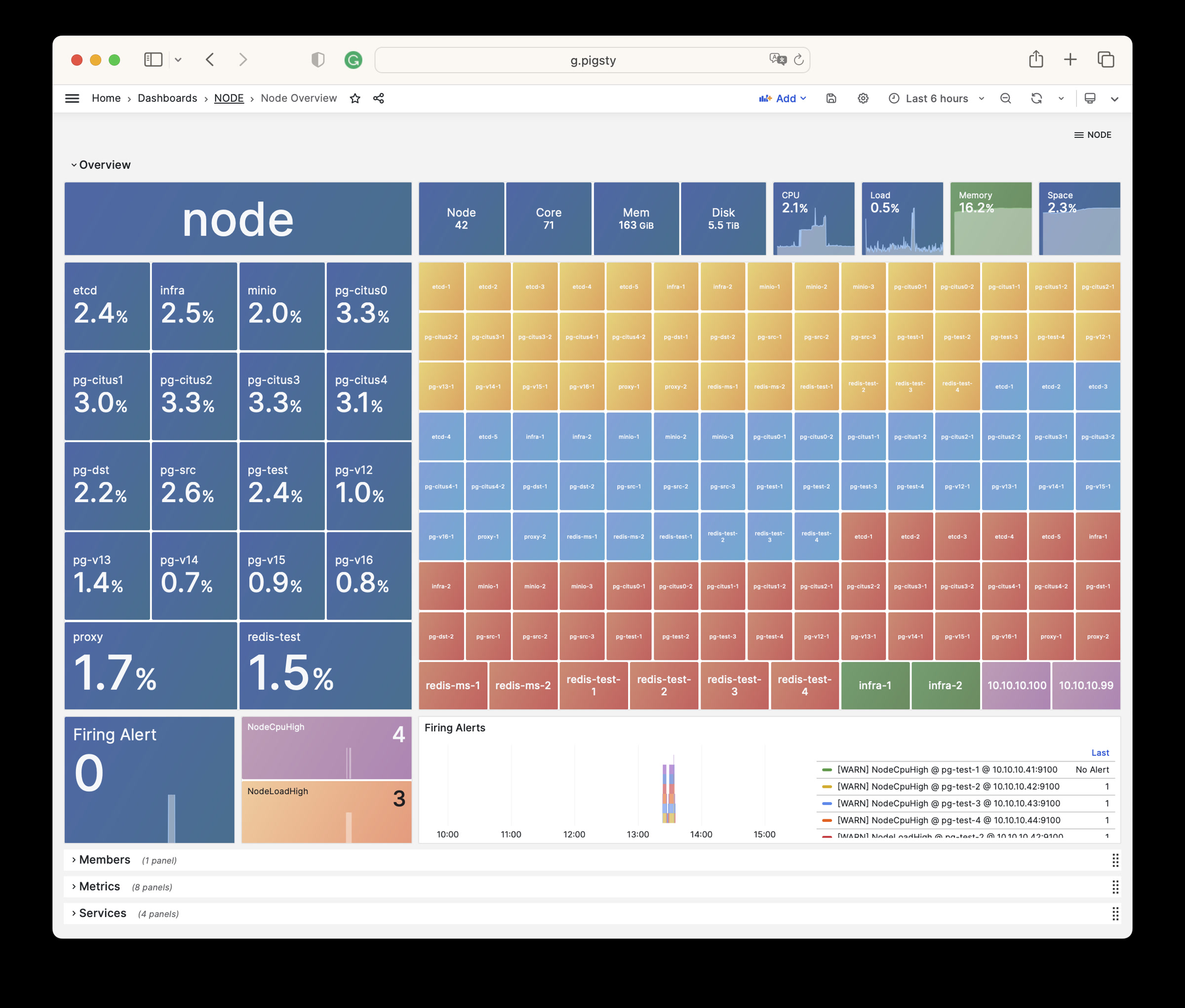
NODE Overview
展示当前环境所有主机节点的总体情况概览。
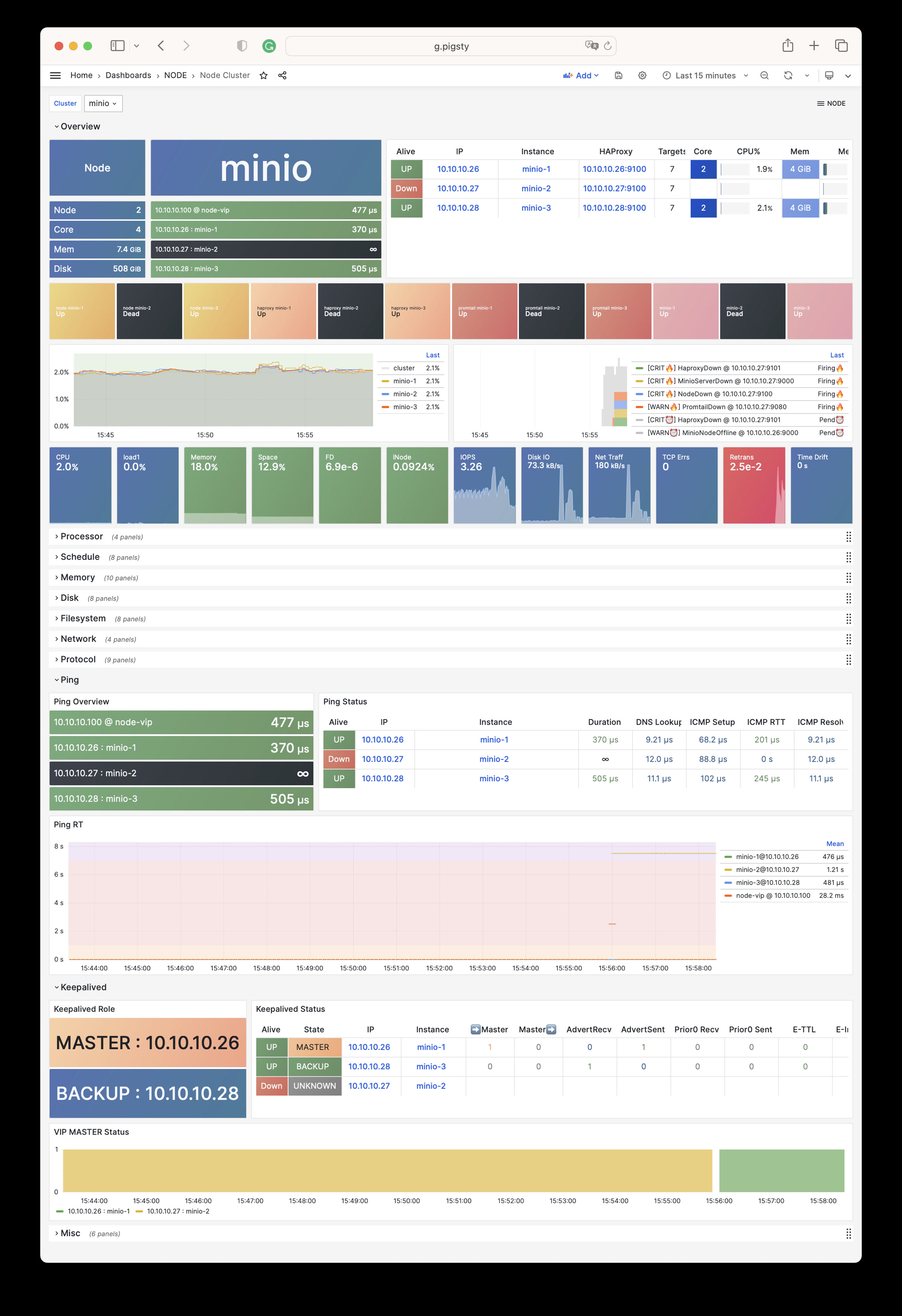
NODE Cluster
显示特定主机集群的详细监控数据。
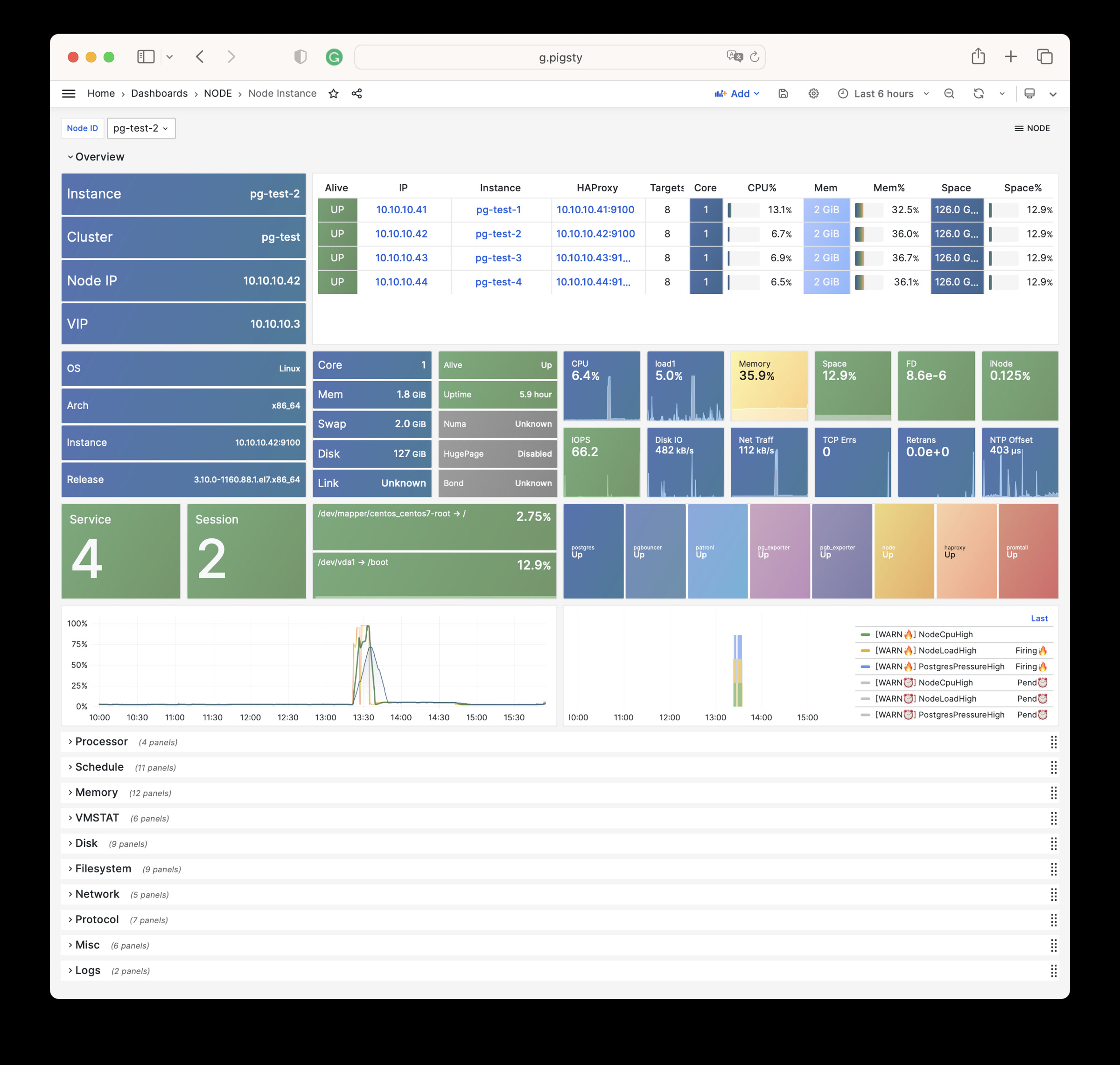
Node Instance
呈现单个主机节点的详细监控信息。
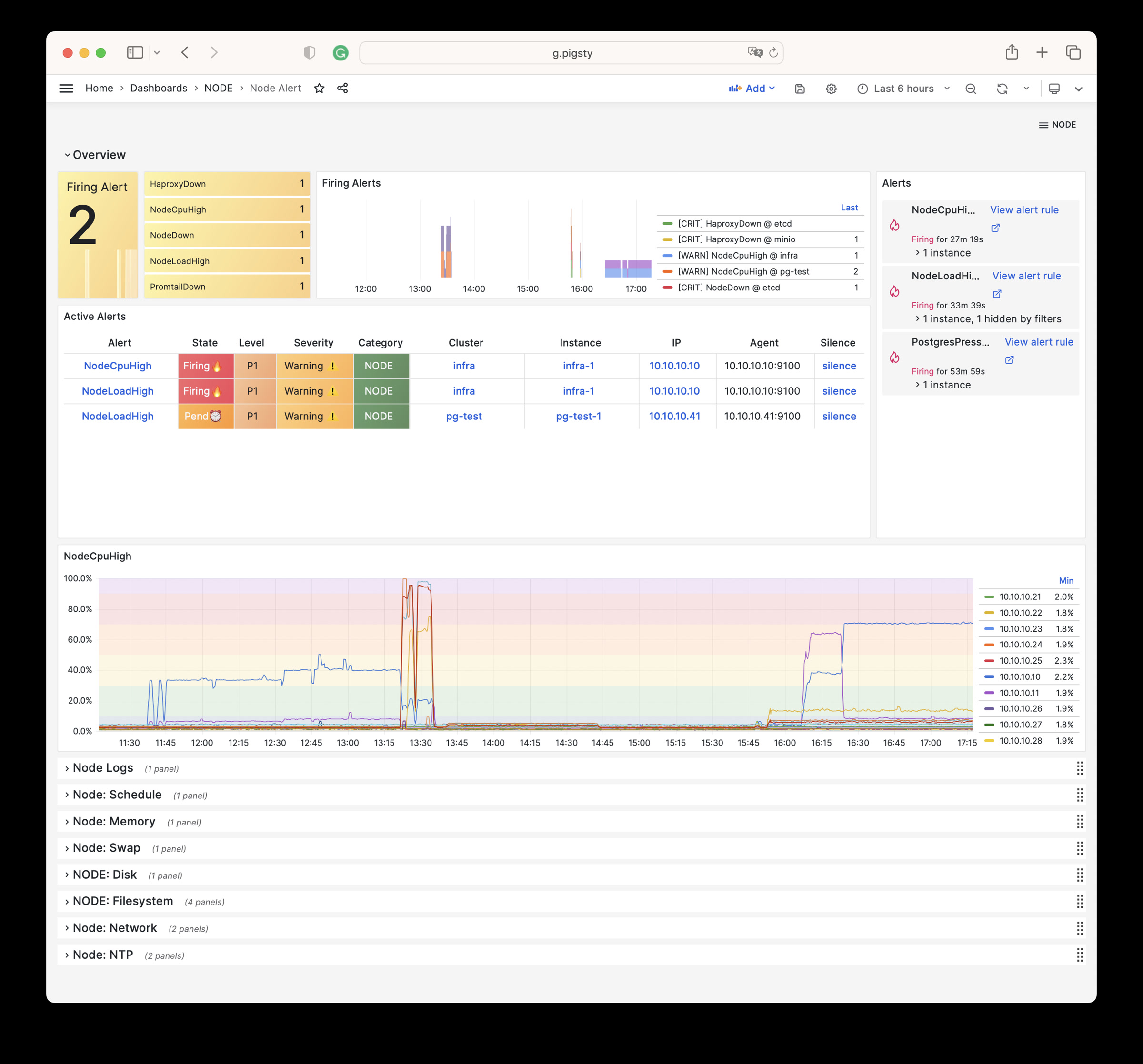
NODE Alert
集中展示环境中所有主机的告警信息。
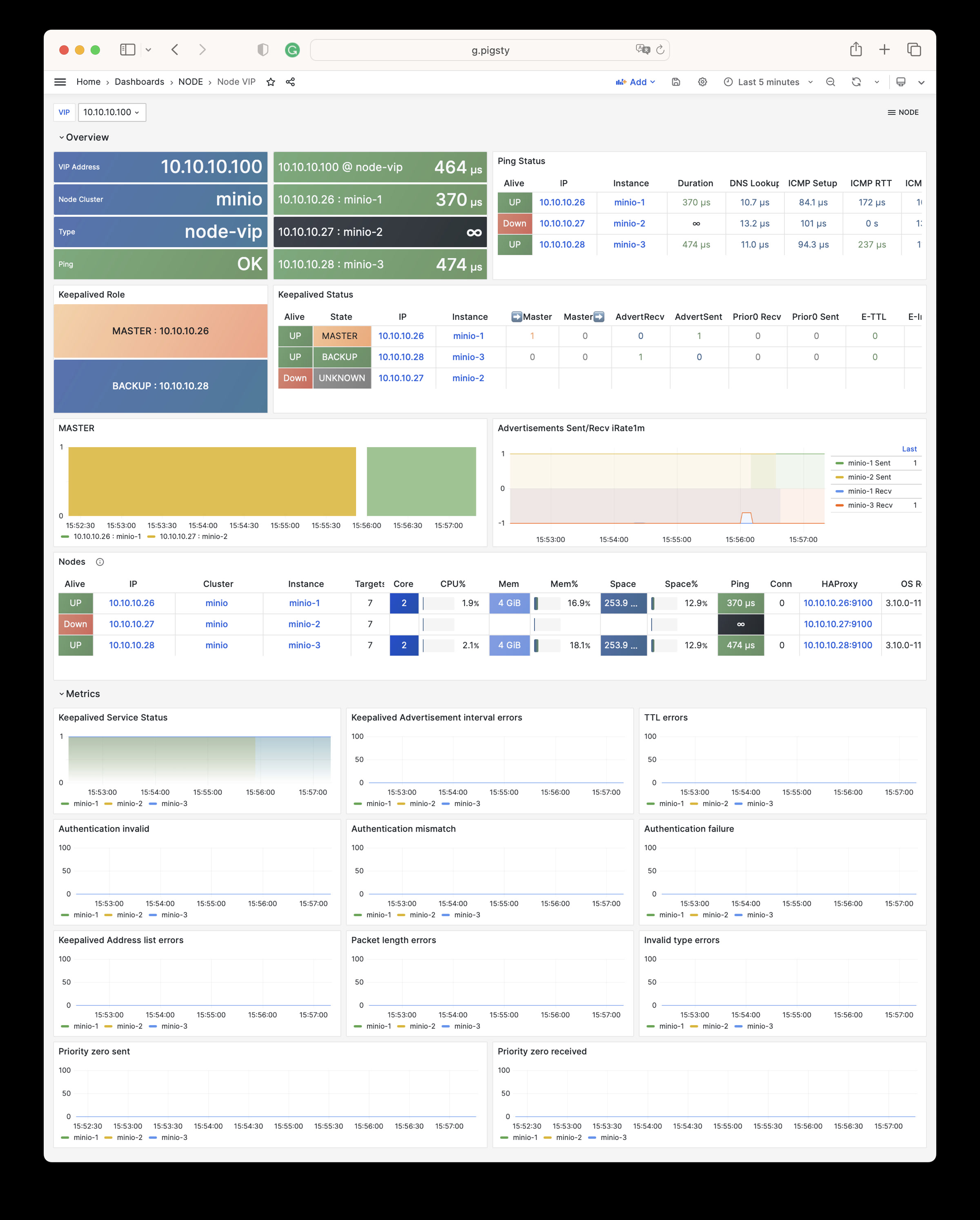
NODE VIP
监控 L2 虚拟 IP 的详细状态。
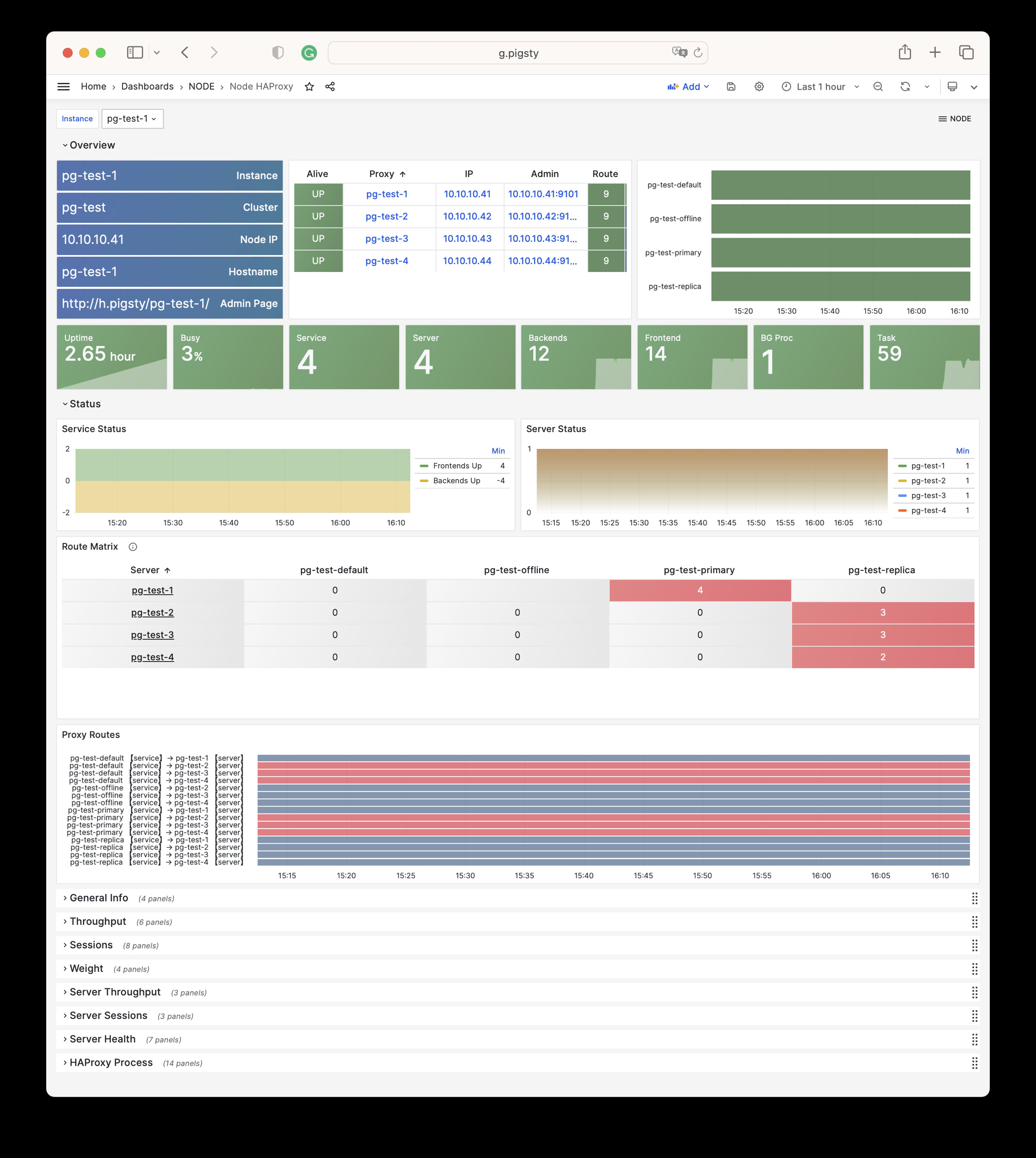
Node Haproxy
追踪 HAProxy 负载均衡器的运行情况。
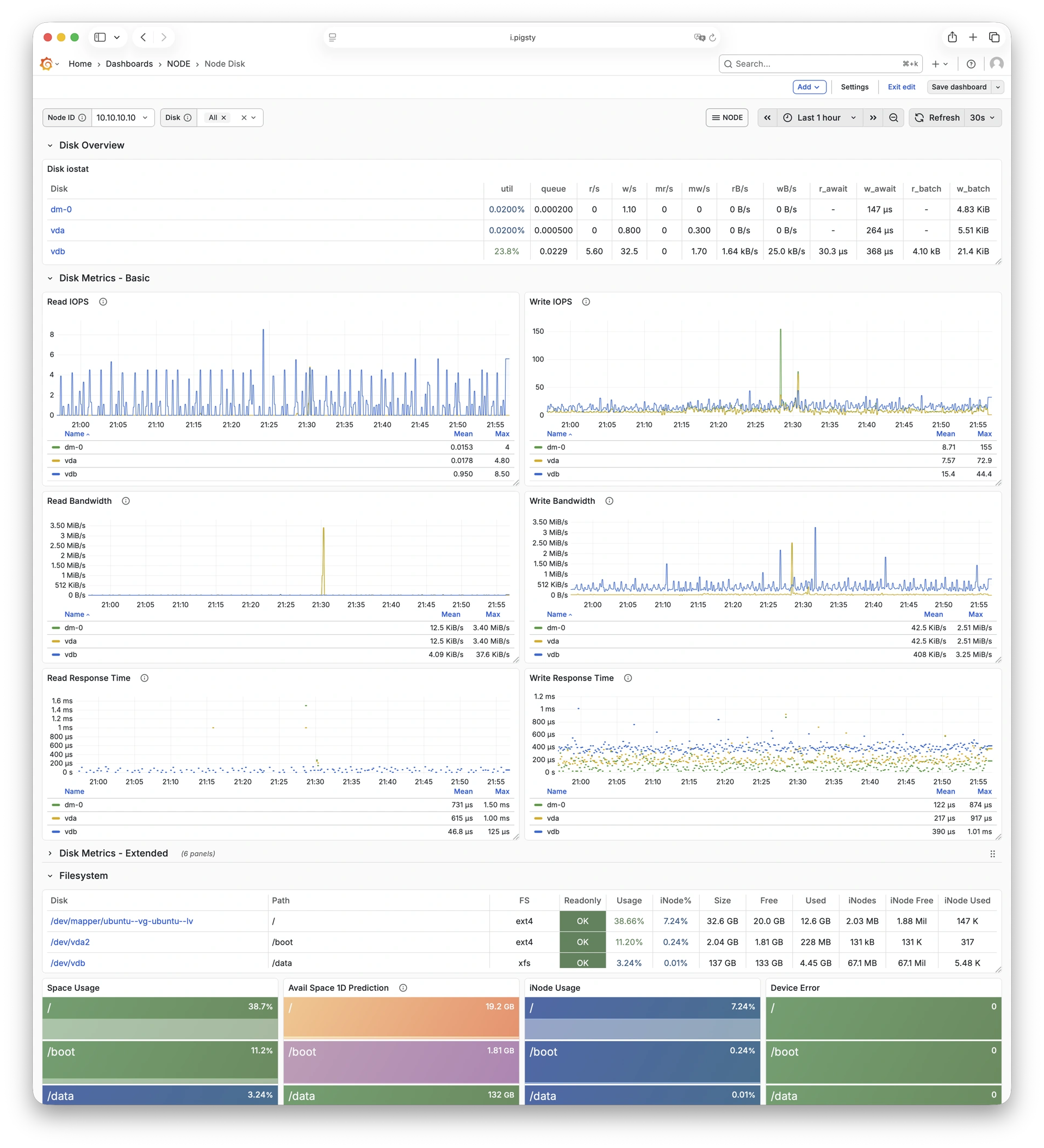
Node Disk
聚焦单盘 I/O 延迟、吞吐与队列深度等存储指标。
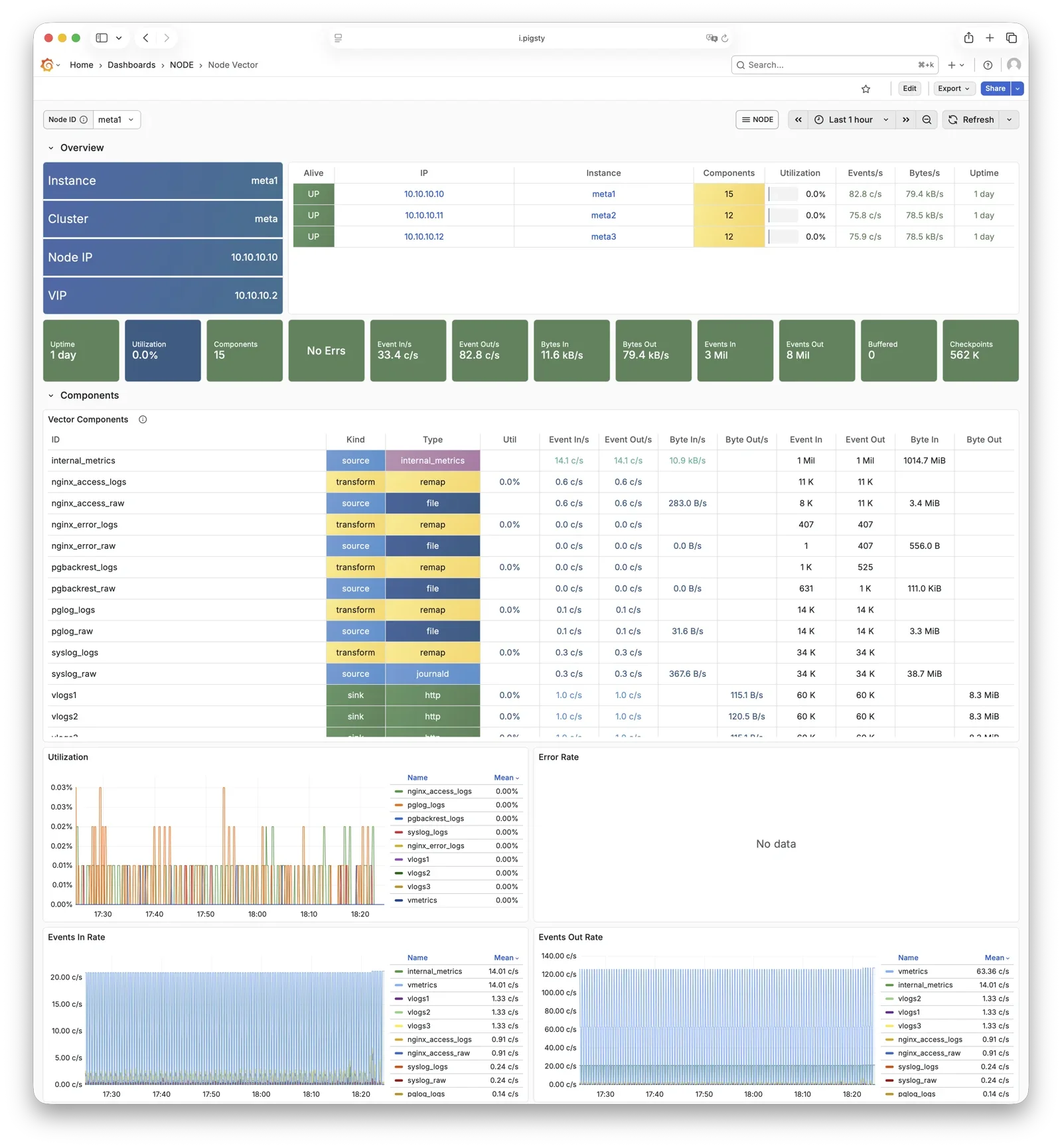
Node Vector
查看 Vector 采集与转发状态,以及日志管道健康度。
告警规则
Pigsty 针对 NODE 实现了以下告警规则:
可用性告警
| 规则 | 级别 | 说明 |
|---|---|---|
NodeDown | CRIT | 节点离线 |
HaproxyDown | CRIT | HAProxy 服务离线 |
VectorDown | WARN | 日志收集代理离线(Vector) |
DockerDown | WARN | 容器引擎离线 |
KeepalivedDown | WARN | Keepalived 守护进程离线 |
CPU 告警
| 规则 | 级别 | 说明 |
|---|---|---|
NodeCpuHigh | WARN | CPU 使用率超过 70% |
调度告警
| 规则 | 级别 | 说明 |
|---|---|---|
NodeLoadHigh | WARN | 标准化负载超过 100% |
内存告警
| 规则 | 级别 | 说明 |
|---|---|---|
NodeOutOfMem | WARN | 可用内存少于 10% |
NodeMemSwapped | WARN | Swap 使用率超过 1% |
文件系统告警
| 规则 | 级别 | 说明 |
|---|---|---|
NodeFsSpaceFull | WARN | 磁盘使用率超过 90% |
NodeFsFilesFull | WARN | Inode 使用率超过 90% |
NodeFdFull | WARN | 文件描述符使用率超过 90% |
磁盘告警
| 规则 | 级别 | 说明 |
|---|---|---|
NodeDiskSlow | INFO | 读写延迟超过 32ms |
网络协议告警
| 规则 | 级别 | 说明 |
|---|---|---|
NodeTcpErrHigh | WARN | TCP 错误率超过 1/分钟 |
NodeTcpRetransHigh | INFO | TCP 重传率超过 1% |
时间同步告警
| 规则 | 级别 | 说明 |
|---|---|---|
NodeTimeDrift | WARN | 系统时间未同步 |
6 - 指标列表
Pigsty NODE 模块提供的完整监控指标列表与释义
NODE 模块包含有 727 类可用监控指标。
| Metric Name | Type | Labels | Description |
|---|---|---|---|
| ALERTS | Unknown | alertname, ip, level, severity, ins, job, alertstate, category, instance, cls | N/A |
| ALERTS_FOR_STATE | Unknown | alertname, ip, level, severity, ins, job, category, instance, cls | N/A |
| deprecated_flags_inuse_total | Unknown | instance, ins, job, ip, cls | N/A |
| go_gc_duration_seconds | summary | quantile, instance, ins, job, ip, cls | A summary of the pause duration of garbage collection cycles. |
| go_gc_duration_seconds_count | Unknown | instance, ins, job, ip, cls | N/A |
| go_gc_duration_seconds_sum | Unknown | instance, ins, job, ip, cls | N/A |
| go_goroutines | gauge | instance, ins, job, ip, cls | Number of goroutines that currently exist. |
| go_info | gauge | version, instance, ins, job, ip, cls | Information about the Go environment. |
| go_memstats_alloc_bytes | gauge | instance, ins, job, ip, cls | Number of bytes allocated and still in use. |
| go_memstats_alloc_bytes_total | counter | instance, ins, job, ip, cls | Total number of bytes allocated, even if freed. |
| go_memstats_buck_hash_sys_bytes | gauge | instance, ins, job, ip, cls | Number of bytes used by the profiling bucket hash table. |
| go_memstats_frees_total | counter | instance, ins, job, ip, cls | Total number of frees. |
| go_memstats_gc_sys_bytes | gauge | instance, ins, job, ip, cls | Number of bytes used for garbage collection system metadata. |
| go_memstats_heap_alloc_bytes | gauge | instance, ins, job, ip, cls | Number of heap bytes allocated and still in use. |
| go_memstats_heap_idle_bytes | gauge | instance, ins, job, ip, cls | Number of heap bytes waiting to be used. |
| go_memstats_heap_inuse_bytes | gauge | instance, ins, job, ip, cls | Number of heap bytes that are in use. |
| go_memstats_heap_objects | gauge | instance, ins, job, ip, cls | Number of allocated objects. |
| go_memstats_heap_released_bytes | gauge | instance, ins, job, ip, cls | Number of heap bytes released to OS. |
| go_memstats_heap_sys_bytes | gauge | instance, ins, job, ip, cls | Number of heap bytes obtained from system. |
| go_memstats_last_gc_time_seconds | gauge | instance, ins, job, ip, cls | Number of seconds since 1970 of last garbage collection. |
| go_memstats_lookups_total | counter | instance, ins, job, ip, cls | Total number of pointer lookups. |
| go_memstats_mallocs_total | counter | instance, ins, job, ip, cls | Total number of mallocs. |
| go_memstats_mcache_inuse_bytes | gauge | instance, ins, job, ip, cls | Number of bytes in use by mcache structures. |
| go_memstats_mcache_sys_bytes | gauge | instance, ins, job, ip, cls | Number of bytes used for mcache structures obtained from system. |
| go_memstats_mspan_inuse_bytes | gauge | instance, ins, job, ip, cls | Number of bytes in use by mspan structures. |
| go_memstats_mspan_sys_bytes | gauge | instance, ins, job, ip, cls | Number of bytes used for mspan structures obtained from system. |
| go_memstats_next_gc_bytes | gauge | instance, ins, job, ip, cls | Number of heap bytes when next garbage collection will take place. |
| go_memstats_other_sys_bytes | gauge | instance, ins, job, ip, cls | Number of bytes used for other system allocations. |
| go_memstats_stack_inuse_bytes | gauge | instance, ins, job, ip, cls | Number of bytes in use by the stack allocator. |
| go_memstats_stack_sys_bytes | gauge | instance, ins, job, ip, cls | Number of bytes obtained from system for stack allocator. |
| go_memstats_sys_bytes | gauge | instance, ins, job, ip, cls | Number of bytes obtained from system. |
| go_threads | gauge | instance, ins, job, ip, cls | Number of OS threads created. |
| haproxy:cls:usage | Unknown | job, cls | N/A |
| haproxy:ins:uptime | Unknown | instance, ins, job, ip, cls | N/A |
| haproxy:ins:usage | Unknown | instance, ins, job, ip, cls | N/A |
| haproxy_backend_active_servers | gauge | proxy, instance, ins, job, ip, cls | Total number of active UP servers with a non-zero weight |
| haproxy_backend_agg_check_status | gauge | state, proxy, instance, ins, job, ip, cls | Backend’s aggregated gauge of servers’ state check status |
| haproxy_backend_agg_server_check_status | gauge | state, proxy, instance, ins, job, ip, cls | [DEPRECATED] Backend’s aggregated gauge of servers’ status |
| haproxy_backend_agg_server_status | gauge | state, proxy, instance, ins, job, ip, cls | Backend’s aggregated gauge of servers’ status |
| haproxy_backend_backup_servers | gauge | proxy, instance, ins, job, ip, cls | Total number of backup UP servers with a non-zero weight |
| haproxy_backend_bytes_in_total | counter | proxy, instance, ins, job, ip, cls | Total number of request bytes since process started |
| haproxy_backend_bytes_out_total | counter | proxy, instance, ins, job, ip, cls | Total number of response bytes since process started |
| haproxy_backend_check_last_change_seconds | gauge | proxy, instance, ins, job, ip, cls | How long ago the last server state changed, in seconds |
| haproxy_backend_check_up_down_total | counter | proxy, instance, ins, job, ip, cls | Total number of failed checks causing UP to DOWN server transitions, per server/backend, since the worker process started |
| haproxy_backend_client_aborts_total | counter | proxy, instance, ins, job, ip, cls | Total number of requests or connections aborted by the client since the worker process started |
| haproxy_backend_connect_time_average_seconds | gauge | proxy, instance, ins, job, ip, cls | Avg. connect time for last 1024 successful connections. |
| haproxy_backend_connection_attempts_total | counter | proxy, instance, ins, job, ip, cls | Total number of outgoing connection attempts on this backend/server since the worker process started |
| haproxy_backend_connection_errors_total | counter | proxy, instance, ins, job, ip, cls | Total number of failed connections to server since the worker process started |
| haproxy_backend_connection_reuses_total | counter | proxy, instance, ins, job, ip, cls | Total number of reused connection on this backend/server since the worker process started |
| haproxy_backend_current_queue | gauge | proxy, instance, ins, job, ip, cls | Number of current queued connections |
| haproxy_backend_current_sessions | gauge | proxy, instance, ins, job, ip, cls | Number of current sessions on the frontend, backend or server |
| haproxy_backend_downtime_seconds_total | counter | proxy, instance, ins, job, ip, cls | Total time spent in DOWN state, for server or backend |
| haproxy_backend_failed_header_rewriting_total | counter | proxy, instance, ins, job, ip, cls | Total number of failed HTTP header rewrites since the worker process started |
| haproxy_backend_http_cache_hits_total | counter | proxy, instance, ins, job, ip, cls | Total number of HTTP requests not found in the cache on this frontend/backend since the worker process started |
| haproxy_backend_http_cache_lookups_total | counter | proxy, instance, ins, job, ip, cls | Total number of HTTP requests looked up in the cache on this frontend/backend since the worker process started |
| haproxy_backend_http_comp_bytes_bypassed_total | counter | proxy, instance, ins, job, ip, cls | Total number of bytes that bypassed HTTP compression for this object since the worker process started (CPU/memory/bandwidth limitation) |
| haproxy_backend_http_comp_bytes_in_total | counter | proxy, instance, ins, job, ip, cls | Total number of bytes submitted to the HTTP compressor for this object since the worker process started |
| haproxy_backend_http_comp_bytes_out_total | counter | proxy, instance, ins, job, ip, cls | Total number of bytes emitted by the HTTP compressor for this object since the worker process started |
| haproxy_backend_http_comp_responses_total | counter | proxy, instance, ins, job, ip, cls | Total number of HTTP responses that were compressed for this object since the worker process started |
| haproxy_backend_http_requests_total | counter | proxy, instance, ins, job, ip, cls | Total number of HTTP requests processed by this object since the worker process started |
| haproxy_backend_http_responses_total | counter | ip, proxy, ins, code, job, instance, cls | Total number of HTTP responses with status 100-199 returned by this object since the worker process started |
| haproxy_backend_internal_errors_total | counter | proxy, instance, ins, job, ip, cls | Total number of internal errors since process started |
| haproxy_backend_last_session_seconds | gauge | proxy, instance, ins, job, ip, cls | How long ago some traffic was seen on this object on this worker process, in seconds |
| haproxy_backend_limit_sessions | gauge | proxy, instance, ins, job, ip, cls | Frontend/listener/server’s maxconn, backend’s fullconn |
| haproxy_backend_loadbalanced_total | counter | proxy, instance, ins, job, ip, cls | Total number of requests routed by load balancing since the worker process started (ignores queue pop and stickiness) |
| haproxy_backend_max_connect_time_seconds | gauge | proxy, instance, ins, job, ip, cls | Maximum observed time spent waiting for a connection to complete |
| haproxy_backend_max_queue | gauge | proxy, instance, ins, job, ip, cls | Highest value of queued connections encountered since process started |
| haproxy_backend_max_queue_time_seconds | gauge | proxy, instance, ins, job, ip, cls | Maximum observed time spent in the queue |
| haproxy_backend_max_response_time_seconds | gauge | proxy, instance, ins, job, ip, cls | Maximum observed time spent waiting for a server response |
| haproxy_backend_max_session_rate | gauge | proxy, instance, ins, job, ip, cls | Highest value of sessions per second observed since the worker process started |
| haproxy_backend_max_sessions | gauge | proxy, instance, ins, job, ip, cls | Highest value of current sessions encountered since process started |
| haproxy_backend_max_total_time_seconds | gauge | proxy, instance, ins, job, ip, cls | Maximum observed total request+response time (request+queue+connect+response+processing) |
| haproxy_backend_queue_time_average_seconds | gauge | proxy, instance, ins, job, ip, cls | Avg. queue time for last 1024 successful connections. |
| haproxy_backend_redispatch_warnings_total | counter | proxy, instance, ins, job, ip, cls | Total number of server redispatches due to connection failures since the worker process started |
| haproxy_backend_requests_denied_total | counter | proxy, instance, ins, job, ip, cls | Total number of denied requests since process started |
| haproxy_backend_response_errors_total | counter | proxy, instance, ins, job, ip, cls | Total number of invalid responses since the worker process started |
| haproxy_backend_response_time_average_seconds | gauge | proxy, instance, ins, job, ip, cls | Avg. response time for last 1024 successful connections. |
| haproxy_backend_responses_denied_total | counter | proxy, instance, ins, job, ip, cls | Total number of denied responses since process started |
| haproxy_backend_retry_warnings_total | counter | proxy, instance, ins, job, ip, cls | Total number of server connection retries since the worker process started |
| haproxy_backend_server_aborts_total | counter | proxy, instance, ins, job, ip, cls | Total number of requests or connections aborted by the server since the worker process started |
| haproxy_backend_sessions_total | counter | proxy, instance, ins, job, ip, cls | Total number of sessions since process started |
| haproxy_backend_status | gauge | state, proxy, instance, ins, job, ip, cls | Current status of the service, per state label value. |
| haproxy_backend_total_time_average_seconds | gauge | proxy, instance, ins, job, ip, cls | Avg. total time for last 1024 successful connections. |
| haproxy_backend_uweight | gauge | proxy, instance, ins, job, ip, cls | Server’s user weight, or sum of active servers’ user weights for a backend |
| haproxy_backend_weight | gauge | proxy, instance, ins, job, ip, cls | Server’s effective weight, or sum of active servers’ effective weights for a backend |
| haproxy_frontend_bytes_in_total | counter | proxy, instance, ins, job, ip, cls | Total number of request bytes since process started |
| haproxy_frontend_bytes_out_total | counter | proxy, instance, ins, job, ip, cls | Total number of response bytes since process started |
| haproxy_frontend_connections_rate_max | gauge | proxy, instance, ins, job, ip, cls | Highest value of connections per second observed since the worker process started |
| haproxy_frontend_connections_total | counter | proxy, instance, ins, job, ip, cls | Total number of new connections accepted on this frontend since the worker process started |
| haproxy_frontend_current_sessions | gauge | proxy, instance, ins, job, ip, cls | Number of current sessions on the frontend, backend or server |
| haproxy_frontend_denied_connections_total | counter | proxy, instance, ins, job, ip, cls | Total number of incoming connections blocked on a listener/frontend by a tcp-request connection rule since the worker process started |
| haproxy_frontend_denied_sessions_total | counter | proxy, instance, ins, job, ip, cls | Total number of incoming sessions blocked on a listener/frontend by a tcp-request connection rule since the worker process started |
| haproxy_frontend_failed_header_rewriting_total | counter | proxy, instance, ins, job, ip, cls | Total number of failed HTTP header rewrites since the worker process started |
| haproxy_frontend_http_cache_hits_total | counter | proxy, instance, ins, job, ip, cls | Total number of HTTP requests not found in the cache on this frontend/backend since the worker process started |
| haproxy_frontend_http_cache_lookups_total | counter | proxy, instance, ins, job, ip, cls | Total number of HTTP requests looked up in the cache on this frontend/backend since the worker process started |
| haproxy_frontend_http_comp_bytes_bypassed_total | counter | proxy, instance, ins, job, ip, cls | Total number of bytes that bypassed HTTP compression for this object since the worker process started (CPU/memory/bandwidth limitation) |
| haproxy_frontend_http_comp_bytes_in_total | counter | proxy, instance, ins, job, ip, cls | Total number of bytes submitted to the HTTP compressor for this object since the worker process started |
| haproxy_frontend_http_comp_bytes_out_total | counter | proxy, instance, ins, job, ip, cls | Total number of bytes emitted by the HTTP compressor for this object since the worker process started |
| haproxy_frontend_http_comp_responses_total | counter | proxy, instance, ins, job, ip, cls | Total number of HTTP responses that were compressed for this object since the worker process started |
| haproxy_frontend_http_requests_rate_max | gauge | proxy, instance, ins, job, ip, cls | Highest value of http requests observed since the worker process started |
| haproxy_frontend_http_requests_total | counter | proxy, instance, ins, job, ip, cls | Total number of HTTP requests processed by this object since the worker process started |
| haproxy_frontend_http_responses_total | counter | ip, proxy, ins, code, job, instance, cls | Total number of HTTP responses with status 100-199 returned by this object since the worker process started |
| haproxy_frontend_intercepted_requests_total | counter | proxy, instance, ins, job, ip, cls | Total number of HTTP requests intercepted on the frontend (redirects/stats/services) since the worker process started |
| haproxy_frontend_internal_errors_total | counter | proxy, instance, ins, job, ip, cls | Total number of internal errors since process started |
| haproxy_frontend_limit_session_rate | gauge | proxy, instance, ins, job, ip, cls | Limit on the number of sessions accepted in a second (frontend only, ‘rate-limit sessions’ setting) |
| haproxy_frontend_limit_sessions | gauge | proxy, instance, ins, job, ip, cls | Frontend/listener/server’s maxconn, backend’s fullconn |
| haproxy_frontend_max_session_rate | gauge | proxy, instance, ins, job, ip, cls | Highest value of sessions per second observed since the worker process started |
| haproxy_frontend_max_sessions | gauge | proxy, instance, ins, job, ip, cls | Highest value of current sessions encountered since process started |
| haproxy_frontend_request_errors_total | counter | proxy, instance, ins, job, ip, cls | Total number of invalid requests since process started |
| haproxy_frontend_requests_denied_total | counter | proxy, instance, ins, job, ip, cls | Total number of denied requests since process started |
| haproxy_frontend_responses_denied_total | counter | proxy, instance, ins, job, ip, cls | Total number of denied responses since process started |
| haproxy_frontend_sessions_total | counter | proxy, instance, ins, job, ip, cls | Total number of sessions since process started |
| haproxy_frontend_status | gauge | state, proxy, instance, ins, job, ip, cls | Current status of the service, per state label value. |
| haproxy_process_active_peers | gauge | instance, ins, job, ip, cls | Current number of verified active peers connections on the current worker process |
| haproxy_process_build_info | gauge | version, instance, ins, job, ip, cls | Build info |
| haproxy_process_busy_polling_enabled | gauge | instance, ins, job, ip, cls | 1 if busy-polling is currently in use on the worker process, otherwise zero (config.busy-polling) |
| haproxy_process_bytes_out_rate | gauge | instance, ins, job, ip, cls | Number of bytes emitted by current worker process over the last second |
| haproxy_process_bytes_out_total | counter | instance, ins, job, ip, cls | Total number of bytes emitted by current worker process since started |
| haproxy_process_connected_peers | gauge | instance, ins, job, ip, cls | Current number of peers having passed the connection step on the current worker process |
| haproxy_process_connections_total | counter | instance, ins, job, ip, cls | Total number of connections on this worker process since started |
| haproxy_process_current_backend_ssl_key_rate | gauge | instance, ins, job, ip, cls | Number of SSL keys created on backends in this worker process over the last second |
| haproxy_process_current_connection_rate | gauge | instance, ins, job, ip, cls | Number of front connections created on this worker process over the last second |
| haproxy_process_current_connections | gauge | instance, ins, job, ip, cls | Current number of connections on this worker process |
| haproxy_process_current_frontend_ssl_key_rate | gauge | instance, ins, job, ip, cls | Number of SSL keys created on frontends in this worker process over the last second |
| haproxy_process_current_run_queue | gauge | instance, ins, job, ip, cls | Total number of active tasks+tasklets in the current worker process |
| haproxy_process_current_session_rate | gauge | instance, ins, job, ip, cls | Number of sessions created on this worker process over the last second |
| haproxy_process_current_ssl_connections | gauge | instance, ins, job, ip, cls | Current number of SSL endpoints on this worker process (front+back) |
| haproxy_process_current_ssl_rate | gauge | instance, ins, job, ip, cls | Number of SSL connections created on this worker process over the last second |
| haproxy_process_current_tasks | gauge | instance, ins, job, ip, cls | Total number of tasks in the current worker process (active + sleeping) |
| haproxy_process_current_zlib_memory | gauge | instance, ins, job, ip, cls | Amount of memory currently used by HTTP compression on the current worker process (in bytes) |
| haproxy_process_dropped_logs_total | counter | instance, ins, job, ip, cls | Total number of dropped logs for current worker process since started |
| haproxy_process_failed_resolutions | counter | instance, ins, job, ip, cls | Total number of failed DNS resolutions in current worker process since started |
| haproxy_process_frontend_ssl_reuse | gauge | instance, ins, job, ip, cls | Percent of frontend SSL connections which did not require a new key |
| haproxy_process_hard_max_connections | gauge | instance, ins, job, ip, cls | Hard limit on the number of per-process connections (imposed by Memmax_MB or Ulimit-n) |
| haproxy_process_http_comp_bytes_in_total | counter | instance, ins, job, ip, cls | Number of bytes submitted to the HTTP compressor in this worker process over the last second |
| haproxy_process_http_comp_bytes_out_total | counter | instance, ins, job, ip, cls | Number of bytes emitted by the HTTP compressor in this worker process over the last second |
| haproxy_process_idle_time_percent | gauge | instance, ins, job, ip, cls | Percentage of last second spent waiting in the current worker thread |
| haproxy_process_jobs | gauge | instance, ins, job, ip, cls | Current number of active jobs on the current worker process (frontend connections, master connections, listeners) |
| haproxy_process_limit_connection_rate | gauge | instance, ins, job, ip, cls | Hard limit for ConnRate (global.maxconnrate) |
| haproxy_process_limit_http_comp | gauge | instance, ins, job, ip, cls | Limit of CompressBpsOut beyond which HTTP compression is automatically disabled |
| haproxy_process_limit_session_rate | gauge | instance, ins, job, ip, cls | Hard limit for SessRate (global.maxsessrate) |
| haproxy_process_limit_ssl_rate | gauge | instance, ins, job, ip, cls | Hard limit for SslRate (global.maxsslrate) |
| haproxy_process_listeners | gauge | instance, ins, job, ip, cls | Current number of active listeners on the current worker process |
| haproxy_process_max_backend_ssl_key_rate | gauge | instance, ins, job, ip, cls | Highest SslBackendKeyRate reached on this worker process since started (in SSL keys per second) |
| haproxy_process_max_connection_rate | gauge | instance, ins, job, ip, cls | Highest ConnRate reached on this worker process since started (in connections per second) |
| haproxy_process_max_connections | gauge | instance, ins, job, ip, cls | Hard limit on the number of per-process connections (configured or imposed by Ulimit-n) |
| haproxy_process_max_fds | gauge | instance, ins, job, ip, cls | Hard limit on the number of per-process file descriptors |
| haproxy_process_max_frontend_ssl_key_rate | gauge | instance, ins, job, ip, cls | Highest SslFrontendKeyRate reached on this worker process since started (in SSL keys per second) |
| haproxy_process_max_memory_bytes | gauge | instance, ins, job, ip, cls | Worker process’s hard limit on memory usage in byes (-m on command line) |
| haproxy_process_max_pipes | gauge | instance, ins, job, ip, cls | Hard limit on the number of pipes for splicing, 0=unlimited |
| haproxy_process_max_session_rate | gauge | instance, ins, job, ip, cls | Highest SessRate reached on this worker process since started (in sessions per second) |
| haproxy_process_max_sockets | gauge | instance, ins, job, ip, cls | Hard limit on the number of per-process sockets |
| haproxy_process_max_ssl_connections | gauge | instance, ins, job, ip, cls | Hard limit on the number of per-process SSL endpoints (front+back), 0=unlimited |
| haproxy_process_max_ssl_rate | gauge | instance, ins, job, ip, cls | Highest SslRate reached on this worker process since started (in connections per second) |
| haproxy_process_max_zlib_memory | gauge | instance, ins, job, ip, cls | Limit on the amount of memory used by HTTP compression above which it is automatically disabled (in bytes, see global.maxzlibmem) |
| haproxy_process_nbproc | gauge | instance, ins, job, ip, cls | Number of started worker processes (historical, always 1) |
| haproxy_process_nbthread | gauge | instance, ins, job, ip, cls | Number of started threads (global.nbthread) |
| haproxy_process_pipes_free_total | counter | instance, ins, job, ip, cls | Current number of allocated and available pipes in this worker process |
| haproxy_process_pipes_used_total | counter | instance, ins, job, ip, cls | Current number of pipes in use in this worker process |
| haproxy_process_pool_allocated_bytes | gauge | instance, ins, job, ip, cls | Amount of memory allocated in pools (in bytes) |
| haproxy_process_pool_failures_total | counter | instance, ins, job, ip, cls | Number of failed pool allocations since this worker was started |
| haproxy_process_pool_used_bytes | gauge | instance, ins, job, ip, cls | Amount of pool memory currently used (in bytes) |
| haproxy_process_recv_logs_total | counter | instance, ins, job, ip, cls | Total number of log messages received by log-forwarding listeners on this worker process since started |
| haproxy_process_relative_process_id | gauge | instance, ins, job, ip, cls | Relative worker process number (1) |
| haproxy_process_requests_total | counter | instance, ins, job, ip, cls | Total number of requests on this worker process since started |
| haproxy_process_spliced_bytes_out_total | counter | instance, ins, job, ip, cls | Total number of bytes emitted by current worker process through a kernel pipe since started |
| haproxy_process_ssl_cache_lookups_total | counter | instance, ins, job, ip, cls | Total number of SSL session ID lookups in the SSL session cache on this worker since started |
| haproxy_process_ssl_cache_misses_total | counter | instance, ins, job, ip, cls | Total number of SSL session ID lookups that didn’t find a session in the SSL session cache on this worker since started |
| haproxy_process_ssl_connections_total | counter | instance, ins, job, ip, cls | Total number of SSL endpoints on this worker process since started (front+back) |
| haproxy_process_start_time_seconds | gauge | instance, ins, job, ip, cls | Start time in seconds |
| haproxy_process_stopping | gauge | instance, ins, job, ip, cls | 1 if the worker process is currently stopping, otherwise zero |
| haproxy_process_unstoppable_jobs | gauge | instance, ins, job, ip, cls | Current number of unstoppable jobs on the current worker process (master connections) |
| haproxy_process_uptime_seconds | gauge | instance, ins, job, ip, cls | How long ago this worker process was started (seconds) |
| haproxy_server_bytes_in_total | counter | proxy, instance, ins, job, server, ip, cls | Total number of request bytes since process started |
| haproxy_server_bytes_out_total | counter | proxy, instance, ins, job, server, ip, cls | Total number of response bytes since process started |
| haproxy_server_check_code | gauge | proxy, instance, ins, job, server, ip, cls | layer5-7 code, if available of the last health check. |
| haproxy_server_check_duration_seconds | gauge | proxy, instance, ins, job, server, ip, cls | Total duration of the latest server health check, in seconds. |
| haproxy_server_check_failures_total | counter | proxy, instance, ins, job, server, ip, cls | Total number of failed individual health checks per server/backend, since the worker process started |
| haproxy_server_check_last_change_seconds | gauge | proxy, instance, ins, job, server, ip, cls | How long ago the last server state changed, in seconds |
| haproxy_server_check_status | gauge | state, proxy, instance, ins, job, server, ip, cls | Status of last health check, per state label value. |
| haproxy_server_check_up_down_total | counter | proxy, instance, ins, job, server, ip, cls | Total number of failed checks causing UP to DOWN server transitions, per server/backend, since the worker process started |
| haproxy_server_client_aborts_total | counter | proxy, instance, ins, job, server, ip, cls | Total number of requests or connections aborted by the client since the worker process started |
| haproxy_server_connect_time_average_seconds | gauge | proxy, instance, ins, job, server, ip, cls | Avg. connect time for last 1024 successful connections. |
| haproxy_server_connection_attempts_total | counter | proxy, instance, ins, job, server, ip, cls | Total number of outgoing connection attempts on this backend/server since the worker process started |
| haproxy_server_connection_errors_total | counter | proxy, instance, ins, job, server, ip, cls | Total number of failed connections to server since the worker process started |
| haproxy_server_connection_reuses_total | counter | proxy, instance, ins, job, server, ip, cls | Total number of reused connection on this backend/server since the worker process started |
| haproxy_server_current_queue | gauge | proxy, instance, ins, job, server, ip, cls | Number of current queued connections |
| haproxy_server_current_sessions | gauge | proxy, instance, ins, job, server, ip, cls | Number of current sessions on the frontend, backend or server |
| haproxy_server_current_throttle | gauge | proxy, instance, ins, job, server, ip, cls | Throttling ratio applied to a server’s maxconn and weight during the slowstart period (0 to 100%) |
| haproxy_server_downtime_seconds_total | counter | proxy, instance, ins, job, server, ip, cls | Total time spent in DOWN state, for server or backend |
| haproxy_server_failed_header_rewriting_total | counter | proxy, instance, ins, job, server, ip, cls | Total number of failed HTTP header rewrites since the worker process started |
| haproxy_server_idle_connections_current | gauge | proxy, instance, ins, job, server, ip, cls | Current number of idle connections available for reuse on this server |
| haproxy_server_idle_connections_limit | gauge | proxy, instance, ins, job, server, ip, cls | Limit on the number of available idle connections on this server (server ‘pool_max_conn’ directive) |
| haproxy_server_internal_errors_total | counter | proxy, instance, ins, job, server, ip, cls | Total number of internal errors since process started |
| haproxy_server_last_session_seconds | gauge | proxy, instance, ins, job, server, ip, cls | How long ago some traffic was seen on this object on this worker process, in seconds |
| haproxy_server_limit_sessions | gauge | proxy, instance, ins, job, server, ip, cls | Frontend/listener/server’s maxconn, backend’s fullconn |
| haproxy_server_loadbalanced_total | counter | proxy, instance, ins, job, server, ip, cls | Total number of requests routed by load balancing since the worker process started (ignores queue pop and stickiness) |
| haproxy_server_max_connect_time_seconds | gauge | proxy, instance, ins, job, server, ip, cls | Maximum observed time spent waiting for a connection to complete |
| haproxy_server_max_queue | gauge | proxy, instance, ins, job, server, ip, cls | Highest value of queued connections encountered since process started |
| haproxy_server_max_queue_time_seconds | gauge | proxy, instance, ins, job, server, ip, cls | Maximum observed time spent in the queue |
| haproxy_server_max_response_time_seconds | gauge | proxy, instance, ins, job, server, ip, cls | Maximum observed time spent waiting for a server response |
| haproxy_server_max_session_rate | gauge | proxy, instance, ins, job, server, ip, cls | Highest value of sessions per second observed since the worker process started |
| haproxy_server_max_sessions | gauge | proxy, instance, ins, job, server, ip, cls | Highest value of current sessions encountered since process started |
| haproxy_server_max_total_time_seconds | gauge | proxy, instance, ins, job, server, ip, cls | Maximum observed total request+response time (request+queue+connect+response+processing) |
| haproxy_server_need_connections_current | gauge | proxy, instance, ins, job, server, ip, cls | Estimated needed number of connections |
| haproxy_server_queue_limit | gauge | proxy, instance, ins, job, server, ip, cls | Limit on the number of connections in queue, for servers only (maxqueue argument) |
| haproxy_server_queue_time_average_seconds | gauge | proxy, instance, ins, job, server, ip, cls | Avg. queue time for last 1024 successful connections. |
| haproxy_server_redispatch_warnings_total | counter | proxy, instance, ins, job, server, ip, cls | Total number of server redispatches due to connection failures since the worker process started |
| haproxy_server_response_errors_total | counter | proxy, instance, ins, job, server, ip, cls | Total number of invalid responses since the worker process started |
| haproxy_server_response_time_average_seconds | gauge | proxy, instance, ins, job, server, ip, cls | Avg. response time for last 1024 successful connections. |
| haproxy_server_responses_denied_total | counter | proxy, instance, ins, job, server, ip, cls | Total number of denied responses since process started |
| haproxy_server_retry_warnings_total | counter | proxy, instance, ins, job, server, ip, cls | Total number of server connection retries since the worker process started |
| haproxy_server_safe_idle_connections_current | gauge | proxy, instance, ins, job, server, ip, cls | Current number of safe idle connections |
| haproxy_server_server_aborts_total | counter | proxy, instance, ins, job, server, ip, cls | Total number of requests or connections aborted by the server since the worker process started |
| haproxy_server_sessions_total | counter | proxy, instance, ins, job, server, ip, cls | Total number of sessions since process started |
| haproxy_server_status | gauge | state, proxy, instance, ins, job, server, ip, cls | Current status of the service, per state label value. |
| haproxy_server_total_time_average_seconds | gauge | proxy, instance, ins, job, server, ip, cls | Avg. total time for last 1024 successful connections. |
| haproxy_server_unsafe_idle_connections_current | gauge | proxy, instance, ins, job, server, ip, cls | Current number of unsafe idle connections |
| haproxy_server_used_connections_current | gauge | proxy, instance, ins, job, server, ip, cls | Current number of connections in use |
| haproxy_server_uweight | gauge | proxy, instance, ins, job, server, ip, cls | Server’s user weight, or sum of active servers’ user weights for a backend |
| haproxy_server_weight | gauge | proxy, instance, ins, job, server, ip, cls | Server’s effective weight, or sum of active servers’ effective weights for a backend |
| haproxy_up | Unknown | instance, ins, job, ip, cls | N/A |
| inflight_requests | gauge | instance, ins, job, route, ip, cls, method | Current number of inflight requests. |
| jaeger_tracer_baggage_restrictions_updates_total | Unknown | instance, ins, job, result, ip, cls | N/A |
| jaeger_tracer_baggage_truncations_total | Unknown | instance, ins, job, ip, cls | N/A |
| jaeger_tracer_baggage_updates_total | Unknown | instance, ins, job, result, ip, cls | N/A |
| jaeger_tracer_finished_spans_total | Unknown | instance, ins, job, sampled, ip, cls | N/A |
| jaeger_tracer_reporter_queue_length | gauge | instance, ins, job, ip, cls | Current number of spans in the reporter queue |
| jaeger_tracer_reporter_spans_total | Unknown | instance, ins, job, result, ip, cls | N/A |
| jaeger_tracer_sampler_queries_total | Unknown | instance, ins, job, result, ip, cls | N/A |
| jaeger_tracer_sampler_updates_total | Unknown | instance, ins, job, result, ip, cls | N/A |
| jaeger_tracer_span_context_decoding_errors_total | Unknown | instance, ins, job, ip, cls | N/A |
| jaeger_tracer_started_spans_total | Unknown | instance, ins, job, sampled, ip, cls | N/A |
| jaeger_tracer_throttled_debug_spans_total | Unknown | instance, ins, job, ip, cls | N/A |
| jaeger_tracer_throttler_updates_total | Unknown | instance, ins, job, result, ip, cls | N/A |
| jaeger_tracer_traces_total | Unknown | state, instance, ins, job, sampled, ip, cls | N/A |
| loki_experimental_features_in_use_total | Unknown | instance, ins, job, ip, cls | N/A |
| loki_internal_log_messages_total | Unknown | level, instance, ins, job, ip, cls | N/A |
| loki_log_flushes_bucket | Unknown | instance, ins, job, le, ip, cls | N/A |
| loki_log_flushes_count | Unknown | instance, ins, job, ip, cls | N/A |
| loki_log_flushes_sum | Unknown | instance, ins, job, ip, cls | N/A |
| loki_log_messages_total | Unknown | level, instance, ins, job, ip, cls | N/A |
| loki_logql_querystats_duplicates_total | Unknown | instance, ins, job, ip, cls | N/A |
| loki_logql_querystats_ingester_sent_lines_total | Unknown | instance, ins, job, ip, cls | N/A |
| loki_querier_index_cache_corruptions_total | Unknown | instance, ins, job, ip, cls | N/A |
| loki_querier_index_cache_encode_errors_total | Unknown | instance, ins, job, ip, cls | N/A |
| loki_querier_index_cache_gets_total | Unknown | instance, ins, job, ip, cls | N/A |
| loki_querier_index_cache_hits_total | Unknown | instance, ins, job, ip, cls | N/A |
| loki_querier_index_cache_puts_total | Unknown | instance, ins, job, ip, cls | N/A |
| net_conntrack_dialer_conn_attempted_total | counter | ip, ins, job, instance, cls, dialer_name | Total number of connections attempted by the given dialer a given name. |
| net_conntrack_dialer_conn_closed_total | counter | ip, ins, job, instance, cls, dialer_name | Total number of connections closed which originated from the dialer of a given name. |
| net_conntrack_dialer_conn_established_total | counter | ip, ins, job, instance, cls, dialer_name | Total number of connections successfully established by the given dialer a given name. |
| net_conntrack_dialer_conn_failed_total | counter | ip, ins, job, reason, instance, cls, dialer_name | Total number of connections failed to dial by the dialer a given name. |
| node:cls:avail_bytes | Unknown | job, cls | N/A |
| node:cls:cpu_count | Unknown | job, cls | N/A |
| node:cls:cpu_usage | Unknown | job, cls | N/A |
| node:cls:cpu_usage_15m | Unknown | job, cls | N/A |
| node:cls:cpu_usage_1m | Unknown | job, cls | N/A |
| node:cls:cpu_usage_5m | Unknown | job, cls | N/A |
| node:cls:disk_io_bytes_rate1m | Unknown | job, cls | N/A |
| node:cls:disk_iops_1m | Unknown | job, cls | N/A |
| node:cls:disk_mreads_rate1m | Unknown | job, cls | N/A |
| node:cls:disk_mreads_ratio1m | Unknown | job, cls | N/A |
| node:cls:disk_mwrites_rate1m | Unknown | job, cls | N/A |
| node:cls:disk_mwrites_ratio1m | Unknown | job, cls | N/A |
| node:cls:disk_read_bytes_rate1m | Unknown | job, cls | N/A |
| node:cls:disk_reads_rate1m | Unknown | job, cls | N/A |
| node:cls:disk_write_bytes_rate1m | Unknown | job, cls | N/A |
| node:cls:disk_writes_rate1m | Unknown | job, cls | N/A |
| node:cls:free_bytes | Unknown | job, cls | N/A |
| node:cls:mem_usage | Unknown | job, cls | N/A |
| node:cls:network_io_bytes_rate1m | Unknown | job, cls | N/A |
| node:cls:network_rx_bytes_rate1m | Unknown | job, cls | N/A |
| node:cls:network_rx_pps1m | Unknown | job, cls | N/A |
| node:cls:network_tx_bytes_rate1m | Unknown | job, cls | N/A |
| node:cls:network_tx_pps1m | Unknown | job, cls | N/A |
| node:cls:size_bytes | Unknown | job, cls | N/A |
| node:cls:space_usage | Unknown | job, cls | N/A |
| node:cls:space_usage_max | Unknown | job, cls | N/A |
| node:cls:stdload1 | Unknown | job, cls | N/A |
| node:cls:stdload15 | Unknown | job, cls | N/A |
| node:cls:stdload5 | Unknown | job, cls | N/A |
| node:cls:time_drift_max | Unknown | job, cls | N/A |
| node:cpu:idle_time_irate1m | Unknown | ip, ins, job, cpu, instance, cls | N/A |
| node:cpu:sched_timeslices_rate1m | Unknown | ip, ins, job, cpu, instance, cls | N/A |
| node:cpu:sched_wait_rate1m | Unknown | ip, ins, job, cpu, instance, cls | N/A |
| node:cpu:time_irate1m | Unknown | ip, mode, ins, job, cpu, instance, cls | N/A |
| node:cpu:total_time_irate1m | Unknown | ip, ins, job, cpu, instance, cls | N/A |
| node:cpu:usage | Unknown | ip, ins, job, cpu, instance, cls | N/A |
| node:cpu:usage_avg15m | Unknown | ip, ins, job, cpu, instance, cls | N/A |
| node:cpu:usage_avg1m | Unknown | ip, ins, job, cpu, instance, cls | N/A |
| node:cpu:usage_avg5m | Unknown | ip, ins, job, cpu, instance, cls | N/A |
| node:dev:disk_avg_queue_size | Unknown | ip, device, ins, job, instance, cls | N/A |
| node:dev:disk_io_batch_1m | Unknown | ip, device, ins, job, instance, cls | N/A |
| node:dev:disk_io_bytes_rate1m | Unknown | ip, device, ins, job, instance, cls | N/A |
| node:dev:disk_io_rt_1m | Unknown | ip, device, ins, job, instance, cls | N/A |
| node:dev:disk_io_time_rate1m | Unknown | ip, device, ins, job, instance, cls | N/A |
| node:dev:disk_iops_1m | Unknown | ip, device, ins, job, instance, cls | N/A |
| node:dev:disk_mreads_rate1m | Unknown | ip, device, ins, job, instance, cls | N/A |
| node:dev:disk_mreads_ratio1m | Unknown | ip, device, ins, job, instance, cls | N/A |
| node:dev:disk_mwrites_rate1m | Unknown | ip, device, ins, job, instance, cls | N/A |
| node:dev:disk_mwrites_ratio1m | Unknown | ip, device, ins, job, instance, cls | N/A |
| node:dev:disk_read_batch_1m | Unknown | ip, device, ins, job, instance, cls | N/A |
| node:dev:disk_read_bytes_rate1m | Unknown | ip, device, ins, job, instance, cls | N/A |
| node:dev:disk_read_rt_1m | Unknown | ip, device, ins, job, instance, cls | N/A |
| node:dev:disk_read_time_rate1m | Unknown | ip, device, ins, job, instance, cls | N/A |
| node:dev:disk_reads_rate1m | Unknown | ip, device, ins, job, instance, cls | N/A |
| node:dev:disk_util_1m | Unknown | ip, device, ins, job, instance, cls | N/A |
| node:dev:disk_write_batch_1m | Unknown | ip, device, ins, job, instance, cls | N/A |
| node:dev:disk_write_bytes_rate1m | Unknown | ip, device, ins, job, instance, cls | N/A |
| node:dev:disk_write_rt_1m | Unknown | ip, device, ins, job, instance, cls | N/A |
| node:dev:disk_write_time_rate1m | Unknown | ip, device, ins, job, instance, cls | N/A |
| node:dev:disk_writes_rate1m | Unknown | ip, device, ins, job, instance, cls | N/A |
| node:dev:network_io_bytes_rate1m | Unknown | ip, device, ins, job, instance, cls | N/A |
| node:dev:network_rx_bytes_rate1m | Unknown | ip, device, ins, job, instance, cls | N/A |
| node:dev:network_rx_pps1m | Unknown | ip, device, ins, job, instance, cls | N/A |
| node:dev:network_tx_bytes_rate1m | Unknown | ip, device, ins, job, instance, cls | N/A |
| node:dev:network_tx_pps1m | Unknown | ip, device, ins, job, instance, cls | N/A |
| node:env:avail_bytes | Unknown | job | N/A |
| node:env:cpu_count | Unknown | job | N/A |
| node:env:cpu_usage | Unknown | job | N/A |
| node:env:cpu_usage_15m | Unknown | job | N/A |
| node:env:cpu_usage_1m | Unknown | job | N/A |
| node:env:cpu_usage_5m | Unknown | job | N/A |
| node:env:device_space_usage_max | Unknown | device, mountpoint, job, fstype | N/A |
| node:env:free_bytes | Unknown | job | N/A |
| node:env:mem_avail | Unknown | job | N/A |
| node:env:mem_total | Unknown | job | N/A |
| node:env:mem_usage | Unknown | job | N/A |
| node:env:size_bytes | Unknown | job | N/A |
| node:env:space_usage | Unknown | job | N/A |
| node:env:stdload1 | Unknown | job | N/A |
| node:env:stdload15 | Unknown | job | N/A |
| node:env:stdload5 | Unknown | job | N/A |
| node:fs:avail_bytes | Unknown | ip, device, mountpoint, ins, cls, job, instance, fstype | N/A |
| node:fs:free_bytes | Unknown | ip, device, mountpoint, ins, cls, job, instance, fstype | N/A |
| node:fs:inode_free | Unknown | ip, device, mountpoint, ins, cls, job, instance, fstype | N/A |
| node:fs:inode_total | Unknown | ip, device, mountpoint, ins, cls, job, instance, fstype | N/A |
| node:fs:inode_usage | Unknown | ip, device, mountpoint, ins, cls, job, instance, fstype | N/A |
| node:fs:inode_used | Unknown | ip, device, mountpoint, ins, cls, job, instance, fstype | N/A |
| node:fs:size_bytes | Unknown | ip, device, mountpoint, ins, cls, job, instance, fstype | N/A |
| node:fs:space_deriv1h | Unknown | ip, device, mountpoint, ins, cls, job, instance, fstype | N/A |
| node:fs:space_exhaust | Unknown | ip, device, mountpoint, ins, cls, job, instance, fstype | N/A |
| node:fs:space_predict_1d | Unknown | ip, device, mountpoint, ins, cls, job, instance, fstype | N/A |
| node:fs:space_usage | Unknown | ip, device, mountpoint, ins, cls, job, instance, fstype | N/A |
| node:ins | Unknown | id, ip, ins, job, nodename, instance, cls | N/A |
| node:ins:avail_bytes | Unknown | instance, ins, job, ip, cls | N/A |
| node:ins:cpu_count | Unknown | instance, ins, job, ip, cls | N/A |
| node:ins:cpu_usage | Unknown | instance, ins, job, ip, cls | N/A |
| node:ins:cpu_usage_15m | Unknown | instance, ins, job, ip, cls | N/A |
| node:ins:cpu_usage_1m | Unknown | instance, ins, job, ip, cls | N/A |
| node:ins:cpu_usage_5m | Unknown | instance, ins, job, ip, cls | N/A |
| node:ins:ctx_switch_rate1m | Unknown | instance, ins, job, ip, cls | N/A |
| node:ins:disk_io_bytes_rate1m | Unknown | instance, ins, job, ip, cls | N/A |
| node:ins:disk_iops_1m | Unknown | instance, ins, job, ip, cls | N/A |
| node:ins:disk_mreads_rate1m | Unknown | instance, ins, job, ip, cls | N/A |
| node:ins:disk_mreads_ratio1m | Unknown | instance, ins, job, ip, cls | N/A |
| node:ins:disk_mwrites_rate1m | Unknown | instance, ins, job, ip, cls | N/A |
| node:ins:disk_mwrites_ratio1m | Unknown | instance, ins, job, ip, cls | N/A |
| node:ins:disk_read_bytes_rate1m | Unknown | instance, ins, job, ip, cls | N/A |
| node:ins:disk_reads_rate1m | Unknown | instance, ins, job, ip, cls | N/A |
| node:ins:disk_write_bytes_rate1m | Unknown | instance, ins, job, ip, cls | N/A |
| node:ins:disk_writes_rate1m | Unknown | instance, ins, job, ip, cls | N/A |
| node:ins:fd_alloc_rate1m | Unknown | instance, ins, job, ip, cls | N/A |
| node:ins:fd_usage | Unknown | instance, ins, job, ip, cls | N/A |
| node:ins:forks_rate1m | Unknown | instance, ins, job, ip, cls | N/A |
| node:ins:free_bytes | Unknown | instance, ins, job, ip, cls | N/A |
| node:ins:inode_usage | Unknown | instance, ins, job, ip, cls | N/A |
| node:ins:interrupt_rate1m | Unknown | instance, ins, job, ip, cls | N/A |
| node:ins:mem_avail | Unknown | instance, ins, job, ip, cls | N/A |
| node:ins:mem_commit_ratio | Unknown | instance, ins, job, ip, cls | N/A |
| node:ins:mem_kernel | Unknown | instance, ins, job, ip, cls | N/A |
| node:ins:mem_rss | Unknown | instance, ins, job, ip, cls | N/A |
| node:ins:mem_usage | Unknown | instance, ins, job, ip, cls | N/A |
| node:ins:network_io_bytes_rate1m | Unknown | instance, ins, job, ip, cls | N/A |
| node:ins:network_rx_bytes_rate1m | Unknown | instance, ins, job, ip, cls | N/A |
| node:ins:network_rx_pps1m | Unknown | instance, ins, job, ip, cls | N/A |
| node:ins:network_tx_bytes_rate1m | Unknown | instance, ins, job, ip, cls | N/A |
| node:ins:network_tx_pps1m | Unknown | instance, ins, job, ip, cls | N/A |
| node:ins:pagefault_rate1m | Unknown | instance, ins, job, ip, cls | N/A |
| node:ins:pagein_rate1m | Unknown | instance, ins, job, ip, cls | N/A |
| node:ins:pageout_rate1m | Unknown | instance, ins, job, ip, cls | N/A |
| node:ins:pgmajfault_rate1m | Unknown | instance, ins, job, ip, cls | N/A |
| node:ins:sched_wait_rate1m | Unknown | instance, ins, job, ip, cls | N/A |
| node:ins:size_bytes | Unknown | instance, ins, job, ip, cls | N/A |
| node:ins:space_usage_max | Unknown | instance, ins, job, ip, cls | N/A |
| node:ins:stdload1 | Unknown | instance, ins, job, ip, cls | N/A |
| node:ins:stdload15 | Unknown | instance, ins, job, ip, cls | N/A |
| node:ins:stdload5 | Unknown | instance, ins, job, ip, cls | N/A |
| node:ins:swap_usage | Unknown | instance, ins, job, ip, cls | N/A |
| node:ins:swapin_rate1m | Unknown | instance, ins, job, ip, cls | N/A |
| node:ins:swapout_rate1m | Unknown | instance, ins, job, ip, cls | N/A |
| node:ins:tcp_active_opens_rate1m | Unknown | instance, ins, job, ip, cls | N/A |
| node:ins:tcp_dropped_rate1m | Unknown | instance, ins, job, ip, cls | N/A |
| node:ins:tcp_error | Unknown | instance, ins, job, ip, cls | N/A |
| node:ins:tcp_error_rate1m | Unknown | instance, ins, job, ip, cls | N/A |
| node:ins:tcp_insegs_rate1m | Unknown | instance, ins, job, ip, cls | N/A |
| node:ins:tcp_outsegs_rate1m | Unknown | instance, ins, job, ip, cls | N/A |
| node:ins:tcp_overflow_rate1m | Unknown | instance, ins, job, ip, cls | N/A |
| node:ins:tcp_passive_opens_rate1m | Unknown | instance, ins, job, ip, cls | N/A |
| node:ins:tcp_retrans_ratio1m | Unknown | instance, ins, job, ip, cls | N/A |
| node:ins:tcp_retranssegs_rate1m | Unknown | instance, ins, job, ip, cls | N/A |
| node:ins:tcp_segs_rate1m | Unknown | instance, ins, job, ip, cls | N/A |
| node:ins:time_drift | Unknown | instance, ins, job, ip, cls | N/A |
| node:ins:udp_in_rate1m | Unknown | instance, ins, job, ip, cls | N/A |
| node:ins:udp_out_rate1m | Unknown | instance, ins, job, ip, cls | N/A |
| node:ins:uptime | Unknown | instance, ins, job, ip, cls | N/A |
| node_arp_entries | gauge | ip, device, ins, job, instance, cls | ARP entries by device |
| node_boot_time_seconds | gauge | instance, ins, job, ip, cls | Node boot time, in unixtime. |
| node_context_switches_total | counter | instance, ins, job, ip, cls | Total number of context switches. |
| node_cooling_device_cur_state | gauge | instance, ins, job, type, ip, cls | Current throttle state of the cooling device |
| node_cooling_device_max_state | gauge | instance, ins, job, type, ip, cls | Maximum throttle state of the cooling device |
| node_cpu_guest_seconds_total | counter | ip, mode, ins, job, cpu, instance, cls | Seconds the CPUs spent in guests (VMs) for each mode. |
| node_cpu_seconds_total | counter | ip, mode, ins, job, cpu, instance, cls | Seconds the CPUs spent in each mode. |
| node_disk_discard_time_seconds_total | counter | ip, device, ins, job, instance, cls | This is the total number of seconds spent by all discards. |
| node_disk_discarded_sectors_total | counter | ip, device, ins, job, instance, cls | The total number of sectors discarded successfully. |
| node_disk_discards_completed_total | counter | ip, device, ins, job, instance, cls | The total number of discards completed successfully. |
| node_disk_discards_merged_total | counter | ip, device, ins, job, instance, cls | The total number of discards merged. |
| node_disk_filesystem_info | gauge | ip, usage, version, device, uuid, ins, type, job, instance, cls | Info about disk filesystem. |
| node_disk_info | gauge | minor, ip, major, revision, device, model, serial, path, ins, job, instance, cls | Info of /sys/block/<block_device>. |
| node_disk_io_now | gauge | ip, device, ins, job, instance, cls | The number of I/Os currently in progress. |
| node_disk_io_time_seconds_total | counter | ip, device, ins, job, instance, cls | Total seconds spent doing I/Os. |
| node_disk_io_time_weighted_seconds_total | counter | ip, device, ins, job, instance, cls | The weighted # of seconds spent doing I/Os. |
| node_disk_read_bytes_total | counter | ip, device, ins, job, instance, cls | The total number of bytes read successfully. |
| node_disk_read_time_seconds_total | counter | ip, device, ins, job, instance, cls | The total number of seconds spent by all reads. |
| node_disk_reads_completed_total | counter | ip, device, ins, job, instance, cls | The total number of reads completed successfully. |
| node_disk_reads_merged_total | counter | ip, device, ins, job, instance, cls | The total number of reads merged. |
| node_disk_write_time_seconds_total | counter | ip, device, ins, job, instance, cls | This is the total number of seconds spent by all writes. |
| node_disk_writes_completed_total | counter | ip, device, ins, job, instance, cls | The total number of writes completed successfully. |
| node_disk_writes_merged_total | counter | ip, device, ins, job, instance, cls | The number of writes merged. |
| node_disk_written_bytes_total | counter | ip, device, ins, job, instance, cls | The total number of bytes written successfully. |
| node_dmi_info | gauge | bios_vendor, ip, product_family, product_version, product_uuid, system_vendor, bios_version, ins, bios_date, cls, job, product_name, instance, chassis_version, chassis_vendor, product_serial | A metric with a constant ‘1’ value labeled by bios_date, bios_release, bios_vendor, bios_version, board_asset_tag, board_name, board_serial, board_vendor, board_version, chassis_asset_tag, chassis_serial, chassis_vendor, chassis_version, product_family, product_name, product_serial, product_sku, product_uuid, product_version, system_vendor if provided by DMI. |
| node_entropy_available_bits | gauge | instance, ins, job, ip, cls | Bits of available entropy. |
| node_entropy_pool_size_bits | gauge | instance, ins, job, ip, cls | Bits of entropy pool. |
| node_exporter_build_info | gauge | ip, version, revision, goversion, branch, ins, goarch, job, tags, instance, cls, goos | A metric with a constant ‘1’ value labeled by version, revision, branch, goversion from which node_exporter was built, and the goos and goarch for the build. |
| node_filefd_allocated | gauge | instance, ins, job, ip, cls | File descriptor statistics: allocated. |
| node_filefd_maximum | gauge | instance, ins, job, ip, cls | File descriptor statistics: maximum. |
| node_filesystem_avail_bytes | gauge | ip, device, mountpoint, ins, cls, job, instance, fstype | Filesystem space available to non-root users in bytes. |
| node_filesystem_device_error | gauge | ip, device, mountpoint, ins, cls, job, instance, fstype | Whether an error occurred while getting statistics for the given device. |
| node_filesystem_files | gauge | ip, device, mountpoint, ins, cls, job, instance, fstype | Filesystem total file nodes. |
| node_filesystem_files_free | gauge | ip, device, mountpoint, ins, cls, job, instance, fstype | Filesystem total free file nodes. |
| node_filesystem_free_bytes | gauge | ip, device, mountpoint, ins, cls, job, instance, fstype | Filesystem free space in bytes. |
| node_filesystem_readonly | gauge | ip, device, mountpoint, ins, cls, job, instance, fstype | Filesystem read-only status. |
| node_filesystem_size_bytes | gauge | ip, device, mountpoint, ins, cls, job, instance, fstype | Filesystem size in bytes. |
| node_forks_total | counter | instance, ins, job, ip, cls | Total number of forks. |
| node_hwmon_chip_names | gauge | chip_name, ip, ins, chip, job, instance, cls | Annotation metric for human-readable chip names |
| node_hwmon_energy_joule_total | counter | sensor, ip, ins, chip, job, instance, cls | Hardware monitor for joules used so far (input) |
| node_hwmon_sensor_label | gauge | sensor, ip, ins, chip, job, label, instance, cls | Label for given chip and sensor |
| node_intr_total | counter | instance, ins, job, ip, cls | Total number of interrupts serviced. |
| node_ipvs_connections_total | counter | instance, ins, job, ip, cls | The total number of connections made. |
| node_ipvs_incoming_bytes_total | counter | instance, ins, job, ip, cls | The total amount of incoming data. |
| node_ipvs_incoming_packets_total | counter | instance, ins, job, ip, cls | The total number of incoming packets. |
| node_ipvs_outgoing_bytes_total | counter | instance, ins, job, ip, cls | The total amount of outgoing data. |
| node_ipvs_outgoing_packets_total | counter | instance, ins, job, ip, cls | The total number of outgoing packets. |
| node_load1 | gauge | instance, ins, job, ip, cls | 1m load average. |
| node_load15 | gauge | instance, ins, job, ip, cls | 15m load average. |
| node_load5 | gauge | instance, ins, job, ip, cls | 5m load average. |
| node_memory_Active_anon_bytes | gauge | instance, ins, job, ip, cls | Memory information field Active_anon_bytes. |
| node_memory_Active_bytes | gauge | instance, ins, job, ip, cls | Memory information field Active_bytes. |
| node_memory_Active_file_bytes | gauge | instance, ins, job, ip, cls | Memory information field Active_file_bytes. |
| node_memory_AnonHugePages_bytes | gauge | instance, ins, job, ip, cls | Memory information field AnonHugePages_bytes. |
| node_memory_AnonPages_bytes | gauge | instance, ins, job, ip, cls | Memory information field AnonPages_bytes. |
| node_memory_Bounce_bytes | gauge | instance, ins, job, ip, cls | Memory information field Bounce_bytes. |
| node_memory_Buffers_bytes | gauge | instance, ins, job, ip, cls | Memory information field Buffers_bytes. |
| node_memory_Cached_bytes | gauge | instance, ins, job, ip, cls | Memory information field Cached_bytes. |
| node_memory_CommitLimit_bytes | gauge | instance, ins, job, ip, cls | Memory information field CommitLimit_bytes. |
| node_memory_Committed_AS_bytes | gauge | instance, ins, job, ip, cls | Memory information field Committed_AS_bytes. |
| node_memory_DirectMap1G_bytes | gauge | instance, ins, job, ip, cls | Memory information field DirectMap1G_bytes. |
| node_memory_DirectMap2M_bytes | gauge | instance, ins, job, ip, cls | Memory information field DirectMap2M_bytes. |
| node_memory_DirectMap4k_bytes | gauge | instance, ins, job, ip, cls | Memory information field DirectMap4k_bytes. |
| node_memory_Dirty_bytes | gauge | instance, ins, job, ip, cls | Memory information field Dirty_bytes. |
| node_memory_FileHugePages_bytes | gauge | instance, ins, job, ip, cls | Memory information field FileHugePages_bytes. |
| node_memory_FilePmdMapped_bytes | gauge | instance, ins, job, ip, cls | Memory information field FilePmdMapped_bytes. |
| node_memory_HardwareCorrupted_bytes | gauge | instance, ins, job, ip, cls | Memory information field HardwareCorrupted_bytes. |
| node_memory_HugePages_Free | gauge | instance, ins, job, ip, cls | Memory information field HugePages_Free. |
| node_memory_HugePages_Rsvd | gauge | instance, ins, job, ip, cls | Memory information field HugePages_Rsvd. |
| node_memory_HugePages_Surp | gauge | instance, ins, job, ip, cls | Memory information field HugePages_Surp. |
| node_memory_HugePages_Total | gauge | instance, ins, job, ip, cls | Memory information field HugePages_Total. |
| node_memory_Hugepagesize_bytes | gauge | instance, ins, job, ip, cls | Memory information field Hugepagesize_bytes. |
| node_memory_Hugetlb_bytes | gauge | instance, ins, job, ip, cls | Memory information field Hugetlb_bytes. |
| node_memory_Inactive_anon_bytes | gauge | instance, ins, job, ip, cls | Memory information field Inactive_anon_bytes. |
| node_memory_Inactive_bytes | gauge | instance, ins, job, ip, cls | Memory information field Inactive_bytes. |
| node_memory_Inactive_file_bytes | gauge | instance, ins, job, ip, cls | Memory information field Inactive_file_bytes. |
| node_memory_KReclaimable_bytes | gauge | instance, ins, job, ip, cls | Memory information field KReclaimable_bytes. |
| node_memory_KernelStack_bytes | gauge | instance, ins, job, ip, cls | Memory information field KernelStack_bytes. |
| node_memory_Mapped_bytes | gauge | instance, ins, job, ip, cls | Memory information field Mapped_bytes. |
| node_memory_MemAvailable_bytes | gauge | instance, ins, job, ip, cls | Memory information field MemAvailable_bytes. |
| node_memory_MemFree_bytes | gauge | instance, ins, job, ip, cls | Memory information field MemFree_bytes. |
| node_memory_MemTotal_bytes | gauge | instance, ins, job, ip, cls | Memory information field MemTotal_bytes. |
| node_memory_Mlocked_bytes | gauge | instance, ins, job, ip, cls | Memory information field Mlocked_bytes. |
| node_memory_NFS_Unstable_bytes | gauge | instance, ins, job, ip, cls | Memory information field NFS_Unstable_bytes. |
| node_memory_PageTables_bytes | gauge | instance, ins, job, ip, cls | Memory information field PageTables_bytes. |
| node_memory_Percpu_bytes | gauge | instance, ins, job, ip, cls | Memory information field Percpu_bytes. |
| node_memory_SReclaimable_bytes | gauge | instance, ins, job, ip, cls | Memory information field SReclaimable_bytes. |
| node_memory_SUnreclaim_bytes | gauge | instance, ins, job, ip, cls | Memory information field SUnreclaim_bytes. |
| node_memory_ShmemHugePages_bytes | gauge | instance, ins, job, ip, cls | Memory information field ShmemHugePages_bytes. |
| node_memory_ShmemPmdMapped_bytes | gauge | instance, ins, job, ip, cls | Memory information field ShmemPmdMapped_bytes. |
| node_memory_Shmem_bytes | gauge | instance, ins, job, ip, cls | Memory information field Shmem_bytes. |
| node_memory_Slab_bytes | gauge | instance, ins, job, ip, cls | Memory information field Slab_bytes. |
| node_memory_SwapCached_bytes | gauge | instance, ins, job, ip, cls | Memory information field SwapCached_bytes. |
| node_memory_SwapFree_bytes | gauge | instance, ins, job, ip, cls | Memory information field SwapFree_bytes. |
| node_memory_SwapTotal_bytes | gauge | instance, ins, job, ip, cls | Memory information field SwapTotal_bytes. |
| node_memory_Unevictable_bytes | gauge | instance, ins, job, ip, cls | Memory information field Unevictable_bytes. |
| node_memory_VmallocChunk_bytes | gauge | instance, ins, job, ip, cls | Memory information field VmallocChunk_bytes. |
| node_memory_VmallocTotal_bytes | gauge | instance, ins, job, ip, cls | Memory information field VmallocTotal_bytes. |
| node_memory_VmallocUsed_bytes | gauge | instance, ins, job, ip, cls | Memory information field VmallocUsed_bytes. |
| node_memory_WritebackTmp_bytes | gauge | instance, ins, job, ip, cls | Memory information field WritebackTmp_bytes. |
| node_memory_Writeback_bytes | gauge | instance, ins, job, ip, cls | Memory information field Writeback_bytes. |
| node_netstat_Icmp6_InErrors | unknown | instance, ins, job, ip, cls | Statistic Icmp6InErrors. |
| node_netstat_Icmp6_InMsgs | unknown | instance, ins, job, ip, cls | Statistic Icmp6InMsgs. |
| node_netstat_Icmp6_OutMsgs | unknown | instance, ins, job, ip, cls | Statistic Icmp6OutMsgs. |
| node_netstat_Icmp_InErrors | unknown | instance, ins, job, ip, cls | Statistic IcmpInErrors. |
| node_netstat_Icmp_InMsgs | unknown | instance, ins, job, ip, cls | Statistic IcmpInMsgs. |
| node_netstat_Icmp_OutMsgs | unknown | instance, ins, job, ip, cls | Statistic IcmpOutMsgs. |
| node_netstat_Ip6_InOctets | unknown | instance, ins, job, ip, cls | Statistic Ip6InOctets. |
| node_netstat_Ip6_OutOctets | unknown | instance, ins, job, ip, cls | Statistic Ip6OutOctets. |
| node_netstat_IpExt_InOctets | unknown | instance, ins, job, ip, cls | Statistic IpExtInOctets. |
| node_netstat_IpExt_OutOctets | unknown | instance, ins, job, ip, cls | Statistic IpExtOutOctets. |
| node_netstat_Ip_Forwarding | unknown | instance, ins, job, ip, cls | Statistic IpForwarding. |
| node_netstat_TcpExt_ListenDrops | unknown | instance, ins, job, ip, cls | Statistic TcpExtListenDrops. |
| node_netstat_TcpExt_ListenOverflows | unknown | instance, ins, job, ip, cls | Statistic TcpExtListenOverflows. |
| node_netstat_TcpExt_SyncookiesFailed | unknown | instance, ins, job, ip, cls | Statistic TcpExtSyncookiesFailed. |
| node_netstat_TcpExt_SyncookiesRecv | unknown | instance, ins, job, ip, cls | Statistic TcpExtSyncookiesRecv. |
| node_netstat_TcpExt_SyncookiesSent | unknown | instance, ins, job, ip, cls | Statistic TcpExtSyncookiesSent. |
| node_netstat_TcpExt_TCPSynRetrans | unknown | instance, ins, job, ip, cls | Statistic TcpExtTCPSynRetrans. |
| node_netstat_TcpExt_TCPTimeouts | unknown | instance, ins, job, ip, cls | Statistic TcpExtTCPTimeouts. |
| node_netstat_Tcp_ActiveOpens | unknown | instance, ins, job, ip, cls | Statistic TcpActiveOpens. |
| node_netstat_Tcp_CurrEstab | unknown | instance, ins, job, ip, cls | Statistic TcpCurrEstab. |
| node_netstat_Tcp_InErrs | unknown | instance, ins, job, ip, cls | Statistic TcpInErrs. |
| node_netstat_Tcp_InSegs | unknown | instance, ins, job, ip, cls | Statistic TcpInSegs. |
| node_netstat_Tcp_OutRsts | unknown | instance, ins, job, ip, cls | Statistic TcpOutRsts. |
| node_netstat_Tcp_OutSegs | unknown | instance, ins, job, ip, cls | Statistic TcpOutSegs. |
| node_netstat_Tcp_PassiveOpens | unknown | instance, ins, job, ip, cls | Statistic TcpPassiveOpens. |
| node_netstat_Tcp_RetransSegs | unknown | instance, ins, job, ip, cls | Statistic TcpRetransSegs. |
| node_netstat_Udp6_InDatagrams | unknown | instance, ins, job, ip, cls | Statistic Udp6InDatagrams. |
| node_netstat_Udp6_InErrors | unknown | instance, ins, job, ip, cls | Statistic Udp6InErrors. |
| node_netstat_Udp6_NoPorts | unknown | instance, ins, job, ip, cls | Statistic Udp6NoPorts. |
| node_netstat_Udp6_OutDatagrams | unknown | instance, ins, job, ip, cls | Statistic Udp6OutDatagrams. |
| node_netstat_Udp6_RcvbufErrors | unknown | instance, ins, job, ip, cls | Statistic Udp6RcvbufErrors. |
| node_netstat_Udp6_SndbufErrors | unknown | instance, ins, job, ip, cls | Statistic Udp6SndbufErrors. |
| node_netstat_UdpLite6_InErrors | unknown | instance, ins, job, ip, cls | Statistic UdpLite6InErrors. |
| node_netstat_UdpLite_InErrors | unknown | instance, ins, job, ip, cls | Statistic UdpLiteInErrors. |
| node_netstat_Udp_InDatagrams | unknown | instance, ins, job, ip, cls | Statistic UdpInDatagrams. |
| node_netstat_Udp_InErrors | unknown | instance, ins, job, ip, cls | Statistic UdpInErrors. |
| node_netstat_Udp_NoPorts | unknown | instance, ins, job, ip, cls | Statistic UdpNoPorts. |
| node_netstat_Udp_OutDatagrams | unknown | instance, ins, job, ip, cls | Statistic UdpOutDatagrams. |
| node_netstat_Udp_RcvbufErrors | unknown | instance, ins, job, ip, cls | Statistic UdpRcvbufErrors. |
| node_netstat_Udp_SndbufErrors | unknown | instance, ins, job, ip, cls | Statistic UdpSndbufErrors. |
| node_network_address_assign_type | gauge | ip, device, ins, job, instance, cls | Network device property: address_assign_type |
| node_network_carrier | gauge | ip, device, ins, job, instance, cls | Network device property: carrier |
| node_network_carrier_changes_total | counter | ip, device, ins, job, instance, cls | Network device property: carrier_changes_total |
| node_network_carrier_down_changes_total | counter | ip, device, ins, job, instance, cls | Network device property: carrier_down_changes_total |
| node_network_carrier_up_changes_total | counter | ip, device, ins, job, instance, cls | Network device property: carrier_up_changes_total |
| node_network_device_id | gauge | ip, device, ins, job, instance, cls | Network device property: device_id |
| node_network_dormant | gauge | ip, device, ins, job, instance, cls | Network device property: dormant |
| node_network_flags | gauge | ip, device, ins, job, instance, cls | Network device property: flags |
| node_network_iface_id | gauge | ip, device, ins, job, instance, cls | Network device property: iface_id |
| node_network_iface_link | gauge | ip, device, ins, job, instance, cls | Network device property: iface_link |
| node_network_iface_link_mode | gauge | ip, device, ins, job, instance, cls | Network device property: iface_link_mode |
| node_network_info | gauge | broadcast, ip, device, operstate, ins, job, adminstate, duplex, address, instance, cls | Non-numeric data from /sys/class/net/ |
| node_network_mtu_bytes | gauge | ip, device, ins, job, instance, cls | Network device property: mtu_bytes |
| node_network_name_assign_type | gauge | ip, device, ins, job, instance, cls | Network device property: name_assign_type |
| node_network_net_dev_group | gauge | ip, device, ins, job, instance, cls | Network device property: net_dev_group |
| node_network_protocol_type | gauge | ip, device, ins, job, instance, cls | Network device property: protocol_type |
| node_network_receive_bytes_total | counter | ip, device, ins, job, instance, cls | Network device statistic receive_bytes. |
| node_network_receive_compressed_total | counter | ip, device, ins, job, instance, cls | Network device statistic receive_compressed. |
| node_network_receive_drop_total | counter | ip, device, ins, job, instance, cls | Network device statistic receive_drop. |
| node_network_receive_errs_total | counter | ip, device, ins, job, instance, cls | Network device statistic receive_errs. |
| node_network_receive_fifo_total | counter | ip, device, ins, job, instance, cls | Network device statistic receive_fifo. |
| node_network_receive_frame_total | counter | ip, device, ins, job, instance, cls | Network device statistic receive_frame. |
| node_network_receive_multicast_total | counter | ip, device, ins, job, instance, cls | Network device statistic receive_multicast. |
| node_network_receive_nohandler_total | counter | ip, device, ins, job, instance, cls | Network device statistic receive_nohandler. |
| node_network_receive_packets_total | counter | ip, device, ins, job, instance, cls | Network device statistic receive_packets. |
| node_network_speed_bytes | gauge | ip, device, ins, job, instance, cls | Network device property: speed_bytes |
| node_network_transmit_bytes_total | counter | ip, device, ins, job, instance, cls | Network device statistic transmit_bytes. |
| node_network_transmit_carrier_total | counter | ip, device, ins, job, instance, cls | Network device statistic transmit_carrier. |
| node_network_transmit_colls_total | counter | ip, device, ins, job, instance, cls | Network device statistic transmit_colls. |
| node_network_transmit_compressed_total | counter | ip, device, ins, job, instance, cls | Network device statistic transmit_compressed. |
| node_network_transmit_drop_total | counter | ip, device, ins, job, instance, cls | Network device statistic transmit_drop. |
| node_network_transmit_errs_total | counter | ip, device, ins, job, instance, cls | Network device statistic transmit_errs. |
| node_network_transmit_fifo_total | counter | ip, device, ins, job, instance, cls | Network device statistic transmit_fifo. |
| node_network_transmit_packets_total | counter | ip, device, ins, job, instance, cls | Network device statistic transmit_packets. |
| node_network_transmit_queue_length | gauge | ip, device, ins, job, instance, cls | Network device property: transmit_queue_length |
| node_network_up | gauge | ip, device, ins, job, instance, cls | Value is 1 if operstate is ‘up’, 0 otherwise. |
| node_nf_conntrack_entries | gauge | instance, ins, job, ip, cls | Number of currently allocated flow entries for connection tracking. |
| node_nf_conntrack_entries_limit | gauge | instance, ins, job, ip, cls | Maximum size of connection tracking table. |
| node_nf_conntrack_stat_drop | gauge | instance, ins, job, ip, cls | Number of packets dropped due to conntrack failure. |
| node_nf_conntrack_stat_early_drop | gauge | instance, ins, job, ip, cls | Number of dropped conntrack entries to make room for new ones, if maximum table size was reached. |
| node_nf_conntrack_stat_found | gauge | instance, ins, job, ip, cls | Number of searched entries which were successful. |
| node_nf_conntrack_stat_ignore | gauge | instance, ins, job, ip, cls | Number of packets seen which are already connected to a conntrack entry. |
| node_nf_conntrack_stat_insert | gauge | instance, ins, job, ip, cls | Number of entries inserted into the list. |
| node_nf_conntrack_stat_insert_failed | gauge | instance, ins, job, ip, cls | Number of entries for which list insertion was attempted but failed. |
| node_nf_conntrack_stat_invalid | gauge | instance, ins, job, ip, cls | Number of packets seen which can not be tracked. |
| node_nf_conntrack_stat_search_restart | gauge | instance, ins, job, ip, cls | Number of conntrack table lookups which had to be restarted due to hashtable resizes. |
| node_os_info | gauge | id, ip, version, version_id, ins, instance, job, pretty_name, id_like, cls | A metric with a constant ‘1’ value labeled by build_id, id, id_like, image_id, image_version, name, pretty_name, variant, variant_id, version, version_codename, version_id. |
| node_os_version | gauge | id, ip, ins, instance, job, id_like, cls | Metric containing the major.minor part of the OS version. |
| node_processes_max_processes | gauge | instance, ins, job, ip, cls | Number of max PIDs limit |
| node_processes_max_threads | gauge | instance, ins, job, ip, cls | Limit of threads in the system |
| node_processes_pids | gauge | instance, ins, job, ip, cls | Number of PIDs |
| node_processes_state | gauge | state, instance, ins, job, ip, cls | Number of processes in each state. |
| node_processes_threads | gauge | instance, ins, job, ip, cls | Allocated threads in system |
| node_processes_threads_state | gauge | instance, ins, job, thread_state, ip, cls | Number of threads in each state. |
| node_procs_blocked | gauge | instance, ins, job, ip, cls | Number of processes blocked waiting for I/O to complete. |
| node_procs_running | gauge | instance, ins, job, ip, cls | Number of processes in runnable state. |
| node_schedstat_running_seconds_total | counter | ip, ins, job, cpu, instance, cls | Number of seconds CPU spent running a process. |
| node_schedstat_timeslices_total | counter | ip, ins, job, cpu, instance, cls | Number of timeslices executed by CPU. |
| node_schedstat_waiting_seconds_total | counter | ip, ins, job, cpu, instance, cls | Number of seconds spent by processing waiting for this CPU. |
| node_scrape_collector_duration_seconds | gauge | ip, collector, ins, job, instance, cls | node_exporter: Duration of a collector scrape. |
| node_scrape_collector_success | gauge | ip, collector, ins, job, instance, cls | node_exporter: Whether a collector succeeded. |
| node_selinux_enabled | gauge | instance, ins, job, ip, cls | SELinux is enabled, 1 is true, 0 is false |
| node_sockstat_FRAG6_inuse | gauge | instance, ins, job, ip, cls | Number of FRAG6 sockets in state inuse. |
| node_sockstat_FRAG6_memory | gauge | instance, ins, job, ip, cls | Number of FRAG6 sockets in state memory. |
| node_sockstat_FRAG_inuse | gauge | instance, ins, job, ip, cls | Number of FRAG sockets in state inuse. |
| node_sockstat_FRAG_memory | gauge | instance, ins, job, ip, cls | Number of FRAG sockets in state memory. |
| node_sockstat_RAW6_inuse | gauge | instance, ins, job, ip, cls | Number of RAW6 sockets in state inuse. |
| node_sockstat_RAW_inuse | gauge | instance, ins, job, ip, cls | Number of RAW sockets in state inuse. |
| node_sockstat_TCP6_inuse | gauge | instance, ins, job, ip, cls | Number of TCP6 sockets in state inuse. |
| node_sockstat_TCP_alloc | gauge | instance, ins, job, ip, cls | Number of TCP sockets in state alloc. |
| node_sockstat_TCP_inuse | gauge | instance, ins, job, ip, cls | Number of TCP sockets in state inuse. |
| node_sockstat_TCP_mem | gauge | instance, ins, job, ip, cls | Number of TCP sockets in state mem. |
| node_sockstat_TCP_mem_bytes | gauge | instance, ins, job, ip, cls | Number of TCP sockets in state mem_bytes. |
| node_sockstat_TCP_orphan | gauge | instance, ins, job, ip, cls | Number of TCP sockets in state orphan. |
| node_sockstat_TCP_tw | gauge | instance, ins, job, ip, cls | Number of TCP sockets in state tw. |
| node_sockstat_UDP6_inuse | gauge | instance, ins, job, ip, cls | Number of UDP6 sockets in state inuse. |
| node_sockstat_UDPLITE6_inuse | gauge | instance, ins, job, ip, cls | Number of UDPLITE6 sockets in state inuse. |
| node_sockstat_UDPLITE_inuse | gauge | instance, ins, job, ip, cls | Number of UDPLITE sockets in state inuse. |
| node_sockstat_UDP_inuse | gauge | instance, ins, job, ip, cls | Number of UDP sockets in state inuse. |
| node_sockstat_UDP_mem | gauge | instance, ins, job, ip, cls | Number of UDP sockets in state mem. |
| node_sockstat_UDP_mem_bytes | gauge | instance, ins, job, ip, cls | Number of UDP sockets in state mem_bytes. |
| node_sockstat_sockets_used | gauge | instance, ins, job, ip, cls | Number of IPv4 sockets in use. |
| node_tcp_connection_states | gauge | state, instance, ins, job, ip, cls | Number of connection states. |
| node_textfile_scrape_error | gauge | instance, ins, job, ip, cls | 1 if there was an error opening or reading a file, 0 otherwise |
| node_time_clocksource_available_info | gauge | ip, device, ins, clocksource, job, instance, cls | Available clocksources read from ‘/sys/devices/system/clocksource’. |
| node_time_clocksource_current_info | gauge | ip, device, ins, clocksource, job, instance, cls | Current clocksource read from ‘/sys/devices/system/clocksource’. |
| node_time_seconds | gauge | instance, ins, job, ip, cls | System time in seconds since epoch (1970). |
| node_time_zone_offset_seconds | gauge | instance, ins, job, time_zone, ip, cls | System time zone offset in seconds. |
| node_timex_estimated_error_seconds | gauge | instance, ins, job, ip, cls | Estimated error in seconds. |
| node_timex_frequency_adjustment_ratio | gauge | instance, ins, job, ip, cls | Local clock frequency adjustment. |
| node_timex_loop_time_constant | gauge | instance, ins, job, ip, cls | Phase-locked loop time constant. |
| node_timex_maxerror_seconds | gauge | instance, ins, job, ip, cls | Maximum error in seconds. |
| node_timex_offset_seconds | gauge | instance, ins, job, ip, cls | Time offset in between local system and reference clock. |
| node_timex_pps_calibration_total | counter | instance, ins, job, ip, cls | Pulse per second count of calibration intervals. |
| node_timex_pps_error_total | counter | instance, ins, job, ip, cls | Pulse per second count of calibration errors. |
| node_timex_pps_frequency_hertz | gauge | instance, ins, job, ip, cls | Pulse per second frequency. |
| node_timex_pps_jitter_seconds | gauge | instance, ins, job, ip, cls | Pulse per second jitter. |
| node_timex_pps_jitter_total | counter | instance, ins, job, ip, cls | Pulse per second count of jitter limit exceeded events. |
| node_timex_pps_shift_seconds | gauge | instance, ins, job, ip, cls | Pulse per second interval duration. |
| node_timex_pps_stability_exceeded_total | counter | instance, ins, job, ip, cls | Pulse per second count of stability limit exceeded events. |
| node_timex_pps_stability_hertz | gauge | instance, ins, job, ip, cls | Pulse per second stability, average of recent frequency changes. |
| node_timex_status | gauge | instance, ins, job, ip, cls | Value of the status array bits. |
| node_timex_sync_status | gauge | instance, ins, job, ip, cls | Is clock synchronized to a reliable server (1 = yes, 0 = no). |
| node_timex_tai_offset_seconds | gauge | instance, ins, job, ip, cls | International Atomic Time (TAI) offset. |
| node_timex_tick_seconds | gauge | instance, ins, job, ip, cls | Seconds between clock ticks. |
| node_udp_queues | gauge | ip, queue, ins, job, exported_ip, instance, cls | Number of allocated memory in the kernel for UDP datagrams in bytes. |
| node_uname_info | gauge | ip, sysname, version, domainname, release, ins, job, nodename, instance, cls, machine | Labeled system information as provided by the uname system call. |
| node_up | Unknown | instance, ins, job, ip, cls | N/A |
| node_vmstat_oom_kill | unknown | instance, ins, job, ip, cls | /proc/vmstat information field oom_kill. |
| node_vmstat_pgfault | unknown | instance, ins, job, ip, cls | /proc/vmstat information field pgfault. |
| node_vmstat_pgmajfault | unknown | instance, ins, job, ip, cls | /proc/vmstat information field pgmajfault. |
| node_vmstat_pgpgin | unknown | instance, ins, job, ip, cls | /proc/vmstat information field pgpgin. |
| node_vmstat_pgpgout | unknown | instance, ins, job, ip, cls | /proc/vmstat information field pgpgout. |
| node_vmstat_pswpin | unknown | instance, ins, job, ip, cls | /proc/vmstat information field pswpin. |
| node_vmstat_pswpout | unknown | instance, ins, job, ip, cls | /proc/vmstat information field pswpout. |
| process_cpu_seconds_total | counter | instance, ins, job, ip, cls | Total user and system CPU time spent in seconds. |
| process_max_fds | gauge | instance, ins, job, ip, cls | Maximum number of open file descriptors. |
| process_open_fds | gauge | instance, ins, job, ip, cls | Number of open file descriptors. |
| process_resident_memory_bytes | gauge | instance, ins, job, ip, cls | Resident memory size in bytes. |
| process_start_time_seconds | gauge | instance, ins, job, ip, cls | Start time of the process since unix epoch in seconds. |
| process_virtual_memory_bytes | gauge | instance, ins, job, ip, cls | Virtual memory size in bytes. |
| process_virtual_memory_max_bytes | gauge | instance, ins, job, ip, cls | Maximum amount of virtual memory available in bytes. |
| prometheus_remote_storage_exemplars_in_total | counter | instance, ins, job, ip, cls | Exemplars in to remote storage, compare to exemplars out for queue managers. |
| prometheus_remote_storage_histograms_in_total | counter | instance, ins, job, ip, cls | HistogramSamples in to remote storage, compare to histograms out for queue managers. |
| prometheus_remote_storage_samples_in_total | counter | instance, ins, job, ip, cls | Samples in to remote storage, compare to samples out for queue managers. |
| prometheus_remote_storage_string_interner_zero_reference_releases_total | counter | instance, ins, job, ip, cls | The number of times release has been called for strings that are not interned. |
| prometheus_sd_azure_failures_total | counter | instance, ins, job, ip, cls | Number of Azure service discovery refresh failures. |
| prometheus_sd_consul_rpc_duration_seconds | summary | ip, call, quantile, ins, job, instance, cls, endpoint | The duration of a Consul RPC call in seconds. |
| prometheus_sd_consul_rpc_duration_seconds_count | Unknown | ip, call, ins, job, instance, cls, endpoint | N/A |
| prometheus_sd_consul_rpc_duration_seconds_sum | Unknown | ip, call, ins, job, instance, cls, endpoint | N/A |
| prometheus_sd_consul_rpc_failures_total | counter | instance, ins, job, ip, cls | The number of Consul RPC call failures. |
| prometheus_sd_consulagent_rpc_duration_seconds | summary | ip, call, quantile, ins, job, instance, cls, endpoint | The duration of a Consul Agent RPC call in seconds. |
| prometheus_sd_consulagent_rpc_duration_seconds_count | Unknown | ip, call, ins, job, instance, cls, endpoint | N/A |
| prometheus_sd_consulagent_rpc_duration_seconds_sum | Unknown | ip, call, ins, job, instance, cls, endpoint | N/A |
| prometheus_sd_consulagent_rpc_failures_total | Unknown | instance, ins, job, ip, cls | N/A |
| prometheus_sd_dns_lookup_failures_total | counter | instance, ins, job, ip, cls | The number of DNS-SD lookup failures. |
| prometheus_sd_dns_lookups_total | counter | instance, ins, job, ip, cls | The number of DNS-SD lookups. |
| prometheus_sd_file_read_errors_total | counter | instance, ins, job, ip, cls | The number of File-SD read errors. |
| prometheus_sd_file_scan_duration_seconds | summary | quantile, instance, ins, job, ip, cls | The duration of the File-SD scan in seconds. |
| prometheus_sd_file_scan_duration_seconds_count | Unknown | instance, ins, job, ip, cls | N/A |
| prometheus_sd_file_scan_duration_seconds_sum | Unknown | instance, ins, job, ip, cls | N/A |
| prometheus_sd_file_watcher_errors_total | counter | instance, ins, job, ip, cls | The number of File-SD errors caused by filesystem watch failures. |
| prometheus_sd_kubernetes_events_total | counter | ip, event, ins, job, role, instance, cls | The number of Kubernetes events handled. |
| prometheus_target_scrape_pool_exceeded_label_limits_total | counter | instance, ins, job, ip, cls | Total number of times scrape pools hit the label limits, during sync or config reload. |
| prometheus_target_scrape_pool_exceeded_target_limit_total | counter | instance, ins, job, ip, cls | Total number of times scrape pools hit the target limit, during sync or config reload. |
| prometheus_target_scrape_pool_reloads_failed_total | counter | instance, ins, job, ip, cls | Total number of failed scrape pool reloads. |
| prometheus_target_scrape_pool_reloads_total | counter | instance, ins, job, ip, cls | Total number of scrape pool reloads. |
| prometheus_target_scrape_pools_failed_total | counter | instance, ins, job, ip, cls | Total number of scrape pool creations that failed. |
| prometheus_target_scrape_pools_total | counter | instance, ins, job, ip, cls | Total number of scrape pool creation attempts. |
| prometheus_target_scrapes_cache_flush_forced_total | counter | instance, ins, job, ip, cls | How many times a scrape cache was flushed due to getting big while scrapes are failing. |
| prometheus_target_scrapes_exceeded_body_size_limit_total | counter | instance, ins, job, ip, cls | Total number of scrapes that hit the body size limit |
| prometheus_target_scrapes_exceeded_sample_limit_total | counter | instance, ins, job, ip, cls | Total number of scrapes that hit the sample limit and were rejected. |
| prometheus_target_scrapes_exemplar_out_of_order_total | counter | instance, ins, job, ip, cls | Total number of exemplar rejected due to not being out of the expected order. |
| prometheus_target_scrapes_sample_duplicate_timestamp_total | counter | instance, ins, job, ip, cls | Total number of samples rejected due to duplicate timestamps but different values. |
| prometheus_target_scrapes_sample_out_of_bounds_total | counter | instance, ins, job, ip, cls | Total number of samples rejected due to timestamp falling outside of the time bounds. |
| prometheus_target_scrapes_sample_out_of_order_total | counter | instance, ins, job, ip, cls | Total number of samples rejected due to not being out of the expected order. |
| prometheus_template_text_expansion_failures_total | counter | instance, ins, job, ip, cls | The total number of template text expansion failures. |
| prometheus_template_text_expansions_total | counter | instance, ins, job, ip, cls | The total number of template text expansions. |
| prometheus_treecache_watcher_goroutines | gauge | instance, ins, job, ip, cls | The current number of watcher goroutines. |
| prometheus_treecache_zookeeper_failures_total | counter | instance, ins, job, ip, cls | The total number of ZooKeeper failures. |
| promhttp_metric_handler_errors_total | counter | ip, cause, ins, job, instance, cls | Total number of internal errors encountered by the promhttp metric handler. |
| promhttp_metric_handler_requests_in_flight | gauge | instance, ins, job, ip, cls | Current number of scrapes being served. |
| promhttp_metric_handler_requests_total | counter | ip, ins, code, job, instance, cls | Total number of scrapes by HTTP status code. |
| request_duration_seconds_bucket | Unknown | instance, ins, job, status_code, route, ws, le, ip, cls, method | N/A |
| request_duration_seconds_count | Unknown | instance, ins, job, status_code, route, ws, ip, cls, method | N/A |
| request_duration_seconds_sum | Unknown | instance, ins, job, status_code, route, ws, ip, cls, method | N/A |
| request_message_bytes_bucket | Unknown | instance, ins, job, route, le, ip, cls, method | N/A |
| request_message_bytes_count | Unknown | instance, ins, job, route, ip, cls, method | N/A |
| request_message_bytes_sum | Unknown | instance, ins, job, route, ip, cls, method | N/A |
| response_message_bytes_bucket | Unknown | instance, ins, job, route, le, ip, cls, method | N/A |
| response_message_bytes_count | Unknown | instance, ins, job, route, ip, cls, method | N/A |
| response_message_bytes_sum | Unknown | instance, ins, job, route, ip, cls, method | N/A |
| scrape_duration_seconds | Unknown | instance, ins, job, ip, cls | N/A |
| scrape_samples_post_metric_relabeling | Unknown | instance, ins, job, ip, cls | N/A |
| scrape_samples_scraped | Unknown | instance, ins, job, ip, cls | N/A |
| scrape_series_added | Unknown | instance, ins, job, ip, cls | N/A |
| tcp_connections | gauge | instance, ins, job, protocol, ip, cls | Current number of accepted TCP connections. |
| tcp_connections_limit | gauge | instance, ins, job, protocol, ip, cls | The max number of TCP connections that can be accepted (0 means no limit). |
| up | Unknown | instance, ins, job, ip, cls | N/A |
7 - 常见问题
Pigsty NODE 主机节点模块常见问题答疑
如何配置主机节点上的NTP服务?
NTP对于生产环境各项服务非常重要,如果没有配置 NTP,您可以使用公共 NTP 服务,或管理节点上的 Chronyd 作为标准时间。
如果您的节点已经配置了 NTP,可以通过设置 node_ntp_enabled 为 false 来保留现有配置,不进行任何变更。
否则,如果您有互联网访问权限,可以使用公共 NTP 服务,例如 pool.ntp.org。
如果您没有互联网访问权限,可以使用以下方式,确保所有环境内的节点与管理节点时间是同步的,或者使用其他内网环境的 NTP 授时服务。
node_ntp_servers:                 # /etc/chrony.conf 中的 ntp 服务器列表
  - pool cn.pool.ntp.org iburst
  - pool ${admin_ip} iburst       # 假设其他节点都没有互联网访问,那么至少与 Admin 节点保持时间同步。
如何在节点上强制同步时间?
为了使用 chronyc 来同步时间。您首先需要配置 NTP 服务。
ansible all -b -a 'chronyc -a makestep' # 同步时间
您可以用任何组或主机 IP 地址替换 all,以限制执行范围。
远程节点无法通过SSH访问怎么办?
如果目标机器隐藏在SSH跳板机后面, 或者进行了一些无法直接使用ssh ip访问的自定义操作, 可以使用诸如 ansible_port
或 ansible_host 这一类 Ansible连接参数 来指定各种 SSH 连接信息,如下所示:
pg-test:
  vars: { pg_cluster: pg-test }
  hosts:
    10.10.10.11: {pg_seq: 1, pg_role: primary, ansible_host: node-1 }
    10.10.10.12: {pg_seq: 2, pg_role: replica, ansible_port: 22223, ansible_user: admin }
    10.10.10.13: {pg_seq: 3, pg_role: offline, ansible_port: 22224 }
远程节点SSH与SUDO需要密码怎么办?
执行部署和更改时,使用的管理员用户必须对所有节点拥有ssh和sudo权限。无需密码免密登录。
您可以在执行剧本时通过 -k|-K 参数传入 ssh 和 sudo 密码,甚至可以通过 -e ansible_user=<another_user> 使用另一个用户来运行剧本。
但是,Pigsty强烈建议为管理员用户配置SSH无密码登录以及无密码的sudo。
如何使用现有管理员创建专用管理员用户?
使用以下命令,使用该节点上现有的管理员用户,创建由 node_admin_username
定义的新的标准的管理员用户。
./node.yml -k -K -e ansible_user=<another_admin> -t node_admin
如何使用节点上的HAProxy对外暴露服务?
您可以在配置中中使用 haproxy_services
来暴露服务,并使用 node.yml -t haproxy_config,haproxy_reload 来更新配置。
以下是使用它暴露MinIO服务的示例:暴露MinIO服务
为什么我的 /etc/yum.repos.d/* 全没了?
Pigsty会在infra节点上构建的本地软件仓库源中包含所有依赖项。而所有普通节点会根据 node_repo_modules 的默认配置 local 来引用并使用 Infra 节点上的本地软件源。
这一设计从而避免了互联网访问,增强了安装过程的稳定性与可靠性。所有原有的源定义文件会被移动到 /etc/yum.repos.d/backup 目录中,您只要按需复制回来即可。
如果您想在普通节点安装过程中保留原有的源定义文件,将 node_repo_remove 设置为false即可。
如果您想在 Infra 节点构建本地源的过程中保留原有的源定义文件,将 repo_remove 设置为false即可。
为什么我的命令行提示符变样了?怎么恢复?
Pigsty 使用的 Shell 命令行提示符是由环境变量 PS1 指定,定义在 /etc/profile.d/node.sh 文件中。
如果您不喜欢,想要修改或恢复原样,可以将这个文件移除,重新登陆即可。
为什么我的主机名变了?
在两种情况下,Pigsty 会修改您的节点主机名:
- 显式定义了
nodename的值(默认为空) - 节点上声明了
PGSQL模块,且启用了node_id_from_pg参数(默认为true)
如果您不希望修改主机名,可以在全局/集群/实例层面修改 nodename_overwrite 参数为 false (默认值为 true)。
详情请参考 NODE_ID 一节。
腾讯云的 OpenCloudOS 有什么兼容性问题?
OpenCloudOS 上的 softdog 内核模块不可用,需要从 node_kernel_modules 中移除。在配置文件全局变量中添加以下配置项以覆盖:
node_kernel_modules: [ ip_vs, ip_vs_rr, ip_vs_wrr, ip_vs_sh ]
Debian 系统有哪些常见问题?
在 Debian/Ubuntu 系统上使用 Pigsty 时,可能遇到以下问题:
本地语言环境缺失
如果系统提示 locale 相关错误,可以使用以下命令修复:
localedef -i en_US -f UTF-8 en_US.UTF-8
缺少 rsync 工具
Pigsty 依赖 rsync 进行文件同步,如果系统未安装,可以使用以下命令安装:
apt-get install rsync