这是本节的多页打印视图。 点击此处打印.

返回本页常规视图.

模块:FERRET

使用 FerretDB 为 PostgreSQL 添加 MongoDB 兼容的协议支持

FERRET 是 Pigsty 中的一个 可选 模块,用于部署 FerretDB —— 这是一个构建在 PostgreSQL 内核与 DocumentDB 扩展之上的协议转换中间件。 能够对接使用 MongoDB 驱动的应用程序,并将这些请求转换为对 PostgreSQL 的操作。

Pigsty 是 FerretDB 社区的合作伙伴,我们制作了 FerretDBDocumentDB (ferretdb 专用分支) 的二进制包, 并提供了开箱即用的配置模板 mongo.yml,帮助您轻松部署企业级质量的 FerretDB 集群。

1 - 使用方法

安装客户端工具,连接并使用 FerretDB

本文档介绍如何安装 MongoDB 客户端工具并连接到 FerretDB。


安装客户端工具

您可以使用 MongoDB 的命令行工具 MongoSH 来访问 FerretDB。

使用 pig 命令添加 MongoDB 仓库,然后使用 yumapt 安装 mongosh

pig repo add mongo -u   # 添加 MongoDB 官方仓库
yum install mongodb-mongosh   # RHEL/CentOS/Rocky/Alma
apt install mongodb-mongosh   # Debian/Ubuntu

安装完成后,您可以使用 mongosh 命令连接到 FerretDB。


连接到 FerretDB

您可以使用任何语言的 MongoDB 驱动程序通过 MongoDB 连接字符串访问 FerretDB。以下是使用 mongosh CLI 工具的示例:

$ mongosh
Current Mongosh Log ID:	67ba8c1fe551f042bf51e943
Connecting to:		mongodb://127.0.0.1:27017/?directConnection=true&serverSelectionTimeoutMS=2000&appName=mongosh+2.4.0
Using MongoDB:		7.0.77
Using Mongosh:		2.4.0

For mongosh info see: https://www.mongodb.com/docs/mongodb-shell/

test>

使用连接字符串

FerretDB 的身份验证完全基于 PostgreSQL。由于 Pigsty 管理的 PostgreSQL 集群默认使用 scram-sha-256 认证方式,您必须在连接字符串中指定 PLAIN 认证机制:

mongosh 'mongodb://dbuser_meta:DBUser.Meta@10.10.10.10:27017?authMechanism=PLAIN'

连接字符串格式:

mongodb://<username>:<password>@<host>:<port>/<database>?authMechanism=PLAIN

使用不同的用户

您可以使用任何已在 PostgreSQL 中创建的用户连接到 FerretDB:

# 使用 dbuser_dba 用户
mongosh 'mongodb://dbuser_dba:DBUser.DBA@10.10.10.10:27017?authMechanism=PLAIN'

# 使用 mongod 超级用户
mongosh 'mongodb://mongod:DBUser.Mongo@10.10.10.10:27017?authMechanism=PLAIN'

# 连接到特定数据库
mongosh 'mongodb://test:test@10.10.10.11:27017/test?authMechanism=PLAIN'

基本操作

连接到 FerretDB 后,您可以像使用 MongoDB 一样进行操作。以下是一些基本操作示例:

数据库操作

// 切换/创建数据库
use mydb

// 显示所有数据库
show dbs

// 删除当前数据库
db.dropDatabase()

集合操作

// 创建集合
db.createCollection('users')

// 显示所有集合
show collections

// 删除集合
db.users.drop()

文档操作

// 插入单个文档
db.users.insertOne({
    name: 'Alice',
    age: 30,
    email: 'alice@example.com'
})

// 插入多个文档
db.users.insertMany([
    { name: 'Bob', age: 25 },
    { name: 'Charlie', age: 35 }
])

// 查询文档
db.users.find()
db.users.find({ age: { $gt: 25 } })
db.users.findOne({ name: 'Alice' })

// 更新文档
db.users.updateOne(
    { name: 'Alice' },
    { $set: { age: 31 } }
)

// 删除文档
db.users.deleteOne({ name: 'Bob' })
db.users.deleteMany({ age: { $lt: 30 } })

索引操作

// 创建索引
db.users.createIndex({ name: 1 })
db.users.createIndex({ age: -1 })

// 查看索引
db.users.getIndexes()

// 删除索引
db.users.dropIndex('name_1')

与 MongoDB 的差异

FerretDB 实现了 MongoDB 的线协议,但底层使用 PostgreSQL 存储数据。这意味着:

  • MongoDB 命令会被翻译为 SQL 语句执行
  • 大多数基本操作与 MongoDB 兼容
  • 某些高级功能可能有差异或不支持

您可以查阅以下资源了解详细信息:


程序语言驱动

除了 mongosh 命令行工具,您还可以使用各种编程语言的 MongoDB 驱动程序连接到 FerretDB:

Python

from pymongo import MongoClient

client = MongoClient('mongodb://dbuser_meta:DBUser.Meta@10.10.10.10:27017/?authMechanism=PLAIN')
db = client.test
collection = db.users
collection.insert_one({'name': 'Alice', 'age': 30})

Node.js

const { MongoClient } = require('mongodb');

const uri = 'mongodb://dbuser_meta:DBUser.Meta@10.10.10.10:27017/?authMechanism=PLAIN';
const client = new MongoClient(uri);

async function run() {
    await client.connect();
    const db = client.db('test');
    const collection = db.collection('users');
    await collection.insertOne({ name: 'Alice', age: 30 });
}

Go

import (
    "go.mongodb.org/mongo-driver/mongo"
    "go.mongodb.org/mongo-driver/mongo/options"
)

uri := "mongodb://dbuser_meta:DBUser.Meta@10.10.10.10:27017/?authMechanism=PLAIN"
client, err := mongo.Connect(context.TODO(), options.Client().ApplyURI(uri))

关键点:所有驱动程序都需要在连接字符串中指定 authMechanism=PLAIN 参数。

2 - 集群配置

配置 FerretDB 模块,定义集群拓扑

在部署 FerretDB 集群之前,您需要使用相关 参数 在配置清单中定义它。


FerretDB 集群

以下示例使用默认的单节点 pg-meta 集群的 meta 数据库作为 FerretDB 的底层存储:

all:
  children:

    #----------------------------------#
    # ferretdb for mongodb on postgresql
    #----------------------------------#
    # ./mongo.yml -l ferret
    ferret:
      hosts:
        10.10.10.10: { mongo_seq: 1 }
      vars:
        mongo_cluster: ferret
        mongo_pgurl: 'postgres://mongod:DBUser.Mongo@10.10.10.10:5432/meta'

这里,mongo_clustermongo_seq 是基本的身份参数。对于 FerretDB,还需要 mongo_pgurl 来指定底层 PostgreSQL 的位置。

请注意,mongo_pgurl 参数需要一个 PostgreSQL 超级用户。在此示例中,为 FerretDB 定义了一个专用的 mongod 超级用户。

请注意,FerretDB 的 身份验证 完全基于 PostgreSQL。您可以使用 FerretDB 或 PostgreSQL 创建其他常规用户。


PostgreSQL 集群

FerretDB 2.0+ 需要一个扩展:DocumentDB,它依赖于几个其他扩展。以下是为 FerretDB 创建 PostgreSQL 集群的模板:

all:
  children:

    #----------------------------------#
    # pgsql (singleton on current node)
    #----------------------------------#
    # postgres cluster: pg-meta
    pg-meta:
      hosts: { 10.10.10.10: { pg_seq: 1, pg_role: primary } }
      vars:
        pg_cluster: pg-meta
        pg_users:
          - { name: mongod      ,password: DBUser.Mongo  ,pgbouncer: true ,roles: [dbrole_admin ] ,superuser: true ,comment: ferretdb super user }
          - { name: dbuser_meta ,password: DBUser.Meta   ,pgbouncer: true ,roles: [dbrole_admin]    ,comment: pigsty admin user }
          - { name: dbuser_view ,password: DBUser.Viewer ,pgbouncer: true ,roles: [dbrole_readonly] ,comment: read-only viewer for meta database }
        pg_databases:
          - {name: meta, owner: mongod ,baseline: cmdb.sql ,comment: pigsty meta database ,schemas: [pigsty] ,extensions: [ documentdb, postgis, vector, pg_cron, rum ]}
        pg_hba_rules:
          - { user: dbuser_view , db: all ,addr: infra ,auth: pwd ,title: 'allow grafana dashboard access cmdb from infra nodes' }
          - { user: mongod      , db: all ,addr: world ,auth: pwd ,title: 'mongodb password access from everywhere' }
        pg_extensions:
          - documentdb, citus, postgis, pgvector, pg_cron, rum
        pg_parameters:
          cron.database_name: meta
        pg_libs: 'pg_documentdb, pg_documentdb_core, pg_cron, pg_stat_statements, auto_explain'

关键配置要点:

  • 用户配置:需要创建一个具有超级用户权限的 mongod 用户,供 FerretDB 使用
  • 数据库配置:数据库需要安装 documentdb 扩展及其依赖
  • HBA 规则:允许 mongod 用户从任意地址通过密码认证连接
  • 共享库:需要在 pg_libs 中预加载 pg_documentdbpg_documentdb_core

高可用性

您可以使用 服务 连接到高可用的 PostgreSQL 集群,并部署多个 FerretDB 实例副本,并为 FerretDB 层绑定 L2 VIP 以实现高可用性。

ferret:
  hosts:
    10.10.10.45: { mongo_seq: 1 }
    10.10.10.46: { mongo_seq: 2 }
    10.10.10.47: { mongo_seq: 3 }
  vars:
    mongo_cluster: ferret
    mongo_pgurl: 'postgres://mongod:DBUser.Mongo@10.10.10.3:5436/test'
    vip_enabled: true
    vip_vrid: 128
    vip_address: 10.10.10.99
    vip_interface: eth1

在这个高可用配置中:

  • 多实例部署:在三个节点上部署 FerretDB 实例,所有实例连接到同一个 PostgreSQL 后端
  • VIP 配置:使用 Keepalived 绑定虚拟 IP 10.10.10.99,实现 FerretDB 层的故障转移
  • 服务地址:使用 PostgreSQL 的服务地址(端口 5436 通常是主库服务),确保连接到正确的主库

这样配置后,客户端可以通过 VIP 地址连接到 FerretDB,即使某个 FerretDB 实例故障,VIP 也会自动漂移到其他可用实例。

3 - 参数列表

使用 9 个参数自定义 FerretDB 组件

参数概览

FERRET 参数组用于 FerretDB 部署与配置,包括身份标识、底层 PostgreSQL 连接、监听端口以及 SSL 设置。

参数类型级别说明
mongo_seqintImongo 实例号,必选身份参数
mongo_clusterstringCmongo 集群名,必选身份参数
mongo_pgurlpgurlC/IFerretDB 底层使用的 PGURL 连接串
mongo_ssl_enabledboolC是否启用 SSL?默认为 false
mongo_listenipC监听地址,默认留空则监听所有地址
mongo_portportC服务端口,默认使用 27017
mongo_ssl_portportCTLS 监听端口,默认使用 27018
mongo_exporter_portportCExporter 端口,默认使用 9216
mongo_extra_varsstringC额外环境变量,默认为空白字符串

默认值

默认参数定义在 roles/ferret/defaults/main.yml 中:

# mongo_cluster:        #CLUSTER  # mongo 集群名称,必选身份参数
# mongo_seq: 0          #INSTANCE # mongo 实例序列号,必选身份参数
# mongo_pgurl: 'postgres:///'     # mongo/ferretdb 底层 postgresql url,必选
mongo_ssl_enabled: false          # mongo/ferretdb ssl 启用,默认为 false
mongo_listen: ''                  # mongo/ferretdb 监听地址,'' 表示所有地址
mongo_port: 27017                 # mongo/ferretdb 监听端口,默认为 27017
mongo_ssl_port: 27018             # mongo/ferretdb tls 监听端口,默认为 27018
mongo_exporter_port: 9216         # mongo/ferretdb exporter 端口,默认为 9216
mongo_extra_vars: ''              # mongo/ferretdb 的额外环境变量

mongo_cluster

参数名称:mongo_cluster,类型:string,级别:C

mongo 集群名称,必选身份参数。

没有默认值,您必须为生产环境显式定义它。

集群名称需要符合正则表达式 [a-z][a-z0-9-]*,建议使用描述性名称。


mongo_seq

参数名称:mongo_seq,类型:int,级别:I

mongo 实例序列号,集群内需要唯一的整数标识。

您必须为每个 mongo 实例显式定义序列号,整数从 0 或 1 开始。


mongo_pgurl

参数名称:mongo_pgurl,类型:pgurl,级别:C/I

FerretDB 连接的底层 PostgreSQL URL,必选参数。

没有默认值,您必须显式定义它。这是 FerretDB 将用作其后端存储的 PostgreSQL 数据库连接串。

格式:postgres://username:password@host:port/database

请注意:

  • 用户需要是 PostgreSQL 超级用户
  • 目标数据库需要安装 documentdb 扩展
  • 建议使用专用的 mongod 用户

mongo_ssl_enabled

参数名称:mongo_ssl_enabled,类型:bool,级别:C

是否为 FerretDB 启用 SSL/TLS 加密。

默认值为 false。设置为 true 以启用 mongo 连接的 SSL/TLS 加密。

启用后,FerretDB 将会:

  • 生成并签发 SSL 证书
  • mongo_ssl_port 端口上监听加密连接

mongo_listen

参数名称:mongo_listen,类型:ip,级别:C

mongo 绑定的监听地址。

默认值为空字符串 '',这意味着监听所有可用地址(0.0.0.0)。您可以指定特定的 IP 地址进行绑定。


mongo_port

参数名称:mongo_port,类型:port,级别:C

mongo 客户端连接的服务端口。

默认值为 27017,这是标准的 MongoDB 端口。如果您需要避免端口冲突或有安全考虑,可以更改此端口。


mongo_ssl_port

参数名称:mongo_ssl_port,类型:port,级别:C

mongo 加密连接的 TLS 监听端口。

默认值为 27018。当通过 mongo_ssl_enabled 启用 SSL/TLS 时,FerretDB 将在此端口上接受加密连接。


mongo_exporter_port

参数名称:mongo_exporter_port,类型:port,级别:C

mongo 指标收集的 Exporter 端口。

默认值为 9216。此端口由 FerretDB 内置的指标导出器使用,向 Prometheus 暴露监控指标。


mongo_extra_vars

参数名称:mongo_extra_vars,类型:string,级别:C

FerretDB 服务器的额外环境变量。

默认值为空字符串 ''。您可以指定将传递给 FerretDB 进程的额外环境变量,格式为 KEY=VALUE,多个变量用空格分隔。

例如:

mongo_extra_vars: 'FERRETDB_LOG_LEVEL=debug FERRETDB_TELEMETRY=disable'

4 - 管理预案

创建、移除、扩展、收缩、升级 FerretDB 集群

本文档介绍 FerretDB 集群的日常管理操作。


创建 FerretDB 集群

配置清单定义 FerretDB 集群后,您可以使用以下命令安装它:

./mongo.yml -l ferret   # 在 ferret 分组上安装 FerretDB

由于 FerretDB 使用 PostgreSQL 作为其底层存储,多次运行此剧本通常是安全的(幂等性)。


移除 FerretDB 集群

要移除 FerretDB 集群,请使用 mongo_purge 参数运行 mongo.yml 剧本的 mongo_purge 子任务:

./mongo.yml -e mongo_purge=true -t mongo_purge

此命令将会:

  • 停止 FerretDB 服务
  • 移除 systemd 服务文件
  • 清理配置文件和证书
  • 从 Prometheus 监控中注销

连接到 FerretDB

您可以使用 MongoDB 连接串,用任何语言的 MongoDB 驱动访问 FerretDB。以下是使用 mongosh 命令行工具的示例:

mongosh 'mongodb://dbuser_meta:DBUser.Meta@10.10.10.10:27017?authMechanism=PLAIN'
mongosh 'mongodb://test:test@10.10.10.11:27017/test?authMechanism=PLAIN'

Pigsty 管理的 PostgreSQL 集群默认使用 scram-sha-256 作为默认的认证方式,因此,您必须使用 PLAIN 认证方式连接至 FerretDB。参阅 FerretDB:认证 获取详细信息。

您也可以使用其他 PostgreSQL 用户来访问 FerretDB,只要在连接串中指定即可:

mongosh 'mongodb://dbuser_dba:DBUser.DBA@10.10.10.10:27017?authMechanism=PLAIN'

快速上手

连接到 FerretDB 后,您可以像使用 MongoDB 一样进行操作:

$ mongosh 'mongodb://dbuser_meta:DBUser.Meta@10.10.10.10:27017?authMechanism=PLAIN'

MongoDB 的命令会被翻译为 SQL 命令,在底层的 PostgreSQL 中执行:

use test                            // CREATE SCHEMA test;
db.dropDatabase()                   // DROP SCHEMA test;
db.createCollection('posts')        // CREATE TABLE posts(_data JSONB,...)
db.posts.insert({                   // INSERT INTO posts VALUES(...);
    title: 'Post One',
    body: 'Body of post one',
    category: 'News',
    tags: ['news', 'events'],
    user: {name: 'John Doe', status: 'author'},
    date: Date()
})
db.posts.find().limit(2).pretty()   // SELECT * FROM posts LIMIT 2;
db.posts.createIndex({ title: 1 })  // CREATE INDEX ON posts(_data->>'title');

如果您不熟悉 MongoDB,这里有一个快速上手教程,同样适用于 FerretDB:Perform CRUD Operations with MongoDB Shell


压力测试

如果您希望生成一些样例负载,可以使用 mongosh 执行以下简易测试脚本:

cat > benchmark.js <<'EOF'
const coll = "testColl";
const numDocs = 10000;

for (let i = 0; i < numDocs; i++) {  // insert
  db.getCollection(coll).insert({ num: i, name: "MongoDB Benchmark Test" });
}

for (let i = 0; i < numDocs; i++) {  // select
  db.getCollection(coll).find({ num: i });
}

for (let i = 0; i < numDocs; i++) {  // update
  db.getCollection(coll).update({ num: i }, { $set: { name: "Updated" } });
}

for (let i = 0; i < numDocs; i++) {  // delete
  db.getCollection(coll).deleteOne({ num: i });
}
EOF

mongosh 'mongodb://dbuser_meta:DBUser.Meta@10.10.10.10:27017?authMechanism=PLAIN' benchmark.js

您可以查阅 FerretDB 支持的 MongoDB 命令,同时还有一些 已知的区别。对于基本的使用来说,这些差异通常不是什么大问题。

5 - 管理剧本

可在 FERRET 模块中使用的 Ansible 剧本

Pigsty 提供了一个内置剧本 mongo.yml 用于在节点上安装 FerretDB。


mongo.yml

剧本地址:mongo.yml

功能说明:在目标主机上安装 MongoDB/FerretDB。

此剧本包含以下子任务:

子任务说明
mongo_check检查 mongo 身份参数
mongo_dbsu创建操作系统用户 mongod
mongo_install安装 ferretdb RPM/DEB 包
mongo_purge清理现有 FerretDB(默认不执行)
mongo_config配置 FerretDB 服务
mongo_cert签发 FerretDB SSL 证书
mongo_launch启动 FerretDB 服务
mongo_register将 FerretDB 注册到 Prometheus

任务详解

mongo_check

检查必选的身份参数是否已定义:

  • mongo_cluster:集群名称
  • mongo_seq:实例序号
  • mongo_pgurl:PostgreSQL 连接串

如果任一参数缺失,剧本将报错退出。

mongo_dbsu

创建 FerretDB 运行所需的操作系统用户和组:

  • 创建 mongod 用户组
  • 创建 mongod 用户,家目录为 /var/lib/mongod

mongo_install

安装 FerretDB 软件包:

  • 在 RPM 系发行版上安装 ferretdb2
  • 在 DEB 系发行版上安装对应的 deb 包

mongo_purge

清理现有的 FerretDB 集群。此任务默认不执行,需要显式指定:

./mongo.yml -e mongo_purge=true -t mongo_purge

清理操作包括:

  • 停止并禁用 ferretdb 服务
  • 移除 systemd 服务文件
  • 移除配置文件和 SSL 证书
  • 从 Prometheus 监控目标中注销

mongo_config

配置 FerretDB 服务:

  • 渲染环境变量配置文件 /etc/default/ferretdb
  • 创建 systemd 服务文件

mongo_cert

mongo_ssl_enabled 设置为 true 时,此任务会:

  • 生成 FerretDB 的 SSL 私钥
  • 创建证书签名请求(CSR)
  • 使用 CA 签发 SSL 证书
  • 将证书文件部署到 /var/lib/mongod/

mongo_launch

启动 FerretDB 服务:

  • 重新加载 systemd 配置
  • 启动并启用 ferretdb 服务
  • 等待服务在指定端口上可用(默认 27017)

mongo_register

将 FerretDB 实例注册到 Prometheus 监控系统:

  • 在所有 infra 节点上创建监控目标文件
  • 目标文件路径:/infra/targets/mongo/<cluster>-<seq>.yml
  • 包含实例的 IP、标签和指标端口信息

使用示例

# 在 ferret 分组上部署 FerretDB
./mongo.yml -l ferret

# 仅执行配置任务
./mongo.yml -l ferret -t mongo_config

# 重新签发 SSL 证书
./mongo.yml -l ferret -t mongo_cert

# 重启 FerretDB 服务
./mongo.yml -l ferret -t mongo_launch

# 清理 FerretDB 集群
./mongo.yml -l ferret -e mongo_purge=true -t mongo_purge

6 - 监控告警

FerretDB 模块的监控仪表板与告警规则

FERRET 模块目前提供了一个监控仪表板。


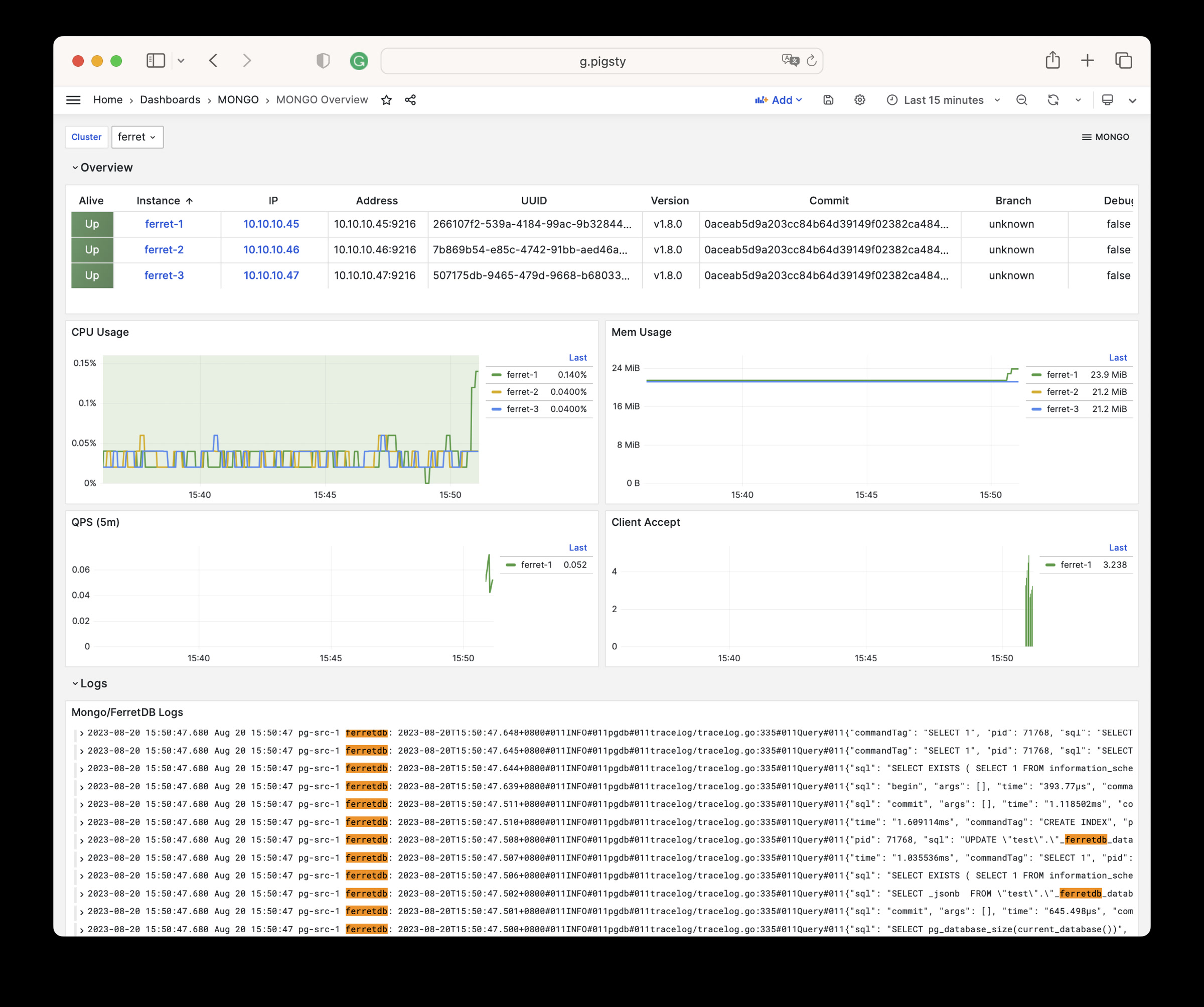
Mongo Overview

Mongo Overview:Mongo/FerretDB 集群概览

这个监控面板提供了关于 FerretDB 的基本监控指标,包括:

  • 实例状态:FerretDB 实例的运行状态
  • 客户端连接:客户端连接数量和请求统计
  • 资源使用:CPU、内存、Goroutine 数量等
  • PostgreSQL 连接池:后端 PostgreSQL 连接池状态

mongo-overview.jpg

由于 FerretDB 底层使用 PostgreSQL 作为存储引擎,更多的监控指标请参考 PostgreSQL 监控


监控指标

FerretDB 通过内置的 Exporter 在 mongo_exporter_port(默认 9216)端口暴露 Prometheus 格式的监控指标。

关键指标类别包括:

指标前缀说明
ferretdb_*FerretDB 核心指标
ferretdb_client_*客户端连接和请求统计
ferretdb_postgresql_*PostgreSQL 后端状态
go_*Go 运行时指标
process_*进程级别指标

完整的指标列表请参阅 指标列表


告警规则

FerretDB 模块目前使用基本的实例存活告警:

- alert: FerretDBDown
  expr: ferretdb_up == 0
  for: 1m
  labels:
    severity: critical
  annotations:
    summary: "FerretDB instance {{ $labels.ins }} is down"
    description: "FerretDB instance {{ $labels.ins }} on {{ $labels.ip }} has been down for more than 1 minute."

由于 FerretDB 是无状态的代理层,主要的监控和告警应该集中在底层的 PostgreSQL 集群上。

7 - 指标列表

FerretDB 模块提供的完整监控指标列表与释义

MONGO 模块包含有 54 类可用监控指标。

Metric NameTypeLabelsDescription
ferretdb_client_accepts_totalUnknownerror, cls, ip, ins, instance, jobN/A
ferretdb_client_duration_seconds_bucketUnknownerror, le, cls, ip, ins, instance, jobN/A
ferretdb_client_duration_seconds_countUnknownerror, cls, ip, ins, instance, jobN/A
ferretdb_client_duration_seconds_sumUnknownerror, cls, ip, ins, instance, jobN/A
ferretdb_client_requests_totalUnknowncls, ip, ins, opcode, instance, command, jobN/A
ferretdb_client_responses_totalUnknownresult, argument, cls, ip, ins, opcode, instance, command, jobN/A
ferretdb_postgresql_metadata_databasesgaugecls, ip, ins, instance, jobThe current number of database in the registry.
ferretdb_postgresql_pool_sizegaugecls, ip, ins, instance, jobThe current number of pools.
ferretdb_upgaugecls, version, commit, ip, ins, dirty, telemetry, package, update_available, uuid, instance, job, branch, debugFerretDB instance state.
go_gc_duration_secondssummarycls, ip, ins, instance, quantile, jobA summary of the pause duration of garbage collection cycles.
go_gc_duration_seconds_countUnknowncls, ip, ins, instance, jobN/A
go_gc_duration_seconds_sumUnknowncls, ip, ins, instance, jobN/A
go_goroutinesgaugecls, ip, ins, instance, jobNumber of goroutines that currently exist.
go_infogaugecls, version, ip, ins, instance, jobInformation about the Go environment.
go_memstats_alloc_bytesgaugecls, ip, ins, instance, jobNumber of bytes allocated and still in use.
go_memstats_alloc_bytes_totalcountercls, ip, ins, instance, jobTotal number of bytes allocated, even if freed.
go_memstats_buck_hash_sys_bytesgaugecls, ip, ins, instance, jobNumber of bytes used by the profiling bucket hash table.
go_memstats_frees_totalcountercls, ip, ins, instance, jobTotal number of frees.
go_memstats_gc_sys_bytesgaugecls, ip, ins, instance, jobNumber of bytes used for garbage collection system metadata.
go_memstats_heap_alloc_bytesgaugecls, ip, ins, instance, jobNumber of heap bytes allocated and still in use.
go_memstats_heap_idle_bytesgaugecls, ip, ins, instance, jobNumber of heap bytes waiting to be used.
go_memstats_heap_inuse_bytesgaugecls, ip, ins, instance, jobNumber of heap bytes that are in use.
go_memstats_heap_objectsgaugecls, ip, ins, instance, jobNumber of allocated objects.
go_memstats_heap_released_bytesgaugecls, ip, ins, instance, jobNumber of heap bytes released to OS.
go_memstats_heap_sys_bytesgaugecls, ip, ins, instance, jobNumber of heap bytes obtained from system.
go_memstats_last_gc_time_secondsgaugecls, ip, ins, instance, jobNumber of seconds since 1970 of last garbage collection.
go_memstats_lookups_totalcountercls, ip, ins, instance, jobTotal number of pointer lookups.
go_memstats_mallocs_totalcountercls, ip, ins, instance, jobTotal number of mallocs.
go_memstats_mcache_inuse_bytesgaugecls, ip, ins, instance, jobNumber of bytes in use by mcache structures.
go_memstats_mcache_sys_bytesgaugecls, ip, ins, instance, jobNumber of bytes used for mcache structures obtained from system.
go_memstats_mspan_inuse_bytesgaugecls, ip, ins, instance, jobNumber of bytes in use by mspan structures.
go_memstats_mspan_sys_bytesgaugecls, ip, ins, instance, jobNumber of bytes used for mspan structures obtained from system.
go_memstats_next_gc_bytesgaugecls, ip, ins, instance, jobNumber of heap bytes when next garbage collection will take place.
go_memstats_other_sys_bytesgaugecls, ip, ins, instance, jobNumber of bytes used for other system allocations.
go_memstats_stack_inuse_bytesgaugecls, ip, ins, instance, jobNumber of bytes in use by the stack allocator.
go_memstats_stack_sys_bytesgaugecls, ip, ins, instance, jobNumber of bytes obtained from system for stack allocator.
go_memstats_sys_bytesgaugecls, ip, ins, instance, jobNumber of bytes obtained from system.
go_threadsgaugecls, ip, ins, instance, jobNumber of OS threads created.
mongo_upUnknowncls, ip, ins, instance, jobN/A
process_cpu_seconds_totalcountercls, ip, ins, instance, jobTotal user and system CPU time spent in seconds.
process_max_fdsgaugecls, ip, ins, instance, jobMaximum number of open file descriptors.
process_open_fdsgaugecls, ip, ins, instance, jobNumber of open file descriptors.
process_resident_memory_bytesgaugecls, ip, ins, instance, jobResident memory size in bytes.
process_start_time_secondsgaugecls, ip, ins, instance, jobStart time of the process since unix epoch in seconds.
process_virtual_memory_bytesgaugecls, ip, ins, instance, jobVirtual memory size in bytes.
process_virtual_memory_max_bytesgaugecls, ip, ins, instance, jobMaximum amount of virtual memory available in bytes.
promhttp_metric_handler_errors_totalcounterjob, cls, ip, ins, instance, causeTotal number of internal errors encountered by the promhttp metric handler.
promhttp_metric_handler_requests_in_flightgaugecls, ip, ins, instance, jobCurrent number of scrapes being served.
promhttp_metric_handler_requests_totalcounterjob, cls, ip, ins, instance, codeTotal number of scrapes by HTTP status code.
scrape_duration_secondsUnknowncls, ip, ins, instance, jobN/A
scrape_samples_post_metric_relabelingUnknowncls, ip, ins, instance, jobN/A
scrape_samples_scrapedUnknowncls, ip, ins, instance, jobN/A
scrape_series_addedUnknowncls, ip, ins, instance, jobN/A
upUnknowncls, ip, ins, instance, jobN/A

8 - 常见问题

FerretDB 与 DocumentDB 模块常见问题答疑

为什么要使用 FerretDB?

MongoDB 曾经 是一项令人惊叹的技术,让开发者能够抛开关系型数据库的"模式束缚",快速构建应用程序。 然而随着时间推移,MongoDB 放弃了它的开源本质,将许可证更改为 SSPL,这使得许多开源项目和早期商业项目无法使用它。 大多数 MongoDB 用户其实并不需要 MongoDB 提供的高级功能,但他们确实需要一个易于使用的开源文档数据库解决方案。为了填补这个空白,FerretDB 应运而生。

PostgreSQL 的 JSON 功能支持已经足够完善了:二进制存储 JSONB,GIN 任意字段索引,各种 JSON 处理函数,JSON PATH 和 JSON Schema,它早已是一个功能完备,性能强大的文档数据库。 但是提供替代的功能,与 直接仿真 还是不一样的。FerretDB 可以为使用 MongoDB 驱动的应用程序提供一个丝滑迁移到 PostgreSQL 的过渡方案。


Pigsty 对 FerretDB 的支持历史?

Pigsty 从 1.x 开始就提供了基于 Docker 的 FerretDB 模板,在 v2.3 中提供了原生部署支持。 它作为一个选装项,对丰富 PostgreSQL 生态大有裨益。Pigsty 社区已经与 FerretDB 社区成为了合作伙伴,后续将进行深度的合作与适配支持。

FERRET 是 Pigsty 中的一个 可选 模块。自 v2.0 以来,它需要 documentdb 扩展才能工作。 Pigsty 已经打包了这个扩展,并提供了一个 mongo.yml 模板,帮助您轻松部署 FerretDB 集群。


安装 MongoSH

您可以使用 MongoSH 作为客户端工具访问 FerretDB 集群。

推荐使用 pig 命令添加 MongoDB 仓库并安装:

pig repo add mongo -u   # 添加 MongoDB 官方仓库
yum install mongodb-mongosh   # RHEL/CentOS/Rocky/Alma
apt install mongodb-mongosh   # Debian/Ubuntu

您也可以手动添加 MongoDB 仓库:

# RHEL/CentOS 系
cat > /etc/yum.repos.d/mongo.repo <<EOF
[mongodb-org-7.0]
name=MongoDB Repository
baseurl=https://repo.mongodb.org/yum/redhat/\$releasever/mongodb-org/7.0/\$basearch/
gpgcheck=1
enabled=1
gpgkey=https://www.mongodb.org/static/pgp/server-7.0.asc
EOF
yum install -y mongodb-mongosh

认证方式

FerretDB 的身份验证完全基于底层的 PostgreSQL。由于 Pigsty 管理的 PostgreSQL 集群默认使用 scram-sha-256 认证,您必须在连接字符串中指定 PLAIN 认证机制:

mongosh 'mongodb://user:password@host:27017?authMechanism=PLAIN'

如果忘记添加 authMechanism=PLAIN 参数,连接将会失败并报认证错误。


与 MongoDB 的兼容性

FerretDB 实现了 MongoDB 的线协议,但底层使用 PostgreSQL 存储。这意味着:

  • 大多数基本的 CRUD 操作与 MongoDB 兼容
  • 某些高级功能可能不支持或有差异
  • 聚合管道支持有限

详细的兼容性信息请参阅:


为什么需要超级用户

FerretDB 2.0+ 使用 documentdb 扩展,该扩展需要超级用户权限来创建和管理内部结构。因此,在 mongo_pgurl 中指定的用户必须是 PostgreSQL 超级用户。

建议创建一个专用的 mongod 超级用户供 FerretDB 使用,而不是使用默认的 postgres 用户。


如何实现高可用

FerretDB 本身是无状态的,所有数据都存储在底层的 PostgreSQL 中。要实现高可用:

  1. PostgreSQL 层:使用 Pigsty 的 PGSQL 模块部署高可用 PostgreSQL 集群
  2. FerretDB 层:部署多个 FerretDB 实例,使用 VIP 或负载均衡器

详细配置请参阅 高可用配置


性能如何

FerretDB 的性能取决于底层的 PostgreSQL 集群。由于需要将 MongoDB 命令翻译为 SQL,会有一定的性能开销。对于大多数 OLTP 场景,性能是可接受的。

如果您需要更高的性能,可以:

  • 使用更快的存储(NVMe SSD)
  • 增加 PostgreSQL 的资源配置
  • 优化 PostgreSQL 参数
  • 使用连接池减少连接开销